
Preview





Description
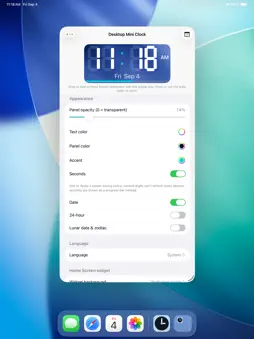
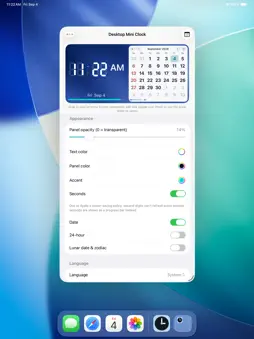
Desktop Mini Clock brings a precision LCD clock to every Apple platform — your Mac desktop, iPhone and iPad Home Screen, and Apple Vision Pro. MAC — ALWAYS-ON FLOATING PANEL A compact clock panel floats above your other windows, exactly where you need it. Lock position, stay always on top, or hide and reveal with a click. Drag anywhere, and the panel automatically stays on screen when your display setup changes. Start at login so the clock is always ready. iPHONE & iPAD — HOME SCREEN WIDGETS From a glanceable Small square to an Extra Large layout that pairs the clock with a full month calendar, pick the size that fits your life. Lock Screen accessories show the time at a glance. Set a personal photo as the widget background. APPLE VISION PRO — SPATIAL CLOCK Place the clock anywhere in your space. Scale from a subtle accent to a bold centerpiece. Hover over the date line to reveal the lunar annotation. Open the calendar or settings window while the clock stays in view. BILINGUAL — ENGLISH & TRADITIONAL CHINESE One tap switches the entire interface: date formats, weekday names, and lunar annotations all follow your language choice. Lunar calendar covers solar terms, traditional holidays, and leap months. CUSTOMIZE SETTINGS · LCD digit color and accent hue · 12 / 24-hour format · Seconds display with smooth progress bar · Date and lunar annotation on or off HONEST BY DESIGN No ads. No tracking. No network access needed.
What's New
Version 0.2.6 2026-09-16
Adjusted the display formats for the lunar calendar, 24 solar terms, and traditional festivals. Added a settings reset feature and support for saving multiple c... Technical Analysis
Package Overview Basic metadata
Bundle ID
com.lukwama.desktopclock Current Version 0.2.6
Minimum iOS 17.0
Package Size App Store Size
Package Metadata 0 / 0 version records
Detailed binary, privacy manifest, framework, and Info.plist results have not been indexed for this package yet. The verified App Store and archive metadata above remains available.
Developer Information
Known Version Records
0 version records with stored package metadata
Stored metadata does not guarantee a package is currently available to download.
| Details | Version / IDs | Version date | Action |
|---|