
Preview








Description
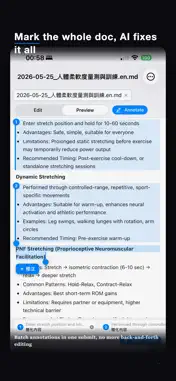
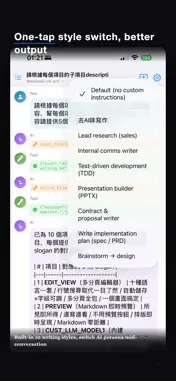
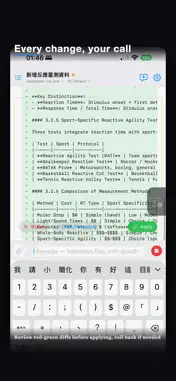
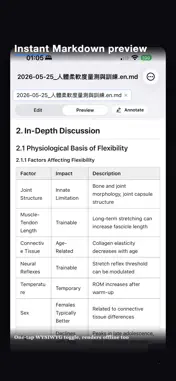
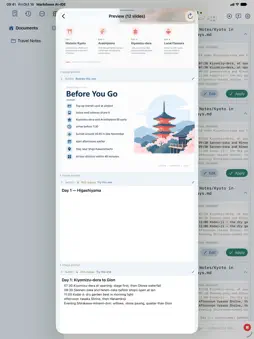
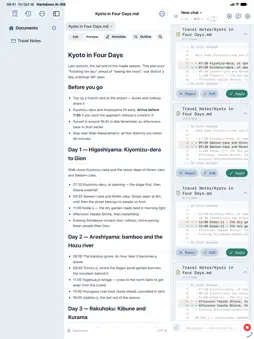
AI-IDE is a lightweight editor for iPhone, iPad, and Mac. Edit Markdown, code, and config files inside iCloud Drive or any Files folder — and work with the LLM of your choice without leaving the document. KEY FEATURES • Mark up the preview, let AI edit — Tap a spot or select a passage and say what to change. Queue marks, send one batch, review one diff. • Bring your own AI — Anthropic, Gemini, DeepSeek, OpenRouter, Groq, Mistral, any API-compatible endpoint, local Ollama, or an AISA key for 70+ models. 16 one-tap presets. No built-in account or key: nothing runs until you add one. • You approve every change — Edits show a diff first; nothing is written until you tap Apply, and overwrites are snapshotted. • Multi-tab editor — Syntax highlighting for 10 languages, line numbers, autosave, find & replace. • Rich Markdown preview — Outline navigation, in-document search, reading progress with resume, code copy, task checkboxes, light/dark themes. • Office files and PDFs, both ways — Export to PDF, Word, Excel, and PowerPoint on device; "AI Refine" turns a document into slides, using your own .pptx as the master and Brand Kits for colours, fonts, and logo. Open a .docx, .xlsx, .pptx, or PDF to edit in place, formatting kept. • AI illustrations — One prompt draws an illustration at the cursor with your own image model; it flows into PDF, Word, and PowerPoint. Decks can auto-illustrate. • Built-in data tools — 35 the AI calls itself: web pages, academic papers, US financials and SEC filings, crypto prices, X posts, prediction markets, Perplexity. Switched on by category, with the token cost shown. HTTPS-only and host-whitelisted; your key is injected on device, never seen by the model. • Prompt Library — Activate several presets at once, merged in your order with a size meter. Three research procedures are built in; add more from the library or GitHub. • KB Library — File a document once and reference it as often as you like: type ~ to attach one, or let the AI search the library and read only the passage it needs. Ranked search working in Chinese and says so when nothing matches. • Share what you tune — Prompts, export styles and KB entries export as files. Install from the built-in library or add a source: any public GitHub repo or page. Updates are flagged, never automatic, and an edited copy is never overwritten. • Tool-using AI — Reads, searches, and writes workspace files. Optional web search via Brave, Tavily, Perplexity, or AISA. • Files done right — Open files from anywhere; create, rename, move, duplicate, delete; multiple pinned workspaces. • Local version control — Snapshot, diff, and revert on device: no git account, history never leaves it, instant in huge folders. Auto-commit optional. • Reliable by default — Suggests the right model for the job; dropped streams resume without re-sending the conversation. • Multimodal — Attach files, photos, or clipboard images. Vision models get them directly; PDF / DOCX / PPTX / XLSX are transcribed. • Trilingual — Full UI in English, 繁體中文, 简体中文; switch without a restart. • iPad and Mac — Three-pane Split View on iPad and Mac, tabs on iPhone, a full Mac menu bar and keyboard shortcuts. PRIVACY • API keys live in the Keychain (device-only). Your content goes straight to the endpoints you configure — no proxy, no telemetry. Chat history is local. REQUIREMENTS • iOS / iPadOS 17.0 or later, or macOS 14.0 or later. You provide the API keys for the services you use. For support, send mail to [email protected]. AI-IDE Pro is an auto-renewable subscription. Payment is charged to your Apple ID account at confirmation of purchase. The subscription renews automatically unless cancelled at least 24 hours before the end of the current period; manage or cancel it in your Apple ID account settings. Terms of Use (EULA): https://www.apple.com/legal/internet-services/itunes/dev/stdeula/ Privacy Policy: https://www.termsfeed.com/live/92fad2c6-6901-4de6-9110-e4aa7aa1f7d8
What's New
Version 1.19 2026-10-25
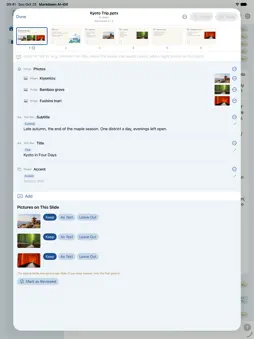
Edit the PowerPoint you already have Every slide, as soon as it opens • A .pptx opens with a thumbnail of every slide, and each slide's text boxes, pictures, s... Technical Analysis
Package Overview Basic metadata
Bundle ID
com.usagi.aiide Current Version 1.19
Minimum iOS 17.0
Package Size App Store Size
Package Metadata 2 / 16 version records
Detailed binary, privacy manifest, framework, and Info.plist results have not been indexed for this package yet. The verified App Store and archive metadata above remains available.
Price History (USA store)
2 recorded price change points. These are historical observations, not a guarantee of the current price.
| Recorded at | Price | Currency |
|---|---|---|
| 1.99 | USD | |
| 0.0 | USD |
Developer Information
Known Version Records
2 version records with stored package metadata • 16 known version records
Stored metadata does not guarantee a package is currently available to download.
| Details | Version / IDs | Version date | Action |
|---|---|---|---|
| 18.71 MB | v1.16.0 App Store ID: 890686264Build: 1.16.0 | 2026-09-02 22:04:27 | Get Version |
| 18.71 MB | v1.16.0 App Store ID: 889515199Build: 1.16.0 | 2026-09-02 22:04:27 | Get Version |
| Not archived | v1.14.1 App Store ID: 889421488Build: 1.14.1 | 2026-08-08 00:53:49 | Request Version |
| Not archived | v1.14 App Store ID: 888830214Build: 1.14 | 2026-08-01 23:13:44 | Request Version |
| Not archived | v1.13 App Store ID: 888552450Build: 1.13 | 2026-07-24 02:10:54 | Request Version |
| Not archived | v1.12 App Store ID: 888288360Build: 1.12 | 2026-07-19 19:36:50 | Request Version |
| Not archived | v1.11 App Store ID: 888237837Build: 1.11 | 2026-07-14 01:25:31 | Request Version |
| Not archived | v1.10 App Store ID: 888150160Build: 1.10 | 2026-07-11 23:41:31 | Request Version |
| Not archived | v1.9 App Store ID: 888104332Build: 1.9 | 2026-07-11 00:24:32 | Request Version |
| Not archived | v1.8 App Store ID: 887866615Build: 1.8 | 2026-07-07 23:08:22 | Request Version |
| Not archived | v1.7 App Store ID: 887450922Build: 1.7 | 2026-06-26 00:54:02 | Request Version |
| Not archived | v1.6 App Store ID: 886973485Build: 1.6 | 2026-06-18 23:21:48 | Request Version |
| Not archived | v1.5 App Store ID: 886837747Build: 1.5 | 2026-06-12 19:53:38 | Request Version |
| Not archived | v1.4 App Store ID: 886658512Build: 1.4 | 2026-06-09 18:36:27 | Request Version |
| Not archived | v1.3 App Store ID: 886587368Build: 1.3 | 2026-06-06 01:32:52 | Request Version |
| Not archived | v1.2 App Store ID: 886220794Build: 1.2 | 2026-06-03 15:48:03 | Request Version |