
Preview



Description
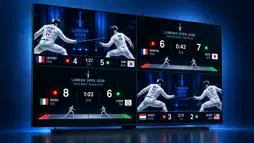
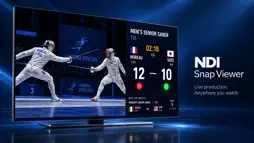
NDI Snap Viewer transforms your Apple TV into an NDI monitor/viewer! View up to four NDI video sources simultaneously with multi-view layouts — perfect for live production, security monitoring, worship environments, and broadcast studios. Multi-View Monitoring Display one, two, three, or four NDI sources at once. A single source fills the screen; two sources go side by side or stacked, three as one featured shot with two beside it or in a row, and four in a grid. Pick square or rounded corners and a backdrop behind the feeds, with smooth 24–30 fps streaming. Full Camera Control Manage each source independently — mute audio, mirror horizontally, flip vertically, or adjust volume per camera. PTZ-enabled cameras get dedicated pan, tilt, zoom, and preset recall controls right from your remote. Web Remote Control Control NDI feeds from your phone, tablet, or computer. A built-in web server on port 8080 lets you add or remove cameras from the live display, mute audio, and view live preview snapshots — all without touching the Apple TV remote. Real-Time Monitoring Tools On-screen overlays show source names and stereo VU audio meters. Toggle overlays on or off with a single press for a clean, distraction-free view. Kiosk & Auto-Reconnect Enable Kiosk Mode to automatically start displaying your saved sources at launch — ideal for always-on lobby displays and digital signage. Auto-reconnect restores streams seamlessly if a source drops. Custom No-Signal Screen Upload your own fallback image to display when a source goes offline — show your logo or branding instead of a black screen. Legacy NDI Support Compatible with older NDI|HX1 cameras through a dedicated low-bandwidth mode.
What's New
Version 1.6 2026-10-27
Multiview, redesigned. - Five layouts: Side by Side or Stacked for two feeds, Featured or Row for three, Grid for four. - Corner styles: Square, Soft or Round....Multiview, redesigned. - Five layouts: Side by Side or Stacked for two feeds, Featured or Row for three, Grid for four. - Corner styles: Square, Soft or Round. - Backdrops behind your feeds: Black, Midnight, Ocean, Plum, or your own picture (your fallback image). - Press Play/Pause while viewing to change layout, corners and backdrop on screen, or set them in Settings › Multiview. - The first four sources are selected for you, so one press of Display starts multiview. - Your choices are remembered for next time. Technical Analysis
Package Overview Basic metadata
Bundle ID
com.blackbarproductions.NDI-Snap-Viewer Current Version 1.6
Minimum iOS 26.0
Package Size App Store Size
Package Metadata 0 / 2 version records
Detailed binary, privacy manifest, framework, and Info.plist results have not been indexed for this package yet. The verified App Store and archive metadata above remains available.
Developer Information
Known Version Records
0 version records with stored package metadata • 2 known version records
Stored metadata does not guarantee a package is currently available to download.
| Details | Version / IDs | Version date | Action |
|---|---|---|---|
| Not archived | App Store ID: 883755433 | Unknown | Paid / Arcade |
| Not archived | App Store ID: 880916221 | Unknown | Paid / Arcade |