
Preview




Description
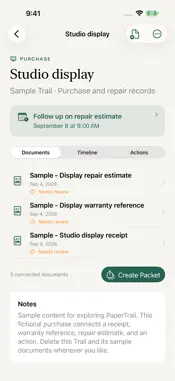
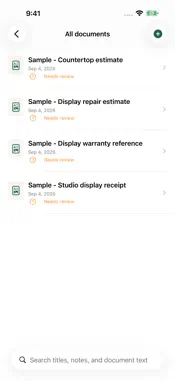
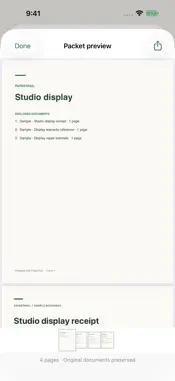
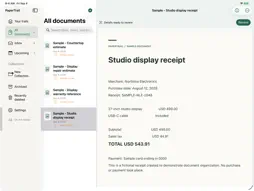
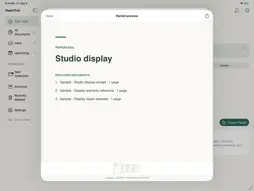
Give your paperwork a place. PaperTrail brings receipts, warranties, reference documents and the details behind them into a private workspace for iPhone and iPad. Build a Trail around a purchase, a project or a part of your life, then keep its documents, notes and next actions together. CAPTURE AND FIND Scan multiple pages with your camera, choose photos, import files or use Save to PaperTrail from another app. Keep original PDFs and images intact, then search their text with on-device text recognition. REVIEW THE DETAILS Check suggested merchants, dates, totals and currencies against the original. Suggestions stay unconfirmed until you review them, and extracted dates never create reminders automatically. CONNECT YOUR PAPERWORK Organize Trails into collections, add tags and notes, and link one document to several Trails without duplicating its original. Use Inbox to find documents that need attention and Upcoming to see your next actions. REMEMBER WHAT COMES NEXT Add your own deadlines and enable optional local reminders. Notification details are private by default. Actions remain available in the app if you decline notification permission. MAKE A USEFUL PDF PACKET Select documents, arrange their order and add an optional cover and summary. Preview the finished PDF, then share it when you need to send a repair history, purchase record or project packet. KEEP CONTROL OF YOUR LIBRARY Use optional Face ID, Touch ID or device-passcode authentication. PaperTrail hides document content when inactive and preserves deleted documents in Trash until you choose permanent deletion. Your library is stored on this device, with no PaperTrail account, advertising, analytics SDK or cloud AI. PaperTrail is free, with no subscriptions or in-app purchases. BACK UP AND MOVE DELIBERATELY Export a manual backup to keep a recovery copy or transfer your library to another device. Library files are excluded from automatic device backups, including iCloud Backup, so keep a manual backup somewhere safe. There is no automatic sync between iPhone and iPad. Manual backups are not password-protected. Shared files and copies saved to cloud providers are outside PaperTrail's app lock. Restore validates a backup before replacing the current library; it does not merge libraries. Start with your own documents or explore the optional, clearly labeled sample library in Settings. Requires iOS or iPadOS 18 or later. Camera scanning requires a supported device. Supports PDF, JPEG, PNG, HEIC/HEIF and TIFF originals up to 100 MB each. Manual backups support libraries up to 1 GB.
Technical Analysis
Package Overview Basic metadata
Bundle ID
com.kirklanddigital.PaperTrail Current Version 1.0.0
Minimum iOS 18.0
Package Size App Store Size
Package Metadata 0 / 0 version records
Detailed binary, privacy manifest, framework, and Info.plist results have not been indexed for this package yet. The verified App Store and archive metadata above remains available.
Known Version Records
0 version records with stored package metadata
Stored metadata does not guarantee a package is currently available to download.
| Details | Version / IDs | Version date | Action |
|---|