
Preview



Description
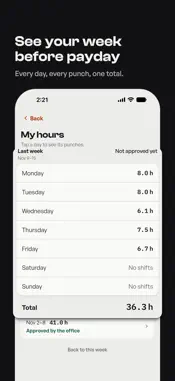
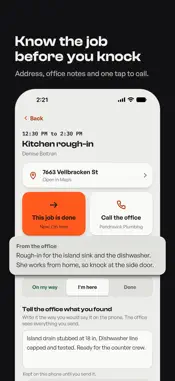
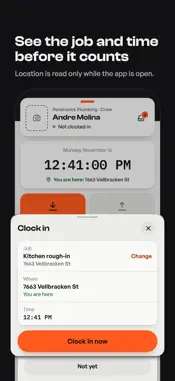
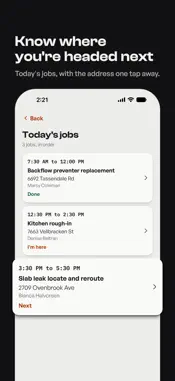
QELM is the crew's time clock. Clock in and out on the job, see your hours before payday, and file receipts with a photo. What you punch reaches the office. YOU PICK THE JOB Tap Clock In and pick your job. With location on, the closest ones come first, and you can always search. The app never picks the job for you. On a site the office has not set up yet? Type the street address and clock in there. CHECK IT BEFORE IT COUNTS Clock In shows the job, the time and the place before anything is sent. Every punch you make in the app then waits ten seconds: tap Undo and nothing is sent. Punches made outside the app, such as from Control Center, send right away. MOVE TO THE NEXT JOB Switch job clocks you out of one job and into the next at the same moment. NO SIGNAL STILL COUNTS Basements, new builds, the far end of the site. Punches and notes are held on the phone and sent the next time the app has signal. Each punch keeps the time you tapped, even if it reaches the office later. YOUR SHIFT IN SIGHT While you work, the running time sits on the Lock Screen and in the Dynamic Island. On iOS 18 or later you can end the shift from Control Center. A punch made there carries no location. TODAY'S JOBS Home shows which job is next. Tap a job to see the address, open it in Maps and read the note from the office. Tell the office where you are with one tap: On my way, I'm here, Done. Found something? Send the office a note from the same screen. If the office listed a phone number, you can call it too. THE OFFICE WRITES TO YOU The inbox keeps what the office sends you. A message opens the job, the hours or the punch it is about. YOUR WEEK BEFORE PAYDAY My hours shows each day of the week with its punches and the total. Last week is there too. When the app asks you to check your week, you answer that it is right or say what is wrong. SOMETHING WRONG WITH A PUNCH? Open Recent punches, tap a finished punch from today and say what happened: wrong job, wrong time, or you did not make it. The office fixes it, and My hours shows what changed. Forgot to clock out? The app asks when you really finished. The office sees that time and can change it. RECEIPTS WITH A PHOTO Bought materials? Photograph the receipt. The app reads the vendor, the amount and the date. Check it, pick the category and the job, and save. My receipts, in the menu, lists the ones you filed. SIGN IN WITHOUT A PASSWORD Type your work email. You get a link and a 6-digit code; use either one. After that you can open the app with Face ID or Touch ID. MAKE IT YOURS Cool and Warm color themes, or your company's colors when the office sets them. Light or dark, and three text sizes. WHAT YOU NEED Construction and trade companies use QELM. Your company creates your account; you cannot sign up on your own. If your company does not use QELM yet, ask your office. ABOUT LOCATION The app uses your location only while it is open. It saves where you were when you punch in the app, so the office knows, and it lists the jobs and addresses near you first. There is no geofence and no background tracking, and the app never checks your location while it is closed. If you say no to the permission you can still punch: the punch saves without a location and the office sees that.
What's New
Version 3.1.0 2026-11-13
QELM 3.1.0 changes the whole app. It now opens on a Home screen with your whole day. - New Home: your shift, today's jobs, your hours and receipts on one scree...QELM 3.1.0 changes the whole app. It now opens on a Home screen with your whole day. - New Home: your shift, today's jobs, your hours and receipts on one screen. - You pick the job when you clock in. The app never picks it for you. - Clock In shows the job, the time and the place before it counts. Every punch you make in the app then waits ten seconds in case you want to undo it. - Today's jobs: the address, the note from the office, and On my way, I'm here and Done. Call the office when it has listed a number. - An inbox for what the office sends you. - My hours shows this week and last week. When a week check is due, the app asks if it is right. - Something wrong with a punch? Tap it and tell the office what happened. - Receipts: take the photo, pick the category and the job, and see them all in My receipts. - Sign in with your email. No password. - Cool and Warm themes, light or dark, text size, and a new icon with seasonal options in Settings. - Pull down on Home to refresh everything. - The Lock Screen card shows one more line, such as your next job or punches waiting for signal. - Clocking in no longer waits on the notifications question. - The app no longer asks you to sign in again at 30 days if you use it often. - If your account is not set up to clock in, the app now says so and tells you who to ask. Technical Analysis
Package Overview Basic metadata
Bundle ID
com.hudsonbusinesssolutions.mobile Current Version 3.1.0
Minimum iOS 17.0
Package Size App Store Size
Package Metadata 0 / 4 version records
Detailed binary, privacy manifest, framework, and Info.plist results have not been indexed for this package yet. The verified App Store and archive metadata above remains available.
Developer Information
Known Version Records
0 version records with stored package metadata • 4 known version records
Stored metadata does not guarantee a package is currently available to download.
| Details | Version / IDs | Version date | Action |
|---|---|---|---|
| Not archived | App Store ID: 885635652 | Unknown | Request Version |
| Not archived | App Store ID: 884895233 | Unknown | Request Version |
| Not archived | App Store ID: 884804303 | Unknown | Request Version |
| Not archived | App Store ID: 884734095 | Unknown | Request Version |