Preview




Description
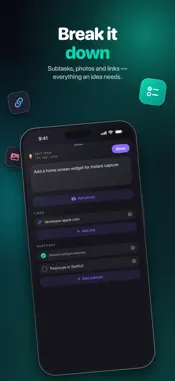
Ideas don't wait. Braindump is the fastest way to get them out of your head — and into a backlog you'll actually work through. CAPTURE IN SECONDS • Type it, or tap the mic and just talk — dictation works in English and Deutsch, switchable with a long-press • Home Screen widgets keep your projects one tap from a new idea, with live open-idea counts • Snap a photo of a whiteboard, book page or sticky note and pull out exactly the sentences you want — Braindump highlights everything it can read, you tap what to keep • Attach photos and reference links to any idea TRULY HANDS-FREE — IN THE CAR TOO • Say "Hey Siri, Braindump" and the app asks "Which project should this go to?", listens, and saves the moment you pause • Finish with the word "braindump" — or a save word of your own — and the idea files itself. No button, no waiting for a pause • On CarPlay your projects are cards on the car display, just like on the phone: tap one, or the mic, and talk — same warm voice, same flow • Ideas the app can't match land safely on an auto-created Braindump list — nothing you say is ever lost A TINY KANBAN FOR EVERY PROJECT • Every idea moves Ideas → Doing → Done with a swipe • Select several ideas and move, copy, share or delete them in one go • Add subtasks with one tap and tick them off right on the card • Optional Spaces separate work from private — switch with one tap • Projects wear your colors, icons — or your own photos BUILT FOR THE AI AGE • The copy button exports every open idea as a ready-to-run brief — paste it into your AI tool of choice and press return • Start in Claude or Codex: connect a project to Claude Code or Codex on your Mac, and one tap sends the whole open backlog over as a brief — by voice, too • Optional GitHub pipeline: one tap turns an idea into an issue that AI can refine and even implement • Send ideas straight to Jira, Asana or Notion with your own API token YOURS, DOWN TO THE DETAILS • Light, dark, or follow the system — your call • Choose your dictation language and your own save word • Reword the copy-prompt so it speaks to your AI tool • Word the shared idea list your way — greeting, sign-off, all of it PRIVATE BY DESIGN • Everything lives on your device. No account, no tracking, no cloud — your API tokens, if you use any, stay in your Keychain. A guided tour walks you through everything on first launch. Stop losing ideas — braindump them.
What's New
Version 1.5 2026-09-07
Everything since 1.0, in one update. CARPLAY, REDONE • Plug in and your projects are cards on the car display — the same look as the phone, with a mic button i... Technical Analysis
Package Overview Basic metadata
Bundle ID
com.christopherbennett.braindump Current Version 1.5
Minimum iOS 17.0
Package Size App Store Size
Package Metadata 0 / 0 version records
Detailed binary, privacy manifest, framework, and Info.plist results have not been indexed for this package yet. The verified App Store and archive metadata above remains available.
Developer Information
Known Version Records
0 version records with stored package metadata
Stored metadata does not guarantee a package is currently available to download.
| Details | Version / IDs | Version date | Action |
|---|