Preview




Description
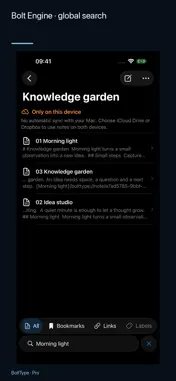
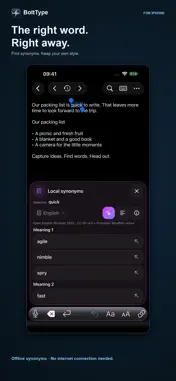
WELCOME, iPhone Duo! A new device. New room for your ideas. BoltType 1.3 brings dedicated iPhone Duo support: layout, toolbars and search adapt as you fold and unfold. Discover a new way to write, read and explore your notes. Your next idea can start anywhere. Capture a thought on iPhone or iPad, find it again when it matters, and build a connected collection of knowledge. BoltType works on its own—and with BoltType for Mac—while your notes remain ordinary files you control. START ON THE GO. CONTINUE ON YOUR MAC. Write down an idea on your iPhone, develop it on iPad and continue at your Mac. Use the same notes folder on your devices with Dropbox or iCloud Drive. After it has synced, you work with the same Markdown and text files—no export for every device change. A HOME FOR IDEAS, EVEN WITHOUT A MAC. BoltType is a standalone notes app for iPhone and iPad. Choose a folder in the Files app or connect Dropbox. You do not need a Mac or a BoltType account. Read, search and edit locally available text notes even when offline. WRITE WHILE THE IDEA IS FRESH. A quick reminder. A journal entry. The first page of your next project. Write in Markdown or plain text, format with the editor toolbar, and switch to the Markdown preview. When space allows, keep editor and preview side by side. Changes save automatically. FIND YOUR THREAD. Full-text search brings your words back. Bookmark important notes and switch between libraries. BoltType remembers where you were reading, so it is easy to pick up the thread. TURN NOTES INTO A KNOWLEDGE NETWORK. Link notes together and point to specific passages. Build a personal Zettelkasten, research collection or project wiki. Back and forward navigation keeps the context intact as you follow ideas. Open web links and approved app links from your notes. You decide which external link types may open in Settings. YOUR NOTES. YOUR FILES. BoltType works with .md, .markdown and .txt files in a folder you choose. Your notes stay compatible with other editors. No proprietary format. No required BoltType account. Existing Markdown and text notes work directly; subfolders are not scanned. MORE WITH BOLTTYPE PRO. Unlock with a one-time in-app purchase: • Organize notes with colored labels and projects. • Filter by link types and navigate between links. • Search text in PDFs and images with on-device recognition. • Import text, links, images and PDFs from the Share Sheet. • Compare locally stored past versions and restore selected changes. • Set reminders for notes. Writing, search, bookmarks and internal links are available without Pro. Dropbox and iCloud Drive are optional and require a connection to their respective services to sync between devices. Version history and reminders are stored on the current device. External app links require the relevant app and content. Would you like support for another file format, link type, or app? Feel free to get in touch. I’ll look into whether the integration can be implemented in a useful and reliable way.
What's New
Version 1.4 2026-10-16
WELCOME, iPhone Duo! Version 1.4 helps you find content, organize files in subfolders and follow changes more easily. Layout, toolbars and search adapt to the ...WELCOME, iPhone Duo! Version 1.4 helps you find content, organize files in subfolders and follow changes more easily. Layout, toolbars and search adapt to the space available on iPhone and iPad, including when folding and unfolding iPhone Duo. • Advanced search: Combine phrases, wildcards, AND/OR/NOT and NEAR proximity searches. Filter by date, file type, folder and other properties. Updated search help offers combinable conditions, a date picker and suitable input fields. • Clearer results: The file list shows continuous text excerpts with highlighted matches. Set preview line counts separately for ordinary entries and search results. • Shared subfolders: Manage notes, images and PDFs within your library. New files go into the selected folder, and exports preserve the folder structure. Recently modified files appear first. • Improved Files and iCloud reconciliation: Text and attachments are processed separately with clearer progress indicators. Unchanged texts are skipped during subsequent updates. • Merge changes selectively: Independent text edits are merged when a common starting version is known. Real conflicts show highlighted differences with a choice for each passage. Draft recovery and handling of continued edits have been improved. • More comfortable writing and searching: Longer queries have more space. The keyboard can hide automatically when scrolling the file list. The active line stays more clearly above the lower glass fade while writing. Search adapts to narrow and wide windows. • More control over photo imports: Edit titles and descriptions and check resolution and file size before importing. With permission, you can use captions from Apple Photos. Supported image formats store these details directly in the image file. • Improved photo and PDF views: Zoom photos with two fingers. Search image metadata and recognized text; additional number recognition also supports scanned PDFs. On iPad, the photo view and search controls have a clearer layout, and PDF matches have dedicated navigation buttons. • Easier renaming: Rename notes, photos and PDFs. On supported devices, Apple Intelligence can suggest a filename from existing document text for you to review and edit before saving. • Follow edits more easily: Before-and-after excerpts highlight changes. Deletion tools use language-appropriate abbreviations, and support requests automatically include the installed app version. Document and photo import features require BoltType Pro. Apple Intelligence suggestions require a supported device and service availability. Technical Analysis
Package Overview Basic metadata
Bundle ID
noobDeveloping.QuickNotes Current Version 1.4
Minimum iOS 26.0
Package Size App Store Size
Package Metadata 0 / 0 version records
Detailed binary, privacy manifest, framework, and Info.plist results have not been indexed for this package yet. The verified App Store and archive metadata above remains available.
Known Version Records
0 version records with stored package metadata
Stored metadata does not guarantee a package is currently available to download.
| Details | Version / IDs | Version date | Action |
|---|