Preview




Description
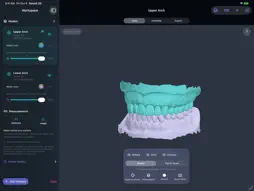
Take a closer look at your 3D models. Dental 3D brings viewing, measurements, and annotations together in a simple workspace for Mac, iPad, and iPhone. • Open the files you already use. Import STL, OBJ, PLY, supported 3MF, WRL, OFF, and point-cloud files. Open ZIP archives with models and their companion textures. • See how models fit together. View several models at once, rotate and zoom, and adjust visibility, color, opacity, and shading while preserving their original alignment. • Measure and revisit. Pick straight-line distances and three-point angles, save camera views, and return to the viewpoint of a saved measurement. • Keep your observations with the model. Add labels and drawings, then save a Dental 3D project with your models, measurements, annotations, and views together. • Share a useful view. Export pictures or silent videos using standard angles, saved views, and camera motions. • Get help in context. Browse nine built-in guide topics, or use Siri and Shortcuts to open, read or search the public guide and reset a ready view. Private models and annotations stay outside the guide index. • Open supported files your way. Follow the in-app instructions for choosing Dental 3D as the default opening app in Finder or on supported iPhone/iPad systems. Your models are processed on your device. There is no account to create and no advertising. Files you open or save through iCloud Drive or another provider follow that provider's settings. Check source scale and alignment before relying on measurements. Unitless models are read as millimetres, and Dental 3D does not align models automatically. Measurements require independent verification; the app does not provide a diagnosis. Supported format subsets and file-size limits apply. Mac requires Apple silicon.
What's New
Version 2.0.1 2026-10-27
Dental 3D now supports iPhone Duo. • The workspace adapts as you fold, unfold or rotate, and as you resize windows on iPad. When there's room, the tools sit be...Dental 3D now supports iPhone Duo. • The workspace adapts as you fold, unfold or rotate, and as you resize windows on iPad. When there's room, the tools sit beside your models; on narrower screens they open in a sheet. • Your models, measurements, labels and camera view stay in place while the screen changes. • An unfinished saved-view name is kept when the layout changes. • At the largest text sizes, the export result buttons now scroll with the export settings, so every export control stays within reach. Technical Analysis
Package Overview Basic metadata
Bundle ID
com.sansargupta.Easy3D Current Version 2.0.1
Minimum iOS 17.0
Package Size App Store Size
Package Metadata 0 / 0 version records
Detailed binary, privacy manifest, framework, and Info.plist results have not been indexed for this package yet. The verified App Store and archive metadata above remains available.
Known Version Records
0 version records with stored package metadata
Stored metadata does not guarantee a package is currently available to download.
| Details | Version / IDs | Version date | Action |
|---|