Preview




Description
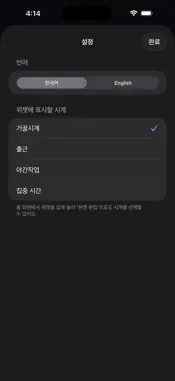
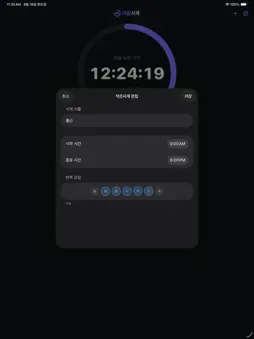
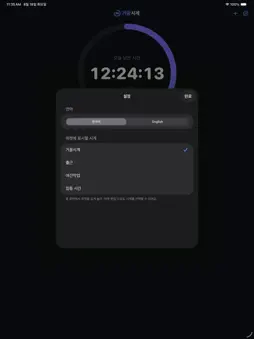
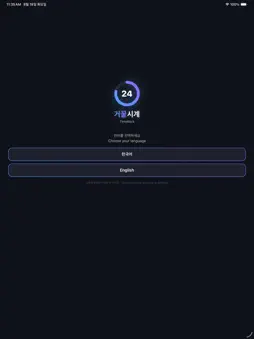
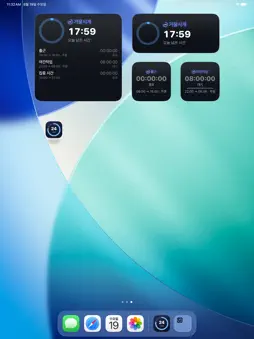
거꿀시계는 시간을 거꾸로 셉니다. 보통 시계는 흘러간 시간을 보여주지만, 정작 궁금한 건 "얼마나 남았는가"입니다. 거꿀시계는 24시에서 시작해 0으로 끝나며, 오늘 남은 시간과 내가 정한 시간대의 남은 시간을 한눈에 보여줍니다. ■ 거꿀시계 — 오늘 남은 시간 자정까지 남은 시간이 24:00:00에서 00:00:00으로 줄어듭니다. 큰 링 게이지가 하루가 얼마나 남았는지 한눈에 보여줍니다. ■ 작은시계 — 내 시간표를 거꾸로 시작 시간과 종료 시간을 정해두면, 시작 시각이 되는 순간 카운트다운이 시작되어 종료 시각에 00:00:00으로 끝납니다. · 출근 09:00 → 퇴근 18:00으로 두면, 9시에 09:00:00부터 시작해 18시에 0이 됩니다 · 22:00 → 06:00처럼 자정을 넘는 시간대도 지원합니다 · 근무, 야간작업, 공부, 운동… 원하는 만큼 만들 수 있습니다 · 시작 전에는 조용히 대기하고, 끝나면 종료로 표시됩니다 ■ 요일 선택 시계마다 반복할 요일을 고를 수 있습니다. 매일 · 주중 · 주말은 물론, 원하는 요일만 골라도 됩니다. 선택하지 않은 요일에는 실행되지 않고 다음 차례를 기다립니다. ■ 시작 · 종료 알림 시계마다 시작할 때와 종료할 때 알림을 받을 수 있습니다. 둘 중 하나만 켜도 되고, 정해 둔 반복 요일에만 울립니다. 앱을 켜두지 않아도 제때 알려드립니다. ■ 홈 화면 위젯 (3가지 크기) · 작게: 큰 숫자와 줄어드는 게이지 · 보통: 링 게이지와 큰 숫자 · 크게: 링과 함께 다른 시계 목록까지 한 화면에 위젯마다 표시할 시계를 따로 정할 수 있습니다. 오늘 남은 시간과 퇴근까지 남은 시간을 나란히 놓아 보세요. 위젯을 길게 눌러 '위젯 편집'에서 언제든 바꿀 수 있습니다. ■ 위젯 색상 6가지 기본 · 그래파이트 · 오션 · 포레스트 · 선셋 · 페이퍼. 숫자가 또렷하게 보이도록 맞춘 조합이고, 밝은 배경의 페이퍼도 있습니다. 위젯마다 다른 색을 쓸 수 있어 여러 개를 놓아도 구분이 쉽습니다. ■ 밀리초까지 표시 설정에서 켜면 남은 시간을 0.001초 단위까지 보여 줍니다. 시간이 실제로 흘러가는 감각이 필요할 때 켜보세요. ■ 한국어 · English 처음 실행할 때 언어를 고르고, 설정에서 언제든 바꿀 수 있습니다. ■ 이런 분께 어울립니다 · 퇴근까지 얼마나 남았는지 자꾸 확인하게 되는 분 · 하루가 얼마나 남았는지 감각적으로 느끼고 싶은 분 · 집중 시간, 공부 시간, 운동 시간을 눈에 보이게 관리하고 싶은 분 · 교대 근무처럼 자정을 넘는 시간대를 쓰는 분 ■ 광고 없음 · 계정 없음 · 인터넷 연결 없음 모든 데이터는 기기 안에만 저장됩니다. 수집하거나 외부로 전송하는 정보가 전혀 없습니다. --- TimeBack counts time backwards. A normal clock shows the time that has passed. But what you usually want to know is how much is left. TimeBack starts at 24 and ends at 0, showing what remains of today and of the hours you care about. ■ TimeBack — what's left of today The time until midnight counts down from 24:00:00 to 00:00:00. A large ring gauge shows how much of the day is left at a glance. ■ Small Clocks — your own hours, backwards Set a start and an end time. The countdown begins the moment your start time arrives and reaches 00:00:00 exactly at the end. · Set 09:00 → 18:00 and it starts at 09:00:00 at nine and hits zero at six · Overnight ranges such as 22:00 → 06:00 are supported · Work, night shifts, study, workouts — create as many as you like · Waits quietly before it starts, and shows as done when finished ■ Repeat days Choose which days each clock repeats on. Every day, weekdays, weekends, or any combination you like. On days you didn't pick, the clock simply waits for its next turn. ■ Start and end notifications Each clock can notify you when it starts and when it ends. Turn on either one, and alerts only fire on the repeat days you picked. You don't have to keep the app open. ■ Home Screen widgets (three sizes) · Small: large numbers with a draining gauge · Medium: ring gauge with large numbers · Large: the ring plus your other clocks in one view Each widget can show a different clock, so you can keep today's remaining time and your shift side by side. Long-press a widget and tap Edit Widget to change it anytime. ■ Six widget colors Default, Graphite, Ocean, Forest, Sunset and Paper. Every pairing keeps the numbers easy to read, including the light Paper theme. Each widget can use a different color, so several widgets stay easy to tell apart. ■ Milliseconds Turn it on in Settings to see the time left down to 0.001s. Handy when you want to feel the time actually moving. ■ English · 한국어 Pick your language on first launch and change it anytime in Settings. ■ No ads · No account · No internet Everything stays on your device. Nothing is collected and nothing is sent anywhere.
What's New
Version 1.5 2026-10-20
· 넓은 위젯이 보기 좋아졌습니다 — 아이패드처럼 넓게 놓으면 링과 숫자가 함께 커지고, 왼쪽으로 쏠리지 않고 가운데에 놓입니다. · 색상 고르기가 편해졌습니다 — 위젯을 길게 눌러 여는 '위젯 편집'에도 색 견본이 보이고, 설정에서는 줄 어디를 눌러도 선택됩니다. --- · Wid...· 넓은 위젯이 보기 좋아졌습니다 — 아이패드처럼 넓게 놓으면 링과 숫자가 함께 커지고, 왼쪽으로 쏠리지 않고 가운데에 놓입니다. · 색상 고르기가 편해졌습니다 — 위젯을 길게 눌러 여는 '위젯 편집'에도 색 견본이 보이고, 설정에서는 줄 어디를 눌러도 선택됩니다. --- · Wide widgets look better — placed wide, as on iPad, the ring and numbers scale up together and sit centered instead of hugging the left edge. · Picking a color is easier — Edit Widget now shows the same color swatches as Settings, and in Settings you can tap anywhere on a row. Technical Analysis
Package Overview Basic metadata
Bundle ID
YUHA.TimeBack Current Version 1.5
Minimum iOS 18.0
Package Size App Store Size
Package Metadata 0 / 0 version records
Detailed binary, privacy manifest, framework, and Info.plist results have not been indexed for this package yet. The verified App Store and archive metadata above remains available.
Known Version Records
0 version records with stored package metadata
Stored metadata does not guarantee a package is currently available to download.
| Details | Version / IDs | Version date | Action |
|---|