
Preview
Description
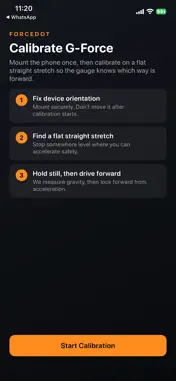
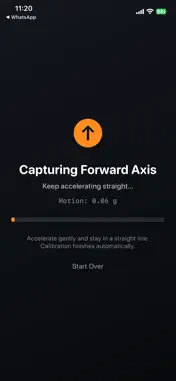
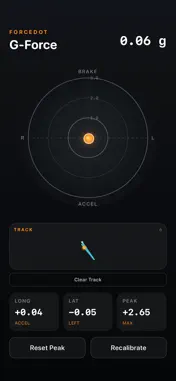
ForceDot turns your iPhone into a driver-oriented G-force meter for the road or track. Works with any mount orientation Fix your phone in the car however you like—dash, windshield, portrait, or landscape. After a quick calibration, ForceDot learns which way is forward and down for your setup, so Accel, Brake, Left, and Right stay correct even if the device isn’t sitting flat. How calibration works 1. Mount the phone securely and leave it fixed 2. Hold still so ForceDot measures gravity 3. Accelerate gently in a straight line to lock the forward axis Then you’re in live mode automatically. What you get 1. Live G-force circle with magnitude and direction 2. Longitudinal, lateral, and session peak readouts 3. Auto-scaling gauge when peaks go beyond the current range 4. GPS track path drawn beside the gauge, colored by G load 5. Layouts for both portrait and landscape viewing Built for real driving ForceDot is meant for a phone that stays in a holder. Don’t move the device after calibration—if you remount at a new angle, recalibrate so directions stay accurate. Drive safely. Use only where it’s legal and you can keep your attention on the road.
What's New
Version 1.01 2026-08-18
- Update Developer URL - Update in-app Advertisement settings Technical Analysis
Package Overview Basic metadata
Bundle ID
racemeter.RaceMeter Current Version 1.01
Minimum iOS 26.5
Package Size App Store Size
Package Metadata 0 / 0 version records
Detailed binary, privacy manifest, framework, and Info.plist results have not been indexed for this package yet. The verified App Store and archive metadata above remains available.
Developer Information
Known Version Records
0 version records with stored package metadata
Stored metadata does not guarantee a package is currently available to download.
| Details | Version / IDs | Version date | Action |
|---|