Preview




Description
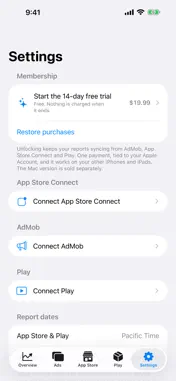
AppScope puts your ad revenue and your store revenue on the same screen. If you ship apps, your ad earnings and your store sales live in different consoles. Checking both every morning is a chore — and neither will tell you what a single app actually earned. AppScope fetches all three with your own credentials and keeps everything on this device. WHAT YOU GET • One number for today — ads plus store, across every app you ship. • Per-app totals that combine ad earnings with store revenue, so a free app that lives on ads no longer looks like it earns nothing. • Gross and net side by side. Apple's share isn't a flat 15% or 30% — local taxes come out of Developer Proceeds too, so it moves with the storefront. • Accidental-tap risk, split by app AND ad format. A banner's low rate hides an interstitial's high one when they're averaged together. • Settlement revisions. AdMob under-reports the last day or two and quietly revises upward later; AppScope lists what changed, so you can tell a correction from a real drop. The web console doesn't show this. • Payouts that reconcile. Apple pays on a fiscal calendar, not a calendar month — "July" is really 28 June to 1 August. AppScope uses those periods, so the payment screen and your sales figures finally agree. • Home Screen and Lock Screen widgets, with the period you choose. EACH SOURCE ON ITS OWN CLOCK AdMob has today and keeps climbing. Apple publishes a day late. AppScope shows each source's own newest day instead of pretending they line up, and marks the day that isn't settled yet. Report dates follow Pacific Time, the same dates App Store Connect shows — not your local dates. The numbers match each console, day for day. YOUR DATA STAYS YOURS No account. No sign-up. Nothing to register. AppScope talks to Apple and Google using credentials you provide, and writes the reports to a database on this device. Your revenue, downloads and app names never reach us. We record only which screens were opened and which errors occurred, with e-mail addresses, account identifiers and file paths stripped out before anything leaves the device. Apple keeps daily reports for one year and does not regenerate them. Everything AppScope has fetched stays here for good. BEFORE YOU BUY Connecting App Store Connect and AdMob takes a few steps — each has its own key or client to create, and AppScope walks you through every one of them. So try it first. The trial starts after your first successful sync, not when you install — time spent setting things up doesn't count against it. If the trial ends, AppScope stops fetching new data, but everything already downloaded stays and remains readable. One-time purchase. No subscription. The Mac version is sold separately. AppScope is an independent app and is not affiliated with, endorsed by, or sponsored by Apple Inc. or Google LLC. Apple, App Store and App Store Connect are trademarks of Apple Inc. Google and AdMob are trademarks of Google LLC.
What's New
Version 1.1 2026-10-19
Rankings AppScope now records your App Store chart positions every day — overall, your app's own category, and top grossing — for the regions where your apps a... Technical Analysis
Package Overview Basic metadata
Bundle ID
one.momosoft.appscope Current Version 1.1
Minimum iOS 17.4
Package Size App Store Size
Package Metadata 0 / 0 version records
Detailed binary, privacy manifest, framework, and Info.plist results have not been indexed for this package yet. The verified App Store and archive metadata above remains available.
Developer Information
Known Version Records
0 version records with stored package metadata
Stored metadata does not guarantee a package is currently available to download.
| Details | Version / IDs | Version date | Action |
|---|