Preview




Description
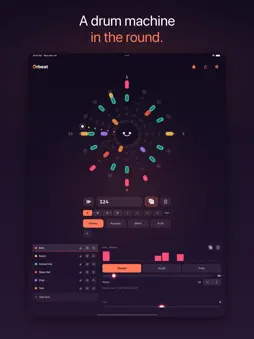
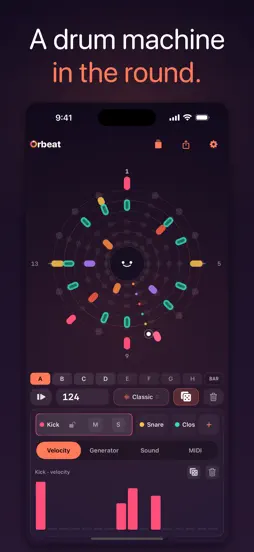
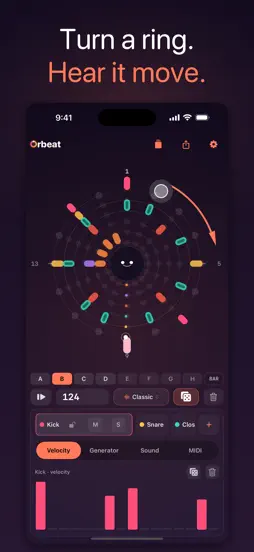
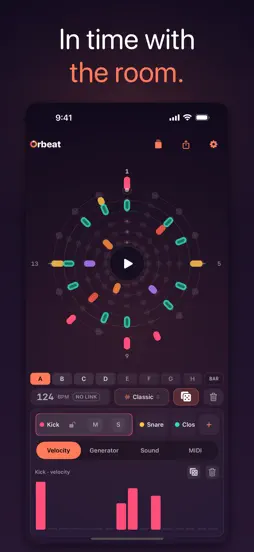
Orbeat is a drum machine in the round. Instead of a grid, your rhythm lives on a glowing mandala — concentric lanes of light that orbit a single play button. Tap the rings, watch the playhead sweep, and feel the groove move. Built to be played, not programmed. Open it and you're already making beats. A CIRCULAR SEQUENCER — UP TO TWELVE LANES Six lanes wrap the screen as rings, and the circle can grow to twelve: the mandala opens a second page of rings in its own electric color set, so every lane keeps its full size. Tap to place hits, lock a lane you love, mute and solo as you build the groove layer by layer. The whole pattern turns as it plays. TURN A RING, PLAY THE CENTRE Drag any ring around the circle and that lane's rhythm turns with your finger, so a hi-hat slides onto the off-beat while the beat keeps playing. Hold the play button in the middle and the circle becomes a performance pad: drag outward to stutter, from a whole beat down to a thirty-second note, left for a low-pass, right for a high-pass. Let go and the beat lands back in time. In a host, Repeat and Filter are parameters you can automate. FOUR DRUM KITS Classic, Acoustic, Glitch, and 8-bit — one tap reskins every voice while your pattern stays put. From clean and punchy to broken and chiptune. BRING YOUR OWN SOUNDS Build a custom kit and drop your own audio into any lane — WAV, AIFF or mp3, up to ten seconds, played at its original pitch and in stereo. Imported samples run clean to the output, while the lanes you leave alone keep their synth voice, so a hi-hat you recorded yourself sits right next to Orbeat's own drums. Your first custom kit is free. GENERATORS THAT SURPRISE YOU Roll the dice for an instant pattern, or use Euclidean rhythms to spread hits evenly around a ring. Like what you hear? Tap the ring to write it in and edit by hand. MAKE IT BREATHE, MAKE IT DRIFT Add swing to push the feel off the grid, draw velocity per step for accents that live, pan each lane across the stereo field, and tune any lane across four octaves — drop a kick into sub territory, tighten a hat, or play an imported sample high and short. With Probability, hits fire by chance; with polymeter, each lane gets its own length so the phases drift in and out of sync. TAKE IT ANYWHERE Bounce any loop to a stereo WAV — named with the beat, its length and its tempo, so it still makes sense in your DAW next month — or export it as a MIDI file that lands on General MIDI drum notes, swing and all. Or run Orbeat as an AUv3 instrument with MIDI in & out — sequence other instruments, or play Orbeat's lanes from your host's piano roll inside GarageBand, AUM, Logic, and other AUv3 hosts. Standalone, play the pads live from any MIDI controller and sync the whole groove to external MIDI clock. PLAY IN SYNC WITH THE ROOM Ableton Link keeps Orbeat in time with every Link-enabled app and device on your network — Ableton Live, AUM, Loopy, a friend's iPad across the table. Tempo follows the session, start and stop are shared, and everyone stays in phase. No cables, no setup. PLAY FREE. UNLOCK ONCE. The full instrument is free forever — every kit, the six-lane circle, turning rings, the performance pad, Euclidean generators, swing, velocity, pan, per-lane tune, your first custom kit with your own samples, MIDI in & out, and Ableton Link. Orbeat Pro is a single one-time purchase (no subscription, ever) that unlocks room to grow the circle to twelve lanes, plus Probability, polymeter, WAV and MIDI export, unlimited saved beats, and extra custom kits. Made for iPhone and iPad. No account, no ads, no tracking — your beats never leave your device unless you share them. Tap the rings. Make it move.
What's New
Version 1.5.0 2026-11-16
The circle has always been where you build a beat. Now you can play it. TURN A RING Put a finger on any ring and drag it around the circle. That lane's rhythm ...The circle has always been where you build a beat. Now you can play it. TURN A RING Put a finger on any ring and drag it around the circle. That lane's rhythm turns with you, a step at a time, so you can slide a hi-hat onto the off-beat while the beat keeps playing and hear it move. Let go and it stays where you left it; Undo puts it back. It works on every lane, hand-drawn or Euclidean, playing or stopped. Pinch the circle to change how many steps the selected lane has. Step lengths are part of Orbeat Pro. PLAY THE CENTRE While the beat is playing, hold the play button in the middle of the circle and it becomes a performance pad. Drag outward to stutter: the further out you go, the tighter the repeat, from a whole beat down to a thirty-second note. Drag to the left to close a low-pass filter over the whole mix, or to the right for a high-pass; straight up leaves the sound alone. Let go and everything snaps back, right on the beat, as if you had never left. A quick tap still starts and stops the beat, the same as before. The stutter happens in the sequencer, not on a recording of the sound, so the notes Orbeat sends over MIDI stutter too, and whatever you are driving follows along. IN YOUR HOST The plug-in gets the same pad in the middle of its circle, and it plays while your host is playing. Repeat and Filter are new parameters, so your host can record a performance as automation and play it back. AND A FEW MORE Swiping across the circle no longer changes page, because the circle needs your finger for turning. Use the arrows underneath to reach lanes seven to twelve. In the plug-in, the circle now stays put while the controls below it scroll. With VoiceOver, the circle offers Shift earlier and Shift later for the selected lane. ALSO IN THIS UPDATE Every hit plays once. Orbeat listened to every MIDI source, its own port included, so each note it sent came back in and fired the lane again a few milliseconds later. It ignores its own port now, and your controllers and DAW work as before. Lanes you mute or solo away also stop sending MIDI. Exports sound like playback. Choke groups now reach WAV export, so an open hat that a closed hat cuts off is cut off in the file too, and export no longer freezes the screen while it renders. Save writes over your project. It used to make a new copy every time; now it updates the project you have open, and Save as New makes a copy. Opening another project over unsaved changes asks first, and your beat is saved in the background every 15 seconds and whenever you leave the app. Undo the dice. After Dice or Clear, Undo waits at the bottom of the screen for a few seconds. Copy a pattern. Long-press A to H to copy, paste or clear. The end of the pattern bar shows when a switch lands (now, on the beat or on the bar), and a tap changes it. Pattern banks are part of Orbeat Pro. On iPhone, a tap between two rings goes to the lane you're editing. Pan and Tune show which way they're turned, and a double-tap centres them. Lanes past six get a minus button that asks before removing one. If a call or a change of headphones stops the sound, Orbeat restarts where it can and tells you where it can't. On iPad in portrait, the controls under the circle scroll. Orbeat now removes imported samples that no kit uses any more. If you delete a kit, its samples go with it unless another kit still uses them. Turning rings and the performance pad are free for everyone. Tell me what you'd like the circle to do next: [email protected]. I read every message. Version 1.4.1 2026-09-09
All of these came from your emails. LANES THAT CUT EACH OTHER OFF Put two lanes in the same choke group and a new hit silences the other — a closed hat stoppin...All of these came from your emails. LANES THAT CUT EACH OTHER OFF Put two lanes in the same choke group and a new hit silences the other — a closed hat stopping an open one, exactly the way a real kit behaves. Until now every lane rang out on its own and hats piled up on top of each other. Choke works everywhere sound leaves Orbeat: the built-in kits, samples you imported yourself, and the MIDI Orbeat sends out, where the choked lane gets a proper note-off so your hardware stops too. Set it per lane, up to four groups. Free for everyone. SAVE A MIDI MAP FOR EACH RIG Set the notes your lanes send once, name it, and recall it when you change gear — instead of re-entering the same table every time you move between instruments. General MIDI, Elektron Analog Rytm, Roland TR-8S and Arturia DrumBrute are built in, and your own maps sit alongside them. Free for everyone. EIGHT PATTERNS, A TO H Every project now holds eight patterns instead of one. Switch by tapping, or from a controller — send a program change, or a note, and Orbeat changes pattern without you touching the screen. You choose when the change lands: instantly, on the next beat, or on the next bar. The sequencer never restarts, so a switch mid-phrase stays in time with everything else you have running. Patterns share your kit, your samples and your MIDI setup — only the rhythm changes, so switching stays instant and never reloads a sound. Pattern banks are part of Orbeat Pro. Choke groups and the MIDI maps are free. YOUR SAMPLES PLAY THROUGH A sample longer than one step used to be cut dead the moment its lane fired again — every hit restarted the file from the top with no fade, so on a busy pattern you got a click per hit and never heard the end of the sound. Now the previous hit fades out under the new one, in the same five milliseconds a choke takes, and a long sample can be retriggered as fast as you like without the chop. A player sent a screen recording of it happening; that recording is what found it. Orbeat also stops holding on to every sample it has ever loaded. Switching kits used to keep the old audio in memory until you quit; it is now released the moment nothing is playing it. Thanks to the three players who wrote in — between them, they are this whole update. Tell us what you need next: [email protected] Version 1.4.0 2026-09-04
All three of these came from your emails. LANES THAT CUT EACH OTHER OFF Put two lanes in the same choke group and a new hit silences the other — a closed hat s...All three of these came from your emails. LANES THAT CUT EACH OTHER OFF Put two lanes in the same choke group and a new hit silences the other — a closed hat stopping an open one, exactly the way a real kit behaves. Until now every lane rang out on its own and hats piled up on top of each other. Choke works everywhere sound leaves Orbeat: the built-in kits, samples you imported yourself, and the MIDI Orbeat sends out, where the choked lane gets a proper note-off so your hardware stops too. Set it per lane, up to four groups. Free for everyone. SAVE A MIDI MAP FOR EACH RIG Set the notes your lanes send once, name it, and recall it when you change gear — instead of re-entering the same table every time you move between instruments. General MIDI, Elektron Analog Rytm, Roland TR-8S and Arturia DrumBrute are built in, and your own maps sit alongside them. Free for everyone. EIGHT PATTERNS, A TO H Every project now holds eight patterns instead of one. Switch by tapping, or from a controller — send a program change, or a note, and Orbeat changes pattern without you touching the screen. You choose when the change lands: instantly, on the next beat, or on the next bar. The sequencer never restarts, so a switch mid-phrase stays in time with everything else you have running. Patterns share your kit, your samples and your MIDI setup — only the rhythm changes, so switching stays instant and never reloads a sound. Pattern banks are part of Orbeat Pro. Choke groups and the MIDI maps are free. Thanks to the two players who wrote in — between them, they are this whole update. Tell us what you need next: [email protected] Version 1.3.2 2026-09-01
SET THE MIDI NOTE EACH LANE SENDS Every lane now carries its own MIDI note and its own MIDI channel, so Orbeat can drive whatever you point it at — a sampler wi...SET THE MIDI NOTE EACH LANE SENDS Every lane now carries its own MIDI note and its own MIDI channel, so Orbeat can drive whatever you point it at — a sampler with its pads mapped some other way, a synth you want to play melodically, six instruments on six channels at once. Until now every lane sent a fixed General MIDI drum note on channel 10: perfect if you were driving a drum machine, and a dead end if you weren't. You'll find it on a new MIDI tab, per lane. Pick the note — shown as a name and a number together, so it matches whatever your instrument's manual calls it — and pick the channel. It applies everywhere notes leave: the AUv3 output inside your host, and the MIDI file export. What you hear in the session is what lands in the file. And it works in the other direction too — play a lane's own note from a controller and that lane fires. Nothing moves unless you move it. Every lane starts on exactly the General MIDI note it has always sent, so existing projects, saved host presets and any hardware you have already mapped keep working untouched. Free for everyone. Thanks to the player who wrote in about this one — it is the whole update. Tell us what you need next: [email protected] Version 1.3.1 2026-08-04
You asked for these. EXPORT AS MIDI Bounce the pattern out as a MIDI file and drop it straight into your DAW. Every lane lands on its General MIDI drum note, s...You asked for these. EXPORT AS MIDI Bounce the pattern out as a MIDI file and drop it straight into your DAW. Every lane lands on its General MIDI drum note, so it hits the right pad in whatever you open it with — and your swing, probability rolls and polymeter phases all come across exactly as you hear them here. Sitting on a polymeter groove where the lanes only line up every fifteen bars? Pick Full and the export runs one complete cycle, so the loop actually loops. TUNE ANY LANE A new Sound tab gives every lane a tune control, four octaves wide. Pitch a kick down until it's a sub, tighten a hi-hat, or take a sample you imported and play it high and short. Your own one-shots resample properly, so a vocal chop or a found sound becomes an instrument you can play across the circle. Free for everyone. EXPORTS THAT SAY WHAT THEY ARE Every bounce used to land as orbeat-4bar.wav — the same name every time, so the third loop you saved turned into "orbeat-4bar 3.wav" and you were left opening files to work out which was which. An export now carries the beat's name, its length and its tempo: orbeat-Midnight-Drive-4bar-124bpm.wav A WAV file has nowhere to keep a tempo, so the filename is the thing that tells your DAW — and you, three months from now — how fast the loop runs. START FROM THE TOP A new button beside the tempo sends the pattern back to the first beat, so you can audition a change from the downbeat instead of wherever the circle happened to be. Thanks for playing. Tell us what you'd love to see next: [email protected] Version 1.3.0 2026-07-28
Orbeat now plays in time with everything else in the room. ABLETON LINK Switch Sync to Link and Orbeat locks to every Link-enabled app and device on your netwo...Orbeat now plays in time with everything else in the room. ABLETON LINK Switch Sync to Link and Orbeat locks to every Link-enabled app and device on your network — Ableton Live, AUM, Loopy, a friend's iPad across the table. Tempo follows the session, start and stop are shared, and everyone stays in phase without a single cable or a moment of setup. You'll find it in Settings under Sync, with a panel showing how many peers are in the jam. YOUR IMPORTED SAMPLES, PLAYED FAITHFULLY If you loaded your own audio into a custom kit and it came back distorted — that was us, and it's fixed. Your samples were being pushed through the drum kit's character processing: the saturation and bit-crush that give Glitch and 8-bit their bite. Wonderful on our synthesised drums. Ruinous on a hi-hat you recorded yourself. Samples now take a clean path straight to the output, while the synth lanes keep every bit of their kit's personality. Nothing to re-import — your existing kits will simply start sounding right. CUSTOM KITS STAY PUT A custom kit's synth lanes used to borrow their tone from whichever built-in kit you'd touched last, so the same kit could sound different from one session to the next. Each custom kit now carries its own voicing and sounds the same every time you open it. EXPORT MATCHES WHAT YOU HEAR Bouncing a beat built on a custom kit quietly swapped your sounds back to the built-in ones — samples missing, lanes you'd silenced suddenly audible. Exports now render exactly what's playing. Thanks to the player who wrote in about the distorted imports: that one report is half this update. Keep them coming — [email protected] Version 1.2.0 2026-07-14
The circle grows — Orbeat now goes up to twelve lanes. TWICE THE CIRCLE You asked for more voices, so here they are. Tap + to grow your kit past six: the manda...The circle grows — Orbeat now goes up to twelve lanes. TWICE THE CIRCLE You asked for more voices, so here they are. Tap + to grow your kit past six: the mandala opens a second page of rings so every lane keeps its full size, and you flip between pages with the corner chevrons. Page two glows in its own electric color set, and the new voices land ready to play — Noise, plus a second Kick, Snare, Hat, Tom, and Clap. Works standalone and as the AUv3 in your host, with existing automation untouched. The first six lanes stay free; growing the circle is part of Orbeat Pro. A CLEANER COCKPIT ON IPHONE Your drum kit moved up beside the tempo — a small chip that names the active kit and opens the full picker in one tap. Below the circle, editing is now a single tidy card: two clear tabs (Velocity and Generator), a taller velocity panel with real room to draw, and a lane strip that follows the circle's page — the lane you're on expands, the rest tuck in tight. Twelve lanes, way less scrolling. Thanks for playing — this one shipped because you asked. Tell us what you'd love to see next: [email protected] Version 1.1.0 2026-07-03
Orbeat now listens: this update is all about MIDI. PLAY IT LIVE Hit the 8 lanes from any MIDI controller or app — GM drum notes with full velocity, standalone ...Orbeat now listens: this update is all about MIDI. PLAY IT LIVE Hit the 8 lanes from any MIDI controller or app — GM drum notes with full velocity, standalone and inside your AUv3 host. Other apps can play Orbeat directly through its new virtual "Orbeat" MIDI port. Note input is always on; pick a channel (or Omni) in Settings, under MIDI. SYNC TO YOUR RIG Set Sync to External MIDI Clock and Orbeat follows the master: START, STOP and CONTINUE, tempo changes, even song-position jumps land on the right bar. The tempo display mirrors the clock with an EXT badge — and tells you the moment the clock disappears. THE LITTLE FACE JOINS THE BAND The play button's face now dresses for your kit — blissed-out for Acoustic, glitchy for Glitch, pixel-perfect for 8-bit. It pops its mouth on every kick and breathes with how loud you play. AND THE GUIDE TO GO WITH IT New MIDI guide on the website — note map, channel setup, and a clock-sync walkthrough: nono-today.github.io/orbeat/midi.html Thanks for playing. Tell us what you'd love to see next: [email protected] Version 1.0.1 2026-06-29
Welcome to Orbeat 1.0 — a drum machine in the round. • A circular, six-lane sequencer you play like a mandala • Four drum kits: Classic, Acoustic, Glitch, and ...Welcome to Orbeat 1.0 — a drum machine in the round. • A circular, six-lane sequencer you play like a mandala • Four drum kits: Classic, Acoustic, Glitch, and 8-bit • Euclidean and Probability generators, plus a one-tap dice roll • Swing, per-step velocity, and polymeter • WAV export and an AUv3 instrument with MIDI out Thanks for playing. Tell us what you'd love to see next: [email protected] Version 1.0 2026-06-27
App Store User Reviews
Enrique Raphaël Page Pérez 2026-07-07
Please consider this request 🙏🏼🙏🏼
Really nice sequencer! I’m very much enjoying my time with it. Unfortunately for me, I have lots of sequencers already and whilst I am tempted to buy this one...Really nice sequencer! I’m very much enjoying my time with it. Unfortunately for me, I have lots of sequencers already and whilst I am tempted to buy this one through the in-app purchase, I’m a bit annoyed by what - I find to be - a weird but most likely arbitrary limitation: only six lanes? Hopefully you can consider adding a system which allows us to “instantiate lanes” — I’d be ok with being able to have from 1 to 16 lanes — I understand if more is a bit annoying… but at least being able to have up to 16 lanes (and the ability to “select how many you want”) would be amazing and would definitely have me buying this immediately. Given that, and sorry if I’m being overwhelming, but as a programmer myself, I think the suggested idea shouldn’t be very hard to implement, I hope you will consider it; it would really make this sequencer a super versatile and beautiful tool. PS: thanks for the amazing, iPhone friendly layout — the UI design in this is crazy good. PS2: I did have a bug where when first trying this out, I couldn’t add notes on the sequencer under the “sequence lane as bars” view. I think in order to fix this, I had to add a note manually under the “circular sequence” view, after that all worked just fine. Great app! Please consider adding more lanes as an option 🙏🏼🙏🏼
Ronzlo 2026-08-04
You can tell the dev cares.
Distinguishing itself right from the start by not paybricking essential features or doing SaaS - and providing regular and useful updates, unlike some of the ‘v...Distinguishing itself right from the start by not paybricking essential features or doing SaaS - and providing regular and useful updates, unlike some of the ‘vibcoded’ stuff hitting the App Store recently.
Technical Analysis
Package Overview Basic metadata
Bundle ID
today.nono.orbeat.app Current Version 1.5.0
Minimum iOS 16.0
Package Size App Store Size
Package Metadata 0 / 10 version records
Detailed binary, privacy manifest, framework, and Info.plist results have not been indexed for this package yet. The verified App Store and archive metadata above remains available.
Related Apps


More by Chih Han Lin


Developer Information
Known Version Records
0 version records with stored package metadata • 10 known version records
Stored metadata does not guarantee a package is currently available to download.
| Details | Version / IDs | Version date | Action |
|---|---|---|---|
| Not archived | v1.5.0 App Store ID: 895371054Build: 1.5.0 | 2026-11-16 19:37:09 | Request Version |
| Not archived | v1.4.1 App Store ID: 891053909Build: 1.4.1 | 2026-09-09 19:03:38 | Request Version |
| Not archived | v1.4.0 App Store ID: 890810672Build: 1.4.0 | 2026-09-05 00:07:25 | Request Version |
| Not archived | v1.3.2 App Store ID: 890604954Build: 1.3.2 | 2026-09-01 17:01:52 | Request Version |
| Not archived | v1.3.1 App Store ID: 888998116Build: 1.3.1 | 2026-08-04 20:03:28 | Request Version |
| Not archived | v1.3.0 App Store ID: 888915081Build: 1.3.0 | 2026-07-28 15:39:45 | Request Version |
| Not archived | v1.2.0 App Store ID: 888187423Build: 1.2.0 | 2026-07-14 09:32:37 | Request Version |
| Not archived | v1.1.0 App Store ID: 887800559Build: 1.1.0 | 2026-07-03 22:26:29 | Request Version |
| Not archived | v1.0.1 App Store ID: 887579253Build: 1.0.1 | 2026-06-29 21:14:04 | Request Version |
| Not archived | v1.0 App Store ID: 887392711Build: 1.0 | 2026-06-27 19:14:20 | Request Version |