
Preview




Description
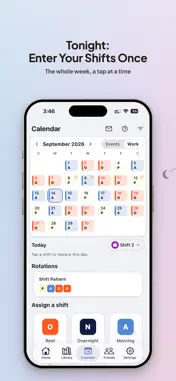
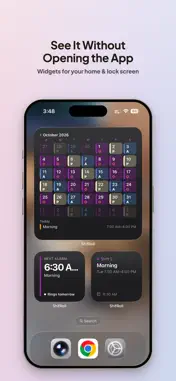
ShifRoll is a shift work calendar with alarms built in. Put your roster on the calendar once, and the right alarms ring on the right days. Made for nurses, security officers, hospitality and retail staff, drivers, and anyone whose week isn't nine to five. Not on shifts? It works for every day too: wake-up alarms that stay quiet when you mark a day off, the rent memo on the 1st of every month, and your family's calendar beside yours. YOUR ROSTER, ON A CALENDAR • Make your shift types once, such as Day, Night and On-call, with their times, codes and alarms. Making a group asks for them all at once, and one tap fills in a common set of shifts. • Tap a day and pick a shift. Rotations such as 4 on, 4 off, and weekly or monthly routines fill whole months for you. • Import the whole month from an Excel, CSV or PDF roster, or a photo (Premium), and check it before anything is added. • Three calendar sizes: the full month with each day's shifts by name, the month with the day's list, or one week. • Mark a Holiday and that day's routines are skipped. Holidays from your phone's calendar can do the same: turn on Treat as holidays, and Calendar holidays skip routines. ALARMS THAT WAKE YOU • Each shift brings its own alarms: before it starts, as it starts, or when it ends. • Alarm sets, like the Clock app: a first alarm and a few more, repeating on the days you choose or ringing once. One switch for the whole set. • Full screen and full volume, through your phone's own alarm system. ◆ On iOS 26 and later it rings on silent and in Focus, with nothing to set up. SEE IT AT A GLANCE • A Home you arrange: next alarm, today, tomorrow, weather and your memo. • Widgets for your Home Screen. ◆ And for your Lock Screen. • Memos and checklists on any day, repeating weekly or monthly if you like. PAY, WORKED OUT FOR YOU • Hourly rates, unpaid breaks, shift bonuses and a monthly pay, counted from the shifts you already keep. FRIENDS AND FAMILY • Add a friend by code, choose what to share, and see each other's calendars side by side: coworkers, a partner, your family. PREMIUM • Sync across your devices, and choose which one rings • Import your roster from a file or a photo • Up to 10 alarms in each alarm set • Voice input (Beta) after the first ten tries • Mix your own colours In English, 繁體中文 and 简体中文. No alarm app is perfectly reliable. Test ShifRoll for a day or two before relying on it for a shift you can't miss. Terms of Use (EULA): https://www.apple.com/legal/internet-services/itunes/dev/stdeula/ Privacy Policy: https://shifroll.com/privacy
What's New
Version v4.17.0 2026-10-28
Friends, made simpler — and alarms you can skip. • Who can see this: each of your groups is shared with Everyone, only Close friends, or Nobody. A new group st... Technical Analysis
Package Overview Basic metadata
Bundle ID
com.fireEar.CalendarAlarm Current Version v4.17.0
Minimum iOS 17.0
Package Size App Store Size
Package Metadata 0 / 8 version records
Detailed binary, privacy manifest, framework, and Info.plist results have not been indexed for this package yet. The verified App Store and archive metadata above remains available.
Developer Information
Known Version Records
0 version records with stored package metadata • 8 known version records
Stored metadata does not guarantee a package is currently available to download.
| Details | Version / IDs | Version date | Action |
|---|---|---|---|
| Not archived | App Store ID: 887859109 | Unknown | Request Version |
| Not archived | App Store ID: 887542266 | Unknown | Request Version |
| Not archived | App Store ID: 887291557 | Unknown | Request Version |
| Not archived | App Store ID: 886851883 | Unknown | Request Version |
| Not archived | App Store ID: 886340612 | Unknown | Request Version |
| Not archived | App Store ID: 885777830 | Unknown | Request Version |
| Not archived | App Store ID: 885717799 | Unknown | Request Version |
| Not archived | App Store ID: 885493781 | Unknown | Request Version |