
Preview






Description
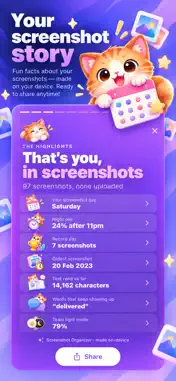
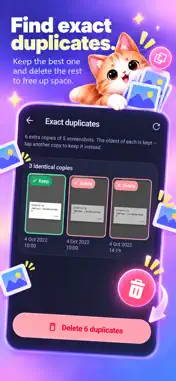
Turn screenshot chaos into organized collections. Screenshot Organizer finds the screenshots on your phone, reads each one on the device, and sorts them into collections you review in a few swipes. Then it lets you search the words inside them: a boarding pass, a coupon code, an address, that one recipe. No account. No cloud. Your screenshots, and the text in them, never leave your phone. HOW IT WORKS 1. Tap Scan My Screenshots and allow photo access. The app picks out your screenshots and skips ordinary photos. 2. Watch the scan. Each screenshot is read once: text, colors, layout. Fun facts appear while you wait. 3. Tap Keep all to file every collection the app is sure about, in one go. 4. Swipe through the rest. Keep a collection, or regroup it into smaller ones. 5. Search any word, any time. WHY IT WORKS A typical phone holds thousands of screenshots in date order, and scrolling is the only way to find one. Screenshot Organizer groups screenshots that look alike, share a layout, carry the same words or were taken close together, then names each collection and tells you why. SEARCH THE TEXT IN ANY SCREENSHOT • One search box covers collection names and the text read from your screenshots. • Open a screenshot to see the recognized text under the image. Select it and copy it. • Browse by type, each with a count: boarding passes, vouchers and coupons, shopping, places and maps, events and tickets, chats, social media. • Reads English, other Latin-script languages and Chinese. YOU STAY IN CHARGE • The app suggests. You decide. Nothing is filed for good without you. • Corrections stick. Screenshots you move by hand, or collections you keep, are never touched by a later scan. • Regroup a collection that is too broad and it splits into tighter groups on the spot. • One-offs wait in Unsorted. Tap Find groups to look for pairs. • Set how picky grouping is: Loose (fewer, bigger collections), Balanced or Strict (more, smaller). CLEAR OUT THE CLUTTER • Exact duplicate finder. Copies are proven identical, byte for byte or pixel for pixel, before they are offered for deletion. The oldest is kept unless you choose another. • Delete a whole collection's screenshots, or only the ones you select. • Every delete asks twice: once in the app, once from iOS. Deleted screenshots stay in Recently Deleted for 30 days. YOUR SCREENSHOT STORY A light-hearted recap of your library: busiest screenshot day, peak hour, oldest screenshot, the words that keep showing up, dark or light mode and more. Share any page as an image. PRIVATE BY DESIGN • All analysis runs on your device. Nothing read from a screenshot is sent anywhere. • No account and no cloud sync. • The only network use is anonymous usage counts and the App Store purchase flow. FREE, WITH ONE OPTIONAL UNLOCK Sorting, reviewing, searching, the screenshot story and the duplicate finder are free. A one-time Lifetime purchase unlocks sharing and deleting your screenshot files. No subscription. Once bought, Lifetime stays unlocked, and you can restore it any time. MADE FOR • Heavy screenshotters with thousands of images • Travelers hunting for a boarding pass or a booking • Shoppers who keep coupons, orders and receipts • Anyone who cares where their data goes QUICK TIPS • Run Keep all first, then review the rest. It is the fastest way through a big library. • Choosing Limited photo access? The app can only see, and delete, the screenshots you share with it. QUESTIONS Does it upload my screenshots? No. Analysis and text reading happen on your device. Does it organize my ordinary photos? No. It reads screenshots only. Will it delete anything by itself? Never. Every delete is your call and asks twice. What does Lifetime unlock? Sharing and deleting screenshot files. The rest is free. Is the app translated? Not yet. Menus are in English for now, while text recognition also reads Chinese.
Technical Analysis
Package Overview Basic metadata
Bundle ID
com.thinklab.screenshot.organizer Current Version 1.0
Minimum iOS 15.0
Package Size App Store Size
Package Metadata 0 / 0 version records
Detailed binary, privacy manifest, framework, and Info.plist results have not been indexed for this package yet. The verified App Store and archive metadata above remains available.
Developer Information
Known Version Records
0 version records with stored package metadata
Stored metadata does not guarantee a package is currently available to download.
| Details | Version / IDs | Version date | Action |
|---|