
Preview








Description
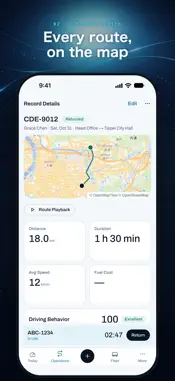
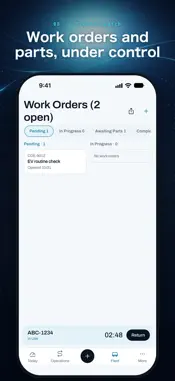
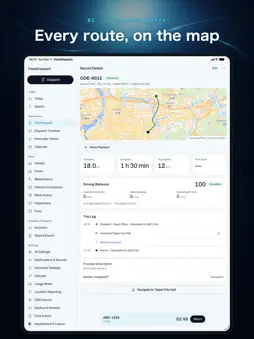
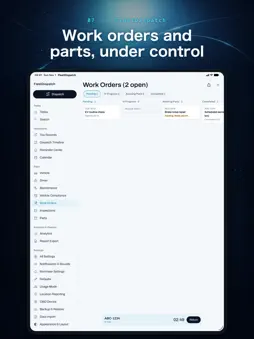
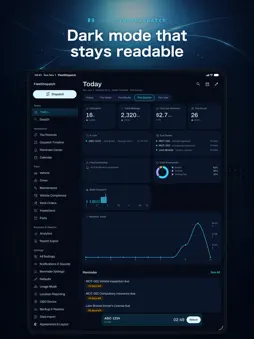
FleetDispatch brings trip logging, maintenance, and analytics together in one app for small fleets, company cars, and anyone managing more than one vehicle. Version 8.0 has an all-new design, consistent across iPhone, iPad, and Mac. It works offline and keeps your data on your device and in your own iCloud by default. WHAT YOU CAN DO A consistent new design - A deep-navy instrument look with fine lines, monospaced readings, and every status spelled out in words. Tab bar on iPhone, sidebar on iPad and Mac. Light, Dark, or Auto, with text that follows your system size. Change the app language right in the app. Today Dashboard - Combine 28 metrics and set a period and comparison for each card. Start from 5 templates; your layout syncs through iCloud. Dispatch, return & trip records - Log the odometer (carried over from the last trip), driver, multiple destinations, cost center, fuel, tolls, parking, and battery swaps. Conflicts for the same vehicle are flagged before you dispatch. Trip details show the route on a map, with playback at up to 64x and driving behavior analysis. Vehicle Status Center & Reminder Center - Everything about a vehicle on one page, and everything that needs attention in one list: due dates, maintenance, overdue returns, pending approvals, and fuel efficiency anomalies. Search & Dispatch Timeline - Search vehicles, drivers, locations, trips, work orders, and parts at once. On iPad and Mac, the Dispatch Timeline shows vehicles across time with conflicts marked. Work orders, inspections, parts & approvals - A work order board, driver vehicle inspections (DVIR), and parts inventory. Completing a work order deducts stock and creates a maintenance record. Drivers submit trip requests; admins approve them. Analytics & reports - Mileage, fuel, and cost trends and rankings. Preview reports, then export an A4 PDF with repeated headers or a re-importable CSV. Export routes as KML or GeoJSON. In the car - In cars that support CarPlay, see trips in progress, dispatch quickly, check to-dos, and navigate to saved locations with a maps app. No typing in the car; enter the end odometer on iPhone after you park. Widgets, Live Activities & Siri - Metric and Lock Screen widgets, plus a Quick Depart control in Control Center. During a trip, the Lock Screen Live Activity has a Return button. Ask Siri to log a dispatch or end a trip. Apple Watch - Today, To Do, and a timer for the trip in progress. Dispatch, return, and approve quickly; your iPhone provides the data and carries out the actions. Mac - Table views, a menu bar panel for active trips and pending approvals, menu commands, and keyboard shortcuts. Team sync - Pair an office host (iPad or Mac) with mobile clients over your local network using a security code and a 6-digit PIN; 7.0 and 6.0 devices still work alongside. Or sync from anywhere through your own FleetDispatch Server (open source; Cloudflare, PHP + MySQL, or Docker). Encrypted, with Admin, Driver, and Viewer roles, an offline queue, and live location during trips. iCloud sync & backup - Sync across your Apple devices, with automatic backups in iCloud Drive. Export password-encrypted backups (compatible with 7.0) and import CSV or JSON. Sample Mode & Help Center - Try everything with sample data kept separate from yours. Help Center articles come from instw.org, with an offline copy built in. More - The Fleet Pulse sound with settings for each notification type, App Lock with Face ID or Touch ID, OBD-II diagnostics (Beta) with a Bluetooth ELM327 adapter, 10 languages, and metric or imperial units. PRIVACY Your data lives on your device and in your own iCloud by default. LAN sync is a direct device-to-device connection; with a custom host, data goes only to the host you set up. Map screens download OpenStreetMap tiles from OpenFreeMap, and the Help Center loads articles from instw.org; neither receives your fleet data. We do not sell your data.
What's New
Version 8.0 2026-11-04
FleetDispatch 8.0 is a complete rebuild with a new design. The first time you open it, your 7.0 data and settings come along automatically. - All-new design: i... Technical Analysis
Package Overview Basic metadata
Bundle ID
com.yucts.fleetdispatch Current Version 8.0
Minimum iOS 26.0
Package Size App Store Size
Package Metadata 0 / 5 version records
Detailed binary, privacy manifest, framework, and Info.plist results have not been indexed for this package yet. The verified App Store and archive metadata above remains available.
Developer Information
Known Version Records
0 version records with stored package metadata • 5 known version records
Stored metadata does not guarantee a package is currently available to download.
| Details | Version / IDs | Version date | Action |
|---|---|---|---|
| Not archived | App Store ID: 885425414 | Unknown | Request Version |
| Not archived | App Store ID: 885372775 | Unknown | Request Version |
| Not archived | App Store ID: 885334455 | Unknown | Request Version |
| Not archived | App Store ID: 885149846 | Unknown | Request Version |
| Not archived | App Store ID: 885077133 | Unknown | Request Version |