
Preview







Description
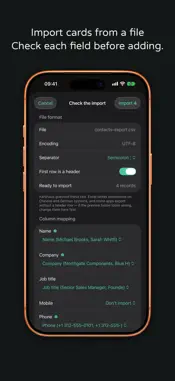
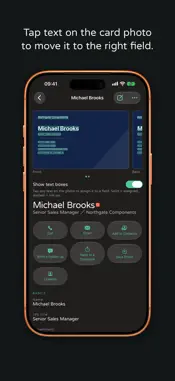
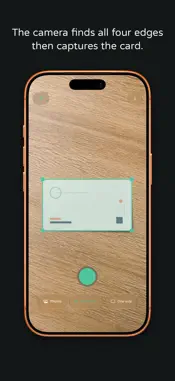
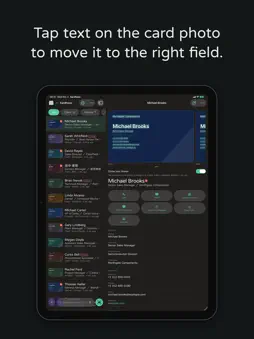
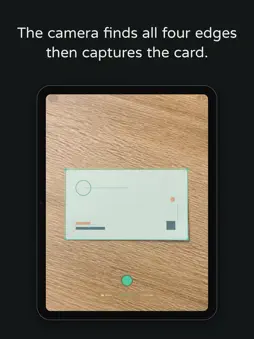
Kardhaus keeps your business cards on your iPhone, with your notes on where you met and what you discussed. Months later, you can still find the right contact. No account. Photo, crop and text recognition happen on your iPhone and work offline. ■ New: the follow-up, in their language Tap Write a Follow-up and Apple's Private Cloud Compute drafts the message in their language, with yours beside it. Kardhaus first shows exactly what will be sent: names, titles, departments and companies, your tags and notes, and excerpts of follow-ups you sent. Never the card's phone numbers, emails, addresses or photo; contact details found in your notes are removed. Apple states the data is used only for your request and is not stored. Nothing is sent to Kardhaus. This needs iOS 27 and Apple Intelligence; otherwise the model on the device or a built-in template writes it. Turn Private Cloud Compute off in Kardhaus Settings › Apple Intelligence. ■ The card map and search The card map shows contacts at the addresses on their cards. Search by name, company, address or your notes, or tap a tag, such as the event where you met. With Pro and Apple Intelligence, type a sentence like "the machine-tool supplier in Taichung I added last month" and Kardhaus works out the filters on the device. ■ An impression only you can see "She handles purchasing, quote due September." Never printed on a card, yet often exactly what you need later. Hold the mic and say it: it is transcribed on the device, and the audio is not stored. ■ One photo, every field Cropped, straightened, compressed, then the words go into the right fields: Chinese and Latin names, title, department, company, branch, phone, email, address, even the credentials on a doctor's or lawyer's card. With Apple Intelligence, AI recognition checks the fields, offline too with the model on the device. ■ The fields a card actually carries Social media accounts get their own fields, and most open in their app with one tap. A tax number, an extension, a license number and the name reading on a Japanese card get their own fields too, instead of a line in the notes. ■ No need to unlock On an iPhone with Camera Control, set it to Kardhaus and one press opens Kardhaus Camera, even on a locked iPhone. Also from the Lock Screen, Control Center or the Action Button. ■ Both sides, one contact Scan the front and back of a bilingual card in one go: one card, fields from both sides. Only scanned the front? Tap Add Back; your edits are kept. ■ Your data, your photo library Export vCard or CSV any time. Import vCard, CSV or card photos; for CSV you confirm the column mapping first. Card photos stay in Kardhaus's own database, never your camera roll, and Kardhaus cannot read your library. ■ iCloud sync, and iPad With iCloud sync on, cards stay in your private iCloud database and follow you to a new iPhone. Native on iPad too, with Split View and Stage Manager. ■ What people ask before installing Where do my cards go? Onto this phone, and into your private iCloud database if sync is on. No account, no ads, no tracking; your cards are never sent to Kardhaus. Company names and addresses are looked up in Apple Maps for the map (for imported cards, only if you allow it). On iOS 27, AI recognition sends the card's photo, text and QR content to Private Cloud Compute for that request only, else uses Apple Intelligence on the device. Sentence search stays on the device. What does Pro add? Pro, an in-app purchase, adds sentence search and lifts the 50-use limit that AI recognition and AI drafts share; all three need Apple Intelligence. Everything else works without it. — Terms of Use: https://kardhaus.com/terms Privacy Policy: https://kardhaus.com/privacy End User License Agreement: https://www.apple.com/legal/internet-services/itunes/dev/stdeula/
What's New
Version 1.3.2 2026-11-14
• Edit tags yourself: Edit Card now has a Tags section to add and remove them. • Preview an accent color, then tap Save to apply it. • A calmer card page: photo...• Edit tags yourself: Edit Card now has a Tags section to add and remove them. • Preview an accent color, then tap Save to apply it. • A calmer card page: photo tools now sit behind ⋯, and paragraphs have more line spacing for easier reading. • Stability and reliability fixes. Technical Analysis
Package Overview Basic metadata
Bundle ID
com.kardhaus.app Current Version 1.3.2
Minimum iOS 26.0
Package Size App Store Size
Package Metadata 0 / 0 version records
Detailed binary, privacy manifest, framework, and Info.plist results have not been indexed for this package yet. The verified App Store and archive metadata above remains available.
Developer Information
Known Version Records
0 version records with stored package metadata
Stored metadata does not guarantee a package is currently available to download.
| Details | Version / IDs | Version date | Action |
|---|