
Preview








Description
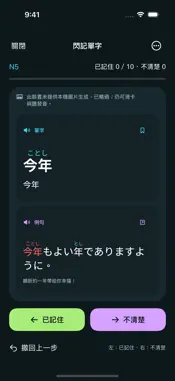
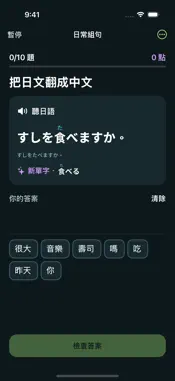
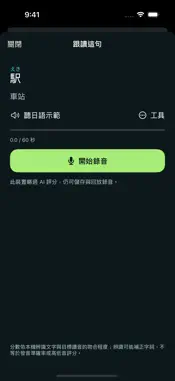
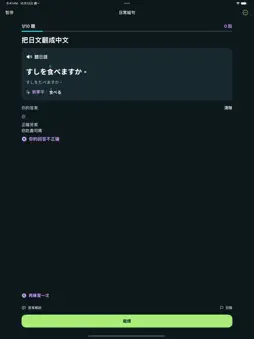
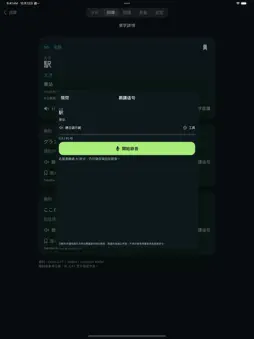
Take a small leap in Japanese every day. Nihongo Leap combines vocabulary, listening, sentence building, shadowing and bookmarks in an app with a Traditional Chinese interface. No account is required. OFFLINE VOCABULARY Explore 19,657 unique entries: 7,726 entries grouped by reference JLPT levels N5–N1 and 11,931 additional entries. Search by Japanese spelling, kana or Chinese meaning. JLPT groups are reference classifications, not an official examination vocabulary list. Examples are available for selected entries. SWIPE TO REMEMBER Swipe left to mark a word remembered, or right if unclear. Undo the last swipe. Cards read the word first, then its example, in separate panels. Target words in examples are highlighted red. Swipe labels do not change quiz mastery. REMEMBER AND LISTEN Practice with multiple choice, flashcards and listening. Kanji show Japanese readings above them, and kana choices include Chinese meanings. Questions play Japanese audio automatically. Correct vocabulary answers advance immediately. New practice batches rearrange words and prioritize reviews that are due. BUILD SENTENCES Drag phrase blocks between the available choices and your answer, or reorder your selected blocks. After submitting, compare your answer with the correct answer and see the result on the same page before continuing. SAVE AND SHADOW Bookmark words and sentences for dedicated practice. Listen to Japanese demonstrations, record yourself and replay the recording. Recordings stay on your device and can be deleted in the app. ON-DEVICE AI WHEN AVAILABLE On compatible devices with Apple Intelligence enabled and ready, Apple’s on-device model can generate everyday examples, support role-play, review difficult vocabulary and explain answers. It also offers text-based shadowing suggestions. AI requires iOS/iPadOS 26 or later, eligible hardware and supported system/model language settings. If unavailable, AI features are skipped while offline learning, bookmarks and recording remain available. No API key is required, and the app does not send learning content or recordings to an external AI service. AI examples also offer sentence puzzles with optional correct-answer reveal while retaining your draft. Card illustrations are generated only on iOS/iPadOS 18.4–26 when the local image model is available. New image generation is skipped on iOS/iPadOS 27 or later. Illustrations are memory aids; no particular anime style is guaranteed. Shadowing scores compare locally recognized text with the target reading. They are not acoustic pronunciation, phoneme or pitch-accent scores. Generated content and recognition may be inaccurate. The first dictionary comparison pass covered the vocabulary; 96 Chinese meanings and four example translations received editorial corrections. Most remaining definitions and examples are machine translated and have not been individually reviewed. MANAGE YOUR DATA Progress and bookmarks are saved locally. Export or restore your own backup, clear AI history, delete recordings or reset learning data. No ads or account login. Basic features require iOS/iPadOS 17 or later. The interface and learning explanations are in Traditional Chinese; this listing does not imply an English interface. OPTIONAL TIPS All learning features are free. Support development with optional one-time consumable in-app purchases. Tips can be repeated, are not subscriptions, and do not unlock features. Prices follow your App Store storefront. The general-learning edition excludes 343 entries and 173 examples. Local AI includes everyday-topic instructions and text screening, not a complete human review or output guarantee.
Technical Analysis
Package Overview Basic metadata
Bundle ID
com.anderson.nihongosteps Current Version 1.0
Minimum iOS 17.0
Package Size App Store Size
Package Metadata 0 / 0 version records
Detailed binary, privacy manifest, framework, and Info.plist results have not been indexed for this package yet. The verified App Store and archive metadata above remains available.
Developer Information
Known Version Records
0 version records with stored package metadata
Stored metadata does not guarantee a package is currently available to download.
| Details | Version / IDs | Version date | Action |
|---|