
Preview


Description
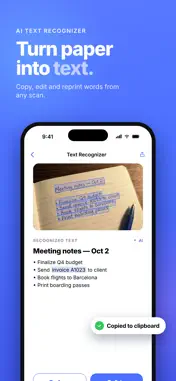
Wireless printing from your iPhone to the AirPrint printer you already own. Printer is a simple printer app with a built-in document scanner. Pick what you want on paper – a scan, a photo, a PDF, a document, a web page, a contact card – and print it over Wi-Fi on any AirPrint printer. Printer finds your printer and takes care of the rest. PRINT ALMOST ANYTHING FROM YOUR IPHONE • Document scans – the camera finds the edges of the page, straightens it and saves a clean PDF • Photo prints – straight from your library, at full size • Documents – PDFs, Word files, spreadsheets and anything else in Files • Notes – write it in the app, print it from the app • Web pages – enter an address and print the page • Contacts – a formatted contact card, ready for paper REVIEW BEFORE YOU PRINT Every document opens in a print preview first, so no paper or ink is wasted on a page that came out wrong. • Crop and rotate individual pages • Sign with your finger, directly on the document • Mark up in color • Choose which pages to print – three out of forty, if that is all you need WIRELESS PRINTING, NO SETUP • AirPrint printers on your Wi-Fi network are found automatically • Printer Wi-Fi setup helps a new printer join your network • Nothing to install: no printer driver, no cable, no desktop software TOOLS • Text Recognizer (OCR) – lift the text out of a scan or a photo, then copy it or save it as a PDF • QR Code – create a code, then print it with Printer Pro • Shopping List and Travel Checklist – build them, tick items off, print a copy to take along EVERYTHING STAYS ON YOUR IPHONE No account. No sign-up. No advertising. No tracking. Your scans, documents, notes and lists are stored inside the app, on your device. What you print travels directly from your iPhone to the printer you selected, over your own Wi-Fi. None of it reaches us, because there is nowhere for it to go. PRINTER PRO Printer Pro unlocks printing QR codes and supports continued development of the app. Everything else described above is free, and stays free. SUBSCRIPTION DETAILS Printer Pro is an auto-renewing subscription: • Weekly – $1.99 • Annual – $39.99, which works out at about $0.77 a week Both plans begin with a 3-day free trial. Prices are shown in US dollars and vary by region; the price you will actually pay is always displayed in the app before you confirm. Payment is charged to your Apple Account when you confirm the purchase. The subscription renews automatically unless auto-renew is turned off at least 24 hours before the end of the current period, and your account is charged for the renewal within 24 hours of that point. You can manage the subscription and turn off auto-renew in your Apple Account settings at any time after purchase. The free trial is offered once per subscription group, and any unused part of a trial is forfeited if you buy a subscription before it ends. Terms of Use (EULA): https://www.apple.com/legal/internet-services/itunes/dev/stdeula/ Terms & Conditions: https://cheese-quake.com/printerios/terms-of-service.html Privacy Policy: https://cheese-quake.com/printerios/privacy-policy.html Questions and bug reports: [email protected]
What's New
Version 1.0.4 2026-11-05
• full-featured scanner details polished for your documents • Sign PDFs and print them right from the app Technical Analysis
Package Overview Basic metadata
Bundle ID
com.printer.smartprint Current Version 1.0.4
Minimum iOS 18.0
Package Size App Store Size
Package Metadata 0 / 0 version records
Detailed binary, privacy manifest, framework, and Info.plist results have not been indexed for this package yet. The verified App Store and archive metadata above remains available.
Developer Information
Known Version Records
0 version records with stored package metadata
Stored metadata does not guarantee a package is currently available to download.
| Details | Version / IDs | Version date | Action |
|---|