Preview








Description
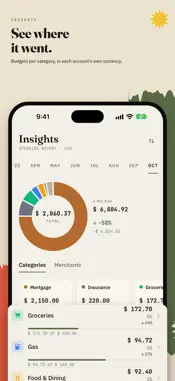
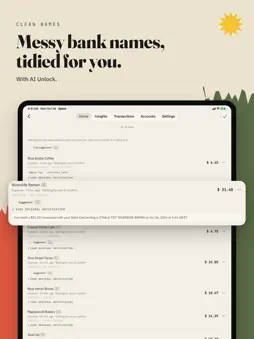
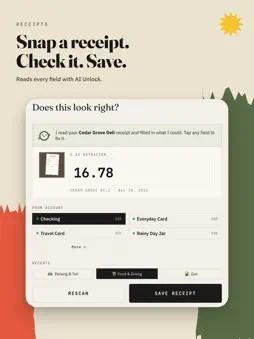
Your bank already tells you. Spent. writes it down. Spent. is a private expense tracker for iPhone. After a one-time Shortcuts setup, payments arrive from Apple Pay and, on iOS 27, from your bank's alerts. You check each one and it's logged. No account, no tracking, and your records stay on your phone. BANK ALERTS (FREE, iOS 27) Your bank or wallet app already tells you when you've paid. Get the shortcut and choose those apps. There's no rule to write: each payment alert waits in your review list, and Spent. learns which account it belongs to from what you approve. No bank login, no connection to your bank, no server. Apple Pay capture (FREE) Add the shortcut in Settings > Apple Pay. Each time you pay with Apple Pay, the purchase waits in your review list with the merchant and amount filled in. Approve them one at a time or all at once. AI UNLOCK Screenshot your bank or e-wallet history, up to 10 screens at a time. Spent. reads every row into one list for you to check. A payment that shows on two screenshots counts once, and ones you already have are set aside. It reads bank and wallet screenshots and receipts, turns "lunch 12" into an entry, and suggests clean names and categories. On iPhone 15 Pro or later running iOS 26 or later with Apple Intelligence on, this runs on Apple's on-device model with nothing to download, and you can try it free for 7 days. Other iPhones with 6 GB of memory or more download Spent.'s model once (3.6 GB). Either way it reads on your phone (Cloud check, below, is the one optional exception), and you check every entry before it saves. On iPhones with less memory, AI Unlock isn't available, and the AI Unlock screen tells you so. ASK LIL BIT (FREE) Lil Bit, the little bookkeeper inside Spent., answers from what you've recorded, right on your phone. • "How much on food this month?" • "How much at Target last month?" • "Compare this month and last" • "Am I over budget?" BUDGETS Set a monthly limit for any category and Insights draws a quiet bar under it, so you can see under, near or over at a glance. Per currency, and included in your backups. WHAT ELSE YOU CAN DO • Track expenses, income and transfers across accounts • Multi-currency: each account keeps its own currency, with no conversions • Insights by category and merchant, month over month • A recap of your week every Monday, as a notification and a card on Home, with past weeks kept in Insights • Scan a pile of receipts for free with on-device text recognition; each waits in your review list with its photo • Double-tap the back of your iPhone on a payment screen to log it (one-time Back Tap setup). With AI Unlock it waits for you in To review, and for a list over several screens you can triple-tap each screen, then double-tap to read them all (a second shortcut) • Pick a category for new captures with one tap in your review list • Select several captures in your review list to approve or discard them together • Select several transactions and change their category, merchant, account or notes at once • See and edit what Spent. remembers about each merchant • Recurring transactions and duplicate detection • Home Screen widget to log, scan or ask in one tap; it shows no data by design • Privacy mask hides every balance with one tap • Siri and Shortcuts • Full backup and restore, any time PRIVACY BY DESIGN Spent. has no server and no account. Nothing is collected, so there is nothing to leak. The AI runs on your iPhone. Cloud check is optional: only if you allow it, Spent. sends the text it read, never the photo, to Apple's Private Cloud Compute for a second look, and Apple can't store it. Your receipts, balances and habits stay with you. Free: manual tracking, bank alerts, Apple Pay capture, Lil Bit chat, receipt scanning, budgets, insights and your weekly recap. AI Unlock is one payment for screenshot import, AI receipt reading, typed entries and AI suggestions. No subscription, ever. Your expenses, tracked privately.
What's New
Version 2.3 2026-11-13
With AI Unlock, screenshot your payments and check them as one list. • Import up to 10 screenshots at once (AI Unlock). Choose + > Import screenshot, pick the ...With AI Unlock, screenshot your payments and check them as one list. • Import up to 10 screenshots at once (AI Unlock). Choose + > Import screenshot, pick the account once, and Spent. reads them into one list. A payment that shows on two screenshots counts once, ones Spent. already has are set aside, and anything unsure waits under Check these. A bank alert already waiting for one of them can be approved in the same save. Tap Later to carry on; the list waits in To review. • Back Tap without the wait (AI Unlock). A double tap on a payment screen opens Spent. and reads the screen while you carry on in the app. It waits for you in To review. For a list over several screens, triple-tap each screen, then double-tap to read them all. Settings > Back Tap shows how to set it up. • Your week, on Home. Each Monday, a notification and a card on Home recap last week, from your own entries. Past weeks stay in Insights > Your weeks. If a capture waits in To review for two days, Spent. reminds you in the evening. You can turn either off in Settings. • Select in To review. Approve several captures at once, or discard what you don't need. • Insights keeps the range you pick in view and names its dates. Your weeks and Budgets sit at the top. Also: without AI Unlock, a screenshot of a list of payments now says "Lists of payments need AI Unlock" instead of reading just one row; one receipt or one payment is still read free. And many fixes for reading wallet screenshots. Technical Analysis
Package Overview Basic metadata
Bundle ID
com.ec.Spent Current Version 2.3
Minimum iOS 18.6
Package Size App Store Size
Package Metadata 0 / 0 version records
Detailed binary, privacy manifest, framework, and Info.plist results have not been indexed for this package yet. The verified App Store and archive metadata above remains available.
Developer Information
Known Version Records
0 version records with stored package metadata
Stored metadata does not guarantee a package is currently available to download.
| Details | Version / IDs | Version date | Action |
|---|