
Preview

Description
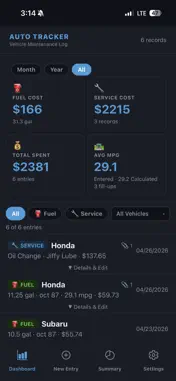
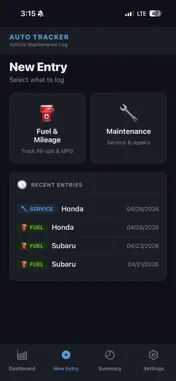
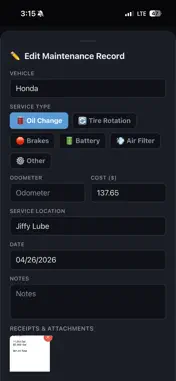
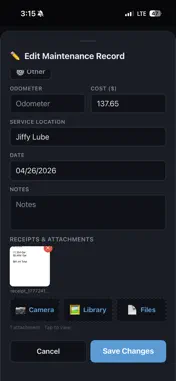
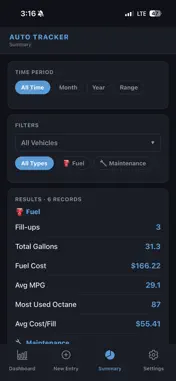
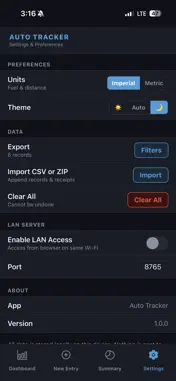
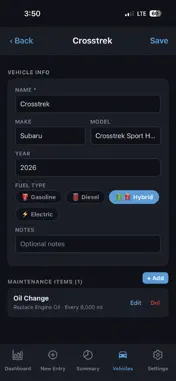
AutoTracker — Vehicle Fuel & Maintenance Log AutoTracker is a private, local-first vehicle tracking app that helps you stay on top of fuel costs, mileage efficiency, and maintenance history for all your vehicles — with no accounts, no cloud, and no data sharing of any kind. Your Data Stays on Your Device Everything AutoTracker stores — every fill-up, every service record, every receipt — lives exclusively on your phone. No data is ever sent to external servers, no account is required, and no third party can access your information. AutoTracker is built for people who want the power of detailed vehicle tracking without sacrificing privacy. Fuel & Mileage Tracking Log every fill-up with gallons, price per gallon, octane grade, odometer reading, and fuel location. AutoTracker automatically calculates your total cost and tracks two MPG values side by side: the figure you enter and a figure calculated from your odometer readings, so you always know how your vehicle is actually performing. Dashboard stat cards update instantly based on the time period and vehicle filters you select. Maintenance Records Track oil changes, tire rotations, brake service, battery replacements, air filters, and any other service your vehicles need. Record service type, location, cost, odometer reading, and notes. Full maintenance history for every vehicle is always at your fingertips. Receipts & Attachments Attach photos, images, and PDF documents directly to any fuel or maintenance record. Take a photo with your camera, pick from your photo library, or attach a file — all stored locally on your device alongside the record it belongs to. Dashboard & Filtering The Dashboard gives you an at-a-glance summary of fuel costs, service costs, total spending, and average MPG across all your vehicles or filtered by a specific one. Switch between Month, Year, and All Time views with a single tap. Every stat card updates immediately to reflect your active filters. LAN Server — Browser Access Over Wi-Fi AutoTracker includes a built-in LAN server that lets you access your data from any web browser on the same Wi-Fi network — no internet required. Open the web interface on your laptop or desktop to view records, add and edit entries, manage receipts, run exports, and import data, all while your phone stays in your pocket. Changes made in the browser appear instantly on your phone, and changes made on your phone appear instantly in the browser. Import & Export Export your records as a CSV file or as a ZIP archive that includes all your receipt files. Import previously exported CSV or ZIP files to restore or transfer your data. Full round-trip portability means your data is never locked in. Themes AutoTracker supports Light, Dark, and Auto themes. Auto mode follows your device's system setting, switching seamlessly between light and dark as you change your system preference. All themes are applied instantly with no restart required. Multiple Vehicles AutoTracker handles as many vehicles as you own. Filter the Dashboard, Summary, and exports by vehicle at any time. Odometer-based MPG calculations are tracked independently per vehicle. Summary View The Summary tab lets you dig deeper into your data with flexible filters — by time period, vehicle, and record type. Spot trends in your fuel efficiency or service spending across any date range. Designed for Simplicity and Speed Every interaction is designed to be fast. Adding a fill-up takes seconds. The interface is clean and focused, with no clutter, no ads, and no upsells. AutoTracker does one thing — helps you track your vehicles — and does it well. AutoTracker requires no account and no internet connection. All data is stored locally on your device and is fully under your control.
What's New
Version 1.1.4 2026-09-04
Updated so that after a vehicle service is performed the in-app notification for that service no longer triggers until the next service interval. Technical Analysis
Package Overview Basic metadata
Bundle ID
com.cebaxo.autotracker Current Version 1.1.4
Minimum iOS 13.4
Package Size App Store Size
Package Metadata 0 / 1 version records
Detailed binary, privacy manifest, framework, and Info.plist results have not been indexed for this package yet. The verified App Store and archive metadata above remains available.
Known Version Records
0 version records with stored package metadata • 1 known version records
Stored metadata does not guarantee a package is currently available to download.
| Details | Version / IDs | Version date | Action |
|---|---|---|---|
| Not archived | App Store ID: 884336090 | Unknown | Paid / Arcade |