Preview



Description
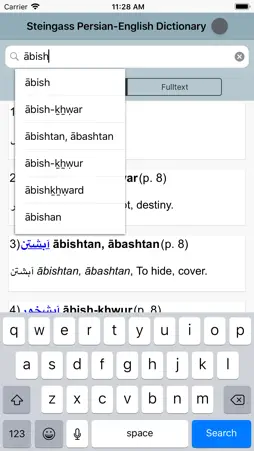
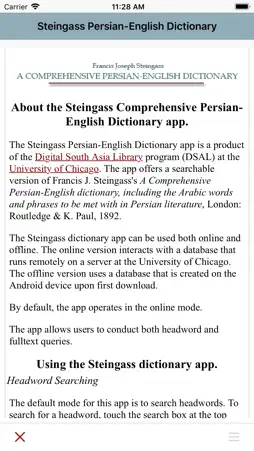
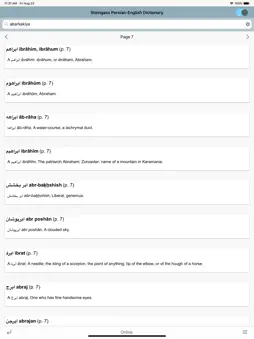
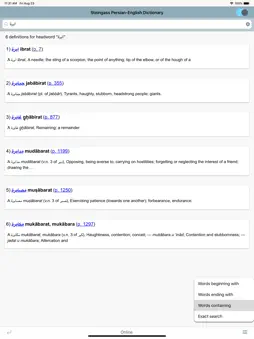
The Steingass Persian-English dictionary app is a product of the Digital South Asia Library program (https://dsal.uchicago.edu) at the University of Chicago. The app offers a searchable version of Francis J. Steingass's "A Comprehensive Persian-English dictionary, including the Arabic words and phrases to be met with in Persian literature," London: Routledge & K. Paul, 1892. The Steingass dictionary app can be used both online and offline. The online version interacts with a database that runs remotely on a server at the University of Chicago. The offline version uses a database that is created on the device upon first download. By default, the app operates in the online mode. The app allows users to conduct both headword and fulltext queries. The default mode for this app is to search headwords. To search for a headword, touch the search box at the top (magnifying glass icon) to expose the on-screen keyboard and begin searching. Headwords can be entered in Perso-Arabic, accented latin characters, and unaccented latin characters. For example, headword searches for کلا, kalām, and kalam all yield a definition for "A word, speech, oration, harangue." After entering three characters in the search box, a scrollable list of search suggestions will pop up. Touch the word to search for and it will automatically fill in the search field. Or ignore suggestions and enter the search term completely. To execute the search, touch the return button on the keyboard. By default, headword searches expand off the end of the search term. In other words, searching for "ram" will generate results for headwords that begin with "kal" and have any number of trailing characters, like "kala" (کالا, kālā), "kalar" (کالار, kālār) etc. To expand the front of a query, users can enter the "%" character at the beginning of search term. For example, "%kal" will find "ittikal" (اتكال ittikāl), "ashkal" (اشكال ashkāl), etc. The wildcard character at the front of a word also expands search suggestions. For fulltext searching, select the "Fulltext" search scope button and then enter the search term in the search box at the top. Fulltext searching supports multiword searching. For example, the search "horse colt" returns 14 results where "horse" and "colt" can be found in the same definition. Multiword searches can be executed with the boolean operators "NOT" and "OR" as well. The search "horse OR colt" returns 1253 fulltext results; "horse NOT colt" returns 1156 fulltext results. To conduct substring matching, select an option from the "Search Options" sub-menu at the bottom right of the screen enter a string in the search field, and touch return. The default for all searching is "Words beginning with." But for example, selecting "Words ending with," "Search all text," and then entering "ham" as the search string will find 434 examples of words that end in "ham." Search results come first in a numbered list that displays the Persian headword, the accented latin transliteration of the headword, and a chunk of the definition. To see a full definition, touch the headword. In online mode, the full result page also has a page number link that the user can click to get the full page context of the definition. Link arrows at the top of the full page allow the user to click to previous and next pages in the dictionary. To select either online or offline mode, simply toggle the selector at the top of the screen. Note that on start up, the app will test to see whether the device has an internet connection and the remote server is available. Again, the app operates in online mode by default. The user should select the appropriate mode before conducting a search.
What's New
Version Version 4.0 2026-11-06
UI updates. Technical Analysis
Package Overview Basic metadata
Bundle ID
edu.edu.uchicago.library.dsal-steingass Current Version Version 4.0
Minimum iOS 16.0
Package Size App Store Size
Package Metadata 0 / 4 version records
Detailed binary, privacy manifest, framework, and Info.plist results have not been indexed for this package yet. The verified App Store and archive metadata above remains available.
Known Version Records
0 version records with stored package metadata • 4 known version records
Stored metadata does not guarantee a package is currently available to download.
| Details | Version / IDs | Version date | Action |
|---|---|---|---|
| Not archived | App Store ID: 868154076 | Unknown | Request Version |
| Not archived | App Store ID: 836145682 | Unknown | Request Version |
| Not archived | App Store ID: 832797974 | Unknown | Request Version |
| Not archived | App Store ID: 832592073 | Unknown | Request Version |