
Preview


Description
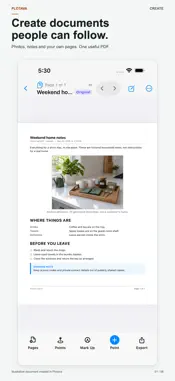
Turn photos, notes and PDFs into documents people can follow. Make illustrated instructions, a home record, a photo report or a clear handoff for work. Create pages, bring in existing material and keep the details together in a Binder. Export a PDF without rebuilding the document somewhere else. CREATE, DON'T JUST COLLECT Start with a Blank Report or a template for Work Instructions, Meeting Notes, Photo Log and more. Add headings, paragraphs, photos, numbered steps, checklists and signature blocks. Edit your own report text on the page and align content left, center or right. BRING YOUR MATERIAL TOGETHER Import PDFs, scan paper documents, photograph a plan or start a sketch. Keep authored Reports and imported pages in the same Binder. Add photos, supporting PDFs, notes and silent video where they belong. KEEP THE CONTEXT CONNECTED Place a Point on a page or photo to connect it to the relevant evidence. Add more detail inside a photo, link to another Sheet, or keep notes and measurements beside the exact location they describe. Complete Binder exports preserve navigation between pages, Points and supporting details. SHOW WHAT YOU MEAN Mark up photos and plans with arrows, notes, dimensions, lines, shapes and freehand drawing. Add imperial dimensions and ordinate measurements. Your imported original stays unchanged; the PDF you export is a new file. SPEAK YOUR EXPLANATION Use Dictate to write a Report block with on-device transcription. Keep, play or delete the original Recordings. On supported devices with Apple Intelligence enabled, Tidy Text can refine dictated wording on-device. Review the result or return to the original words. Tidy Text requires iOS 26 and compatible hardware. EXPORT WHAT THE READER NEEDS Choose Complete Binder for linked context, Photo Report for visual evidence, Measurement Schedule for recorded dimensions, or Pages Only for just your pages without a cover, index or Point-detail pages. Pages Only does not preserve navigation links. Preview, print or share the PDF. Share PDF + Recordings (.zip) includes audio as separate files, not embedded PDF playback. PERSONAL OR PROFESSIONAL Document a room update. Make a visual setup guide. Explain a repeatable process. Record existing conditions or prepare a client handoff. Start with the material you have; a construction plan is not required. LOCAL-FIRST, WITHOUT AN ACCOUNT No sign-up, advertising or tracking. Work offline after source material is on your device. There is no automatic cloud sync or upload. Use Binder Backup to keep an editable recovery copy, and share only what you choose. Optional aerial imagery, address search and purchases require a connection. The built-in User Guide helps you explore the app. FREE AND PRO One binder at a time is free, with everything in it. Finish it, export the PDF, delete it, start the next. Pro keeps unlimited binders on this device. Plotava Pro is an auto-renewing monthly or annual subscription. Payment is charged to your Apple Account at confirmation of purchase. Subscriptions renew automatically unless canceled at least 24 hours before the end of the current period. Manage or cancel in your Apple Account settings. Privacy Policy: https://plotava.com/privacy Terms of Use: https://plotava.com/terms
What's New
Version 1.2.0 2026-09-21
Create and organize more of your documents in Plotava. - Scan a Document: turn paper pages into a new Binder or add them to one you already use. Add Points, ma... Technical Analysis
Package Overview Basic metadata
Bundle ID
com.plotava.app Current Version 1.2.0
Minimum iOS 18.0
Package Size App Store Size
Package Metadata 0 / 0 version records
Detailed binary, privacy manifest, framework, and Info.plist results have not been indexed for this package yet. The verified App Store and archive metadata above remains available.
Developer Information
Known Version Records
0 version records with stored package metadata
Stored metadata does not guarantee a package is currently available to download.
| Details | Version / IDs | Version date | Action |
|---|