Preview





Description
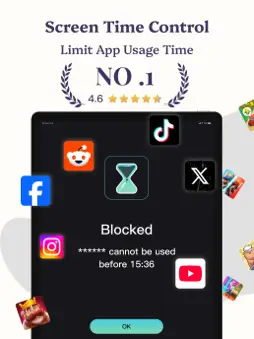
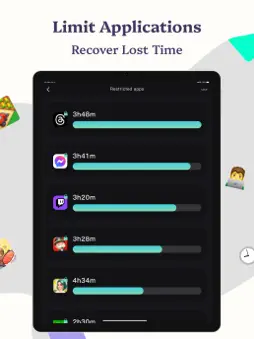
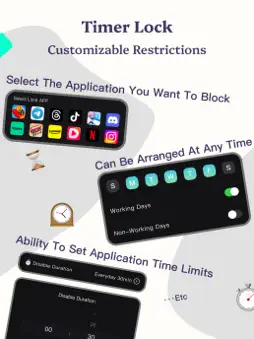
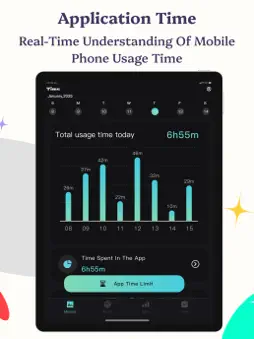
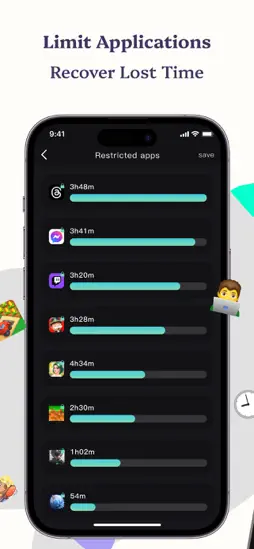
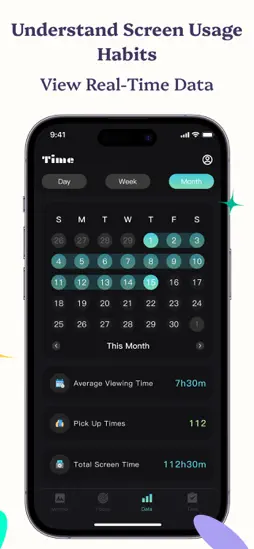
Live a more focused life with Limitify, the screen time control app! Do you often find yourself endlessly scrolling, getting distracted by apps, and wasting precious time? Limitify can help you take back control of your day. Our innovative app gives you control over your digital environment with advanced screen time management, customizable app and website limits, and a deep focus mode to boost productivity, improve mental health, and build healthier digital habits. Why Limitify? • Smart App & Website Blocking: Easily block any app or website (like Instagram, TikTok, YouTube, Twitter, Facebook, Reddit, and more) to minimize distractions and keep you focused on what matters most. Customize your digital space to fit your lifestyle and goals. • Multiple Control Options: Set daily usage limits, schedule specific time slots, or enforce timed locks to ensure balanced screen time. Whether you need a short social media detox or a full day of deep work, Limitify adapts to your schedule. • Real-time Data and Progress Tracking: Get insights into your digital habits with our comprehensive analytics dashboard. Monitor your daily, weekly, and monthly screen time, set personal goals, and track your progress as you build a more productive routine. • Personalized Focus Mode: Whether you’re studying, working, or just taking a digital detox, Limitify lets you create customized focus sessions that block distracting apps and websites. Enjoy a tailored experience designed to help you focus and achieve your goals. • Seamless Integration: Integrate Limitify with your calendar and other productivity tools to automatically enforce screen time limits during work hours or study sessions. Sync with HealthKit to record your focused moments and boost your overall well-being. • Focus Features: Every time you try to access a blocked app, you’ll receive a Limit reminder designed to nudge you toward more mindful digital device use. These prompts help foster focus. • Great for ADHD and Digital Detox: Limitify is designed to support those with ADHD or who need a comprehensive digital detox. Our structured controls help reduce impulsivity and promote sustained focus, making it an essential tool to regain control of your digital life. How Limitify works: Limitify uses cutting-edge technology to monitor your app usage and enforce your personalized screen time limits—all while keeping your data safe on your device. With a user-friendly interface and clean, intuitive design, setting limits and accessing detailed reports is effortless. Limitify enables you to customize every aspect of your digital experience. From simple usage limits to complex blocking schedules and unblocking challenges, our flexible system adapts to your unique lifestyle. Whether you’re a student, professional, or anyone seeking digital balance, Limitify gives you the tools you need to transform your relationship with technology. In today’s fast-paced digital world, distractions are only a tap away. With Limitify, schedule dedicated focus sessions that automatically block social media and other tempting apps, allowing you to dive into deep work without interruption. Our “Strict Mode” ensures you stay on track with your goals, minimizing distracting temptations. Join the growing community of Limitify users who are turning screen time into meaningful productivity. With countless success stories and testimonials, our users report significant increases in productivity, mental clarity, and overall well-being. Don’t let your smartphone rule your life – take control with Limitify and rediscover the joy of uninterrupted focus, enhanced creativity, and a balanced digital lifestyle. Download Limitify today so you can not only manage your screen time, but also live a more productive, healthier, and freer life. Privacy Policy: https://sites.google.com/view/yqprivacy-policy Terms: https://sites.google.com/view/yq-terms
What's New
Version 1.0.8 2025-08-24
1.0.8 Update Log 1. Bug fixes found in the app 2. Functional optimizations Version 1.0.7 2025-07-23
1.0.7 Update log 1. Fixed known issues 2. Adapted to iPad Version 1.0.6 2025-07-16
1.0.6 version update 1. Fix application bugs 2. Function optimization Version 1.0.5 2025-07-10
1.0.5 version update 1. Fix known issues 2. Experience optimization Version 1.0.4 2025-05-22
Version 1.0.4 update 1. Fixed issues that may cause crashes 2. Function optimization Version 1.0.3 2025-05-15
Version 1.0.3 Update 1. Fix known issues 2. Optimize application functions Version 1.0.2 2025-05-06
1.0.2 version update content 1. Application optimization 2. Known problem fixes Version 1.0.1 2025-04-24
Technical Analysis
Package Overview Basic metadata
Bundle ID
com.screen.ark Current Version 1.0.8
Minimum iOS 16.1
Package Size App Store Size
Package Metadata 0 / 9 version records
Detailed binary, privacy manifest, framework, and Info.plist results have not been indexed for this package yet. The verified App Store and archive metadata above remains available.
Related Apps


Developer Information
Known Version Records
0 version records with stored package metadata • 9 known version records
Stored metadata does not guarantee a package is currently available to download.
| Details | Version / IDs | Version date | Action |
|---|---|---|---|
| Not archived | v1.0.8 App Store ID: 884013240Build: 1.0.8 | 2025-08-24 11:39:30 | Request Version |
| Not archived | v1.0.8 App Store ID: 877474446Build: 1.0.8 | 2025-08-24 11:39:30 | Request Version |
| Not archived | v1.0.7 App Store ID: 876622882Build: 1.0.7 | 2025-07-23 23:50:49 | Request Version |
| Not archived | v1.0.6 App Store ID: 876403949Build: 1.0.6 | 2025-07-16 04:30:44 | Request Version |
| Not archived | v1.0.5 App Store ID: 876246616Build: 1.0.5 | 2025-07-10 19:32:25 | Request Version |
| Not archived | v1.0.4 App Store ID: 874949862Build: 1.0.4 | 2025-05-22 08:45:13 | Request Version |
| Not archived | v1.0.3 App Store ID: 874761384Build: 1.0.3 | 2025-05-15 07:58:30 | Request Version |
| Not archived | v1.0.2 App Store ID: 874539411Build: 1.0.2 | 2025-05-06 15:07:13 | Request Version |
| Not archived | v1.0.1 App Store ID: 872741207Build: 1.0.1 | 2025-04-24 15:17:37 | Request Version |