Preview


Description
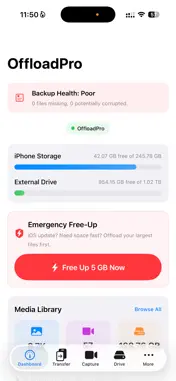
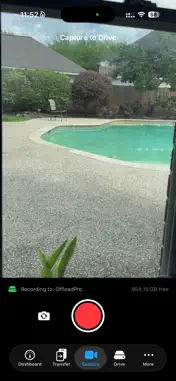
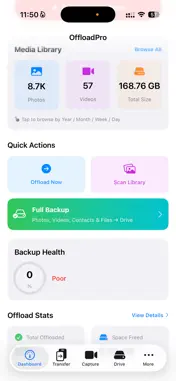
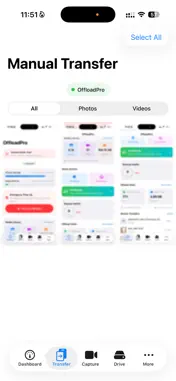
OffloadPro frees your iPhone storage by backing up photos and videos to USB-C external drives — or wirelessly to your Mac over Wi-Fi. Plug in any USB-C flash drive or SSD, and OffloadPro automatically backs up your media. No cloud subscriptions. No monthly fees. Your files stay on hardware you own. HOW TO GET STARTED: 1. Plug a USB-C drive into your iPhone 15 or later 2. Open OffloadPro — the drive is detected automatically 3. Tap "Offload Now" on the Dashboard to back up your photos and videos 4. To free space, enable "Delete After Transfer" in Settings HOW TO TRANSFER TO MAC: 1. Install the free OffloadPro companion app on your Mac 2. Make sure both devices are on the same Wi-Fi network 3. Open OffloadPro on iPhone — your Mac appears automatically 4. Pair once with a secure 6-digit PIN 5. Tap "Send to Mac" to transfer wirelessly — no cables needed KEY FEATURES: Smart Offload — Automatically transfer photos and videos to your USB-C drive. Keeps originals or deletes after transfer to free space. Mac Transfer — Discover your Mac on Wi-Fi, pair with a PIN, and send media wirelessly. No iCloud or cables needed. Emergency Free-Up — iPhone full before an iOS update? Panic Mode offloads your largest files first and reclaims space instantly. Direct Capture — Record photos and videos straight to your external drive. Your iPhone storage stays untouched. Restore — Moving to a new iPhone? Import your backed-up media from the drive right back into your photo library. Drive Browser — See exactly what's on your drive with storage breakdowns, folder navigation, and file previews. Full Backup — One tap backs up photos, videos, contacts, and files — the closest thing to an iTunes backup on iOS. ALSO INCLUDES: - Auto-Backup on Connect — plug in and it just works - Battery-smart transfers that pause at low battery - Backup Health score to track protection status - Transfer history with stats - Background backup support - In-app Help & FAQ section - Files app folder integration REQUIREMENTS: - iPhone 15 or later (USB-C) - iOS 17 or later - Any USB-C flash drive, SSD, or hub - Mac companion app requires macOS 14+ (for Wi-Fi transfer)
What's New
Version 2.3 2026-06-07
Sharper video: Direct Capture now records in crisp 1080p or 4K straight to your USB-C drive. Quality choice: Pick 1080p or 4K in Settings to match your drive's ... Technical Analysis
Package Overview Basic metadata
Bundle ID
com.iphextend.app Current Version 2.3
Minimum iOS 17.0
Package Size App Store Size
Package Metadata 1 / 4 version records
Detailed binary, privacy manifest, framework, and Info.plist results have not been indexed for this package yet. The verified App Store and archive metadata above remains available.
Known Version Records
1 version record with stored package metadata • 4 known version records
Stored metadata does not guarantee a package is currently available to download.
| Details | Version / IDs | Version date | Action |
|---|---|---|---|
| 2.37 MB | v2.3 App Store ID: 886648909Build: 2.3 | 2026-06-08 00:53:40 | Get Version |
| Not archived | App Store ID: 885264538 | Unknown | Request Version |
| Not archived | App Store ID: 884112246 | Unknown | Request Version |
| Not archived | App Store ID: 884022464 | Unknown | Request Version |