Preview


Description
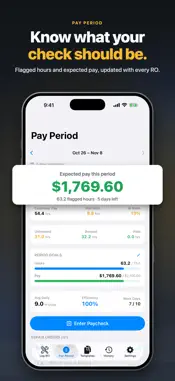
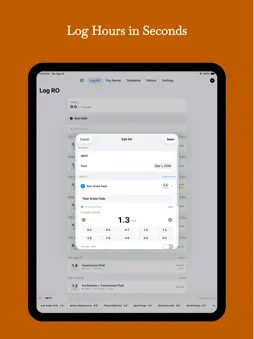
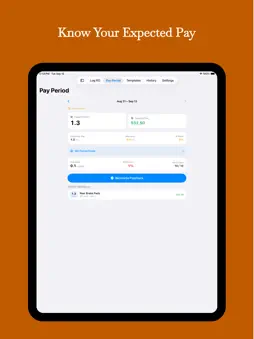
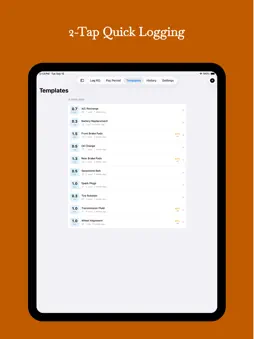
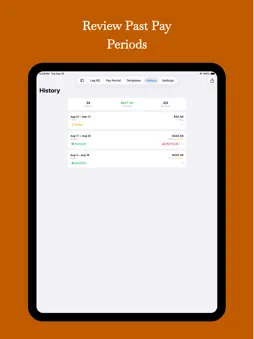
Your shop tracks hours for the business. FlagHour tracks them for you. Scan or log every RO, see flagged hours and expected pay, and check your paycheck before payday. If you work flat rate, you know the drill: you flag hours all day, but you don't really know where you stand until the check hits. FlagHour fixes that. Snap a photo of the RO or log it in a couple of taps, and the app works out your expected gross pay as you go. HOW IT WORKS 1. Set your flag rate, pay schedule and work-day hours 2. Save templates for the jobs you do most 3. Tap a template, enter the RO number, done 4. Watch your hours, pay and efficiency update right away KEY FEATURES • Scan an RO (Pro): take a photo and FlagHour reads the RO number, labor lines and hours. You check the draft before saving, and the photo is read on your phone • Quick RO logging: log an RO in a couple of taps with saved job templates • RO status: Open, Flagged, Booked or Paid, with a list of ROs that still need booking • Hours changes: when the shop changes an RO's hours, keep the old and new hours and a note • Expected pay: your projected gross pay for the current period, updated with every RO • Efficiency: daily and period efficiency at a glance • Pay periods: weekly, biweekly, twice a month or custom • Job templates: save your common jobs (brakes, diag, timing chains) with their usual flag hours • Warranty and customer pay: mark warranty ROs and see the split • Goals: set an hours or pay goal for each period • VIN scanner: scan a VIN barcode to fill in the vehicle • Paycheck reconciliation (Pro): enter what your check shows and see if you were paid for every hour • Pay stub photos (Pro): keep a photo of each stub with its period • History (Pro): every past pay period with full RO details • CSV export (Pro): your hours for your records, taxes or a pay question • Search and filter (Pro): find any RO by number, date, job or vehicle • Widgets: today's hours, period progress and unbooked hours on your Home Screen • Live Activities (Pro): track your shift on the Lock Screen and Dynamic Island • iCloud sync (Pro): keep iPhone and iPad in sync • Reminders: an end-of-shift nudge to log your ROs • Dark Mode, because shop lighting is bad enough BUILT FOR TECHS FlagHour is made for flat-rate technicians, not a generic time tracker forced into the job. Every screen is built around how techs work: RO numbers, flagged hours, job names, warranty vs. customer pay, booked vs. unbooked, and efficiency. No account. No ads. Your data stays on your device, with optional iCloud sync for Pro users. FLAGHOUR PRO Free includes RO logging, RO status, expected pay, efficiency, up to 3 templates, the VIN scanner and widgets. Pro adds RO scanning, unlimited templates, paycheck reconciliation, full history, CSV export, search, iCloud sync and Live Activities. Pro is available as a one-time Lifetime purchase, or as a monthly or annual subscription. Stop guessing what your check will be. Start tracking with FlagHour. EULA: https://www.apple.com/legal/internet-services/itunes/dev/stdeula/ Terms of Use: https://cpickard2790.github.io/terms.html Privacy Policy: https://cpickard2790.github.io/privacy-policy.html#flaghour
What's New
Version 1.2.0 2026-11-04
- Scan an RO (Pro): take a photo and FlagHour reads the RO number, labor lines and hours on your phone. You check the draft before it's saved. - RO status: mark... Technical Analysis
Package Overview Basic metadata
Bundle ID
com.chad.FlagHour Current Version 1.2.0
Minimum iOS 26.2
Package Size App Store Size
Package Metadata 0 / 0 version records
Detailed binary, privacy manifest, framework, and Info.plist results have not been indexed for this package yet. The verified App Store and archive metadata above remains available.
Developer Information
Known Version Records
0 version records with stored package metadata
Stored metadata does not guarantee a package is currently available to download.
| Details | Version / IDs | Version date | Action |
|---|