
Preview





Description
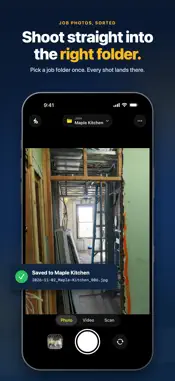
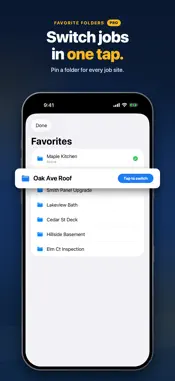
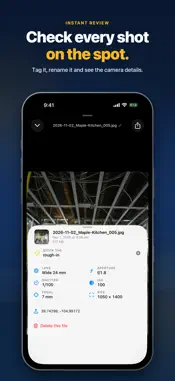
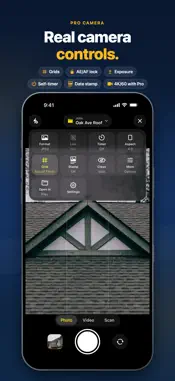
Take photos straight into the right folder, with filenames that keep every job organized. Choose a folder once, then capture photos, videos and scans that land exactly where you want them. Save to Files, iCloud Drive, OneDrive or Google Drive, so you stop digging through your camera roll later. Made for work photos - Photo stamp: the date and time drawn onto every photo. Pro adds GPS, street address, job name and your own text - Pin favorite folders and switch jobs in one tap (Free includes 1 Favorite; Pro is unlimited) - Smart file names from the date, time and a sequence number; with Pro, build your own pattern from 21 tokens like place, device, ISO and GPS, with a live preview - Optional Auto-Sort into Year / Month / Day folders - A clean camera made for iOS 26: your folder up top, everything else one tap away - Photo, Video and Scan in one simple camera - Quick Reveal in Files and easy sharing - Volume buttons as shutter (optional) Uploads you can trust Upload to OneDrive Personal or Business, or to Google Drive. Every photo is saved on your iPhone first and uploads in the background of your session, retrying until it's done, so a dead signal on a job site never loses a shot. The Uploads screen shows anything still waiting. Scanning Scan documents to PDF (Free: up to 3 pages per PDF with a small watermark). Pro removes the page limit and watermark, adds color, grayscale and black-and-white modes with DPI and margin controls, and adds on-device OCR so the text inside scans is searchable in Files, Preview and Spotlight. Camera control Tap to focus and meter. Long-press to lock AE/AF and drag the handle to adjust exposure. Lens chips (Ultra-Wide, Wide, Tele), self-timer (3s / 10s), and grids including rule of thirds, square, golden spiral and diagonals. Choose JPEG or HEIC and quality. Supports the Camera Control button. Free video records up to 30 seconds at 1080p; Pro unlocks longer clips and up to 4K/60. Pro, a one-time purchase - Full photo stamp: GPS, address, job name, custom text - Unlimited scans with OCR, no watermark - Custom file name patterns and Quick Tag - Unlimited Favorites - 4K/60 video, no 30-second limit - Bulk Rename existing files, with undo - Batch import from Photos - RAW capture on supported iPhones - No ads Made for frequent use Use the Action Button or Shortcuts to launch straight into the camera or scanner. Spotlight indexes each capture action, so you can search "take a photo" and shoot. Try Pro Watch a short ad for a 15-minute Pro preview, once a day. Extra Favorites need the one-time Pro purchase.
What's New
Version 2.4.1 2026-11-06
- Restore Purchases now tells you whether a Pro purchase was found, and Pro is picked up more reliably after you buy or restore. - Clearer messages when a purch...- Restore Purchases now tells you whether a Pro purchase was found, and Pro is picked up more reliably after you buy or restore. - Clearer messages when a purchase is pending or doesn't go through. - Scanned more than 3 pages on Free? You can unlock Pro right from the review screen and keep every page. - The upgrade screen now shows exactly which Pro feature you tapped. - The free 15-minute Pro preview is now once a day. - Fixes and polish. Technical Analysis
Package Overview Basic metadata
Bundle ID
com.chad.Shot2File Current Version 2.4.1
Minimum iOS 18.5
Package Size App Store Size
Package Metadata 0 / 13 version records
Detailed binary, privacy manifest, framework, and Info.plist results have not been indexed for this package yet. The verified App Store and archive metadata above remains available.
Developer Information
Known Version Records
0 version records with stored package metadata • 13 known version records
Stored metadata does not guarantee a package is currently available to download.
| Details | Version / IDs | Version date | Action |
|---|---|---|---|
| Not archived | App Store ID: 890342244 | Unknown | Request Version |
| Not archived | App Store ID: 889786745 | Unknown | Request Version |
| Not archived | App Store ID: 889129270 | Unknown | Request Version |
| Not archived | App Store ID: 888132566 | Unknown | Request Version |
| Not archived | App Store ID: 887302381 | Unknown | Request Version |
| Not archived | App Store ID: 885386720 | Unknown | Request Version |
| Not archived | App Store ID: 885209045 | Unknown | Request Version |
| Not archived | App Store ID: 883385675 | Unknown | Request Version |
| Not archived | App Store ID: 883191713 | Unknown | Request Version |
| Not archived | App Store ID: 883073163 | Unknown | Request Version |
| Not archived | App Store ID: 882164492 | Unknown | Request Version |
| Not archived | App Store ID: 881380096 | Unknown | Request Version |
| Not archived | App Store ID: 881256921 | Unknown | Request Version |