
Preview




Description
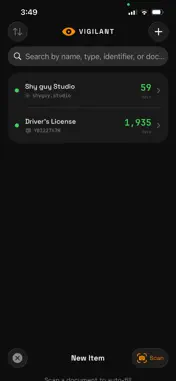
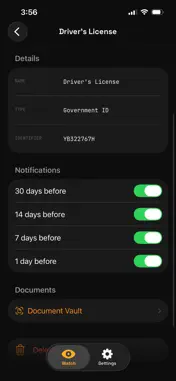
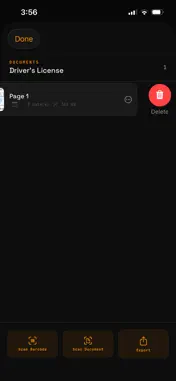
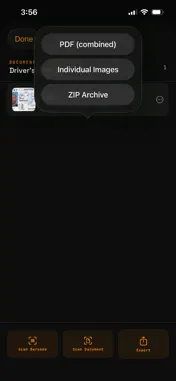
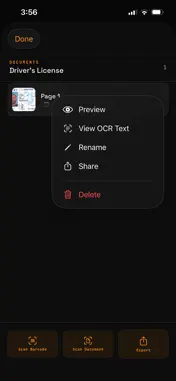
Vigilant keeps every expiry date you care about in one list and reminds you before each one arrives. Track certificates, domains, IDs, insurance, warranties and subscriptions, and see at a glance what runs out next. WHAT YOU CAN TRACK Eleven item types in four groups: • SSL certificates and domain registrations, where Vigilant looks up the expiry date for you • Apple Developer membership and TestFlight builds: enter the date you paid or uploaded, and Vigilant works out the expiry (365 or 90 days later) • API keys and other credentials, software subscriptions, business and professional licenses • Insurance policies, passports, driver's licenses and other government IDs, warranties, and "Other" for anything else SSL AND DOMAIN CHECKS Enter a hostname and Vigilant connects to it over HTTPS and reads the certificate's "not after" date. For a domain, it asks rdap.org, a public RDAP registration-lookup service, for the registry's expiration date. Checks run when you add the item, when you pull to refresh the list, and when you tap Check Now. If a check fails, Vigilant says why and lets you fix the address or save the item without a date. SCAN TO ADD Tap + to scan a document with the iPhone document camera, one page or several. Vigilant reads the text on your device and fills in what it finds: the type of item, a name, the policy, member, license or serial number, and the expiry date, preferring a date next to words like "expires", "valid thru" or "renewal". You can also scan a barcode or QR code live (QR, PDF417, Aztec, Data Matrix, EAN, UPC-E, Code 128 and more). The PDF417 barcode on the back of a US driver's license (AAMVA format) gives the name, license number and expiry. You check every field before saving. REMINDERS Each item can remind you 30, 14, 7 and 1 day before it expires. Turn any of the four on or off per item. They are local notifications, delivered at 9 AM your time, and rebuilt each time the app starts. A DOCUMENT VAULT FOR EACH ITEM • Scan pages with the document camera, scan a barcode, or import up to 10 photos at a time from your library • Every page keeps the text and dates read from it; open the text, copy it or share it • Preview, rename, share or delete each document • Export an item's documents as one combined PDF, as individual images, or as a ZIP archive Search on the main list also matches text printed on an item's documents. AT A GLANCE • Days-left countdowns colored red (under 7 days), amber (under 30) and green • Sort by expiry, name, type or date added • Search by name, type, identifier or document text • A home-screen widget, small or medium, showing the next item to expire • "Add to Vigilant" in the share sheet: share a link or text from Safari, Mail or other apps, and Vigilant suggests the type and finds a date in it • vigilant://add links open a pre-filled Add form, for example from a Shortcuts "Open URLs" action WHAT VIGILANT DOES NOT DO • It does not renew anything or contact your provider, registrar or issuer. • It does not check SSL certificates or domains in the background, only when you add, refresh or tap Check Now. • Other types' dates come from you or a scan; Vigilant cannot look them up. • There is no account and no sync. Your list lives on this device only. • Reminders need notification permission. If notifications are off, Vigilant cannot remind you. • Scans are read by text recognition, which can misread. Check the details before you save. PRIVACY No account, no ads and no analytics. Your items, scans and documents stay on your device, and text recognition runs on your device with Apple's Vision framework. An SSL check connects straight to the host you enter. A domain check sends the domain name to rdap.org. Purchases go through Apple. PRICE Free to download, with every feature, for up to 3 items. Vigilant Pro unlocks unlimited items for a one-time purchase of $2.99. No subscription, nothing recurring. Made by SHYGUY LLC.
What's New
Version 1.2.1 2026-11-06
- Reminders now arrive at 9 AM on the day, and existing reminders are rebuilt when the app opens. - If an SSL or domain check fails when you add an item, Vigila... Technical Analysis
Package Overview Basic metadata
Bundle ID
studio.shyguy.vigilant Current Version 1.2.1
Minimum iOS 17.0
Package Size App Store Size
Package Metadata 1 / 2 version records
Detailed binary, privacy manifest, framework, and Info.plist results have not been indexed for this package yet. The verified App Store and archive metadata above remains available.
Known Version Records
1 version record with stored package metadata • 2 known version records
Stored metadata does not guarantee a package is currently available to download.
| Details | Version / IDs | Version date | Action |
|---|---|---|---|
| 5.03 MB | v1.2.0 App Store ID: 883882618Build: 1.2.0 | 2026-03-29 18:36:41 | Get Version |
| Not archived | App Store ID: 883340828 | Unknown | Request Version |