Preview



Description
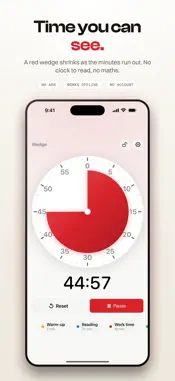
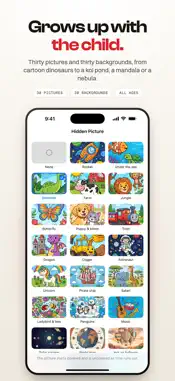
A visual countdown timer you can read from across the room. A coloured wedge shrinks as the time runs out, so anyone can see how much is left at a glance. No reading a clock. No arithmetic. That one idea is why visual timers are standard equipment in classrooms and therapy rooms: for children who cannot tell the time yet, for anyone with ADHD and time blindness, and in occupational therapy and special education, where "five more minutes" means nothing but "when the red is gone" means everything. HIDE A PICTURE UNDERNEATH Turn on a hidden picture and the disc starts fully covered. As the wedge retreats, the picture underneath is uncovered a slice at a time, finishing exactly when the timer does. A child who will not watch a countdown will watch a dinosaur arrive. Thirty pictures and thirty backgrounds, and they are not all for small children. The set runs from cartoon dinosaurs and rockets through to a mandala, a koi pond and a nebula, so the same reveal works for a teenager or for an adult holding their own focus. All of it is off by default, because a classroom wants the plain disc and that room comes first. NO ADS. NOT NOW, NOT LATER. This app is built to be handed to a seven-year-old. No adverts. No pop-ups. No tracking. No account to create. Nothing is ever sent to a server, because there is no server. Your presets and settings stay on your device. WHAT'S INSIDE • A large, calm dial that reads clearly from the back of a classroom • Drag the disc to set any time up to an hour, or tap a saved preset • Presets with their own names and colours, so "Reading 20" is one tap • Ten alarm sounds, six of them deliberately gentle, because one harsh beep is wrong for a sensory-sensitive room • Kid-lock freezes the screen mid-session so nobody can stop the timer • A Live Activity keeps the countdown on your Lock Screen and in the Dynamic Island • Siri and Shortcuts • Keep the screen awake while a timer runs • Seven disc colours • Keeps perfect time while backgrounded, locked, or fully closed • iPhone and iPad, portrait and landscape BUILT FOR REAL ROOMS Teachers use it for transitions, centres and independent work. Occupational therapists use it for sessions, turn-taking and regulation. Parents use it for screen time, tooth brushing, homework and getting out of the door. Adults use it for focus blocks, study sprints and breaking long tasks down. ACCESSIBILITY IS NOT AN AFTERTHOUGHT Full VoiceOver labels on the dial and every control. Dynamic Type throughout. Reduced Motion honoured. State is never shown by colour alone, so the timer still reads for colour-blind users and for a child who is not tracking the colour at all. HONEST PRICING Five complete timers free, with every feature turned on. Not a crippled trial. Then one quiet one-time purchase and it is yours, including every future update. No subscription. No renewals. No upsells. No "premium" tier that switches off something you already paid for. Family Sharing included.
What's New
Version 1.2.1 2026-09-12
Fixes an alarm that could finish silently on iOS 26. - The alarm now rings reliably when the timer ends, including with the app open on screen. - The one-minut... Technical Analysis
Package Overview Basic metadata
Bundle ID
com.chadberry.wedgetimer Current Version 1.2.1
Minimum iOS 18.0
Package Size App Store Size
Package Metadata 0 / 0 version records
Detailed binary, privacy manifest, framework, and Info.plist results have not been indexed for this package yet. The verified App Store and archive metadata above remains available.
Developer Information
Known Version Records
0 version records with stored package metadata
Stored metadata does not guarantee a package is currently available to download.
| Details | Version / IDs | Version date | Action |
|---|