
Preview




Description
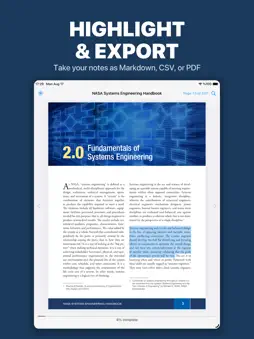
Highlight anything in your PDFs and EPUBs, add your own notes, and export it all as Markdown, CSV, or a clean PDF. Your highlights don't stay locked in the file — take them to your notes app, your research, anywhere. Read both formats, organize your library, and keep everything on your device. Bring books scattered across Files, iCloud Drive, Google Drive, and Dropbox into one organized shelf. Read them in a built-in PDF and EPUB reader, highlight and annotate as you go, and — when you're reading in a foreign language — save any word to your personal dictionary, get an instant definition, translate it, and quiz yourself with spaced-repetition flashcards. It all happens on your device. YOUR BOOKS, BEAUTIFULLY ORGANIZED Import PDFs and EPUBs from Files, iCloud Drive, Google Drive, Dropbox, or any cloud storage app installed on your device. Books appear on a visual bookshelf with colored spines. Group by category, search by title or author, and pick up right where you left off with the Currently Reading bar. BUILT-IN PDF & EPUB READER A native reader for both formats — no third-party apps needed. Page through chapters, jump to any section from the table of contents, search within a book, and your reading position is saved automatically. SCAN PHYSICAL BOOKS Point your camera at any book's ISBN barcode or type it in manually. Lexifolio fetches the title, author, and cover from Open Library so your physical and digital collections live side by side. PERSONAL DICTIONARY (Pro) Select any word while reading to save it with a definition and translation. Definitions are generated on-device using Apple Intelligence, or look up any word online via Wiktionary. Tap the speaker icon to hear pronunciation in any language. Perfect for reading in a second language. HIGHLIGHTS & ANNOTATIONS (Pro) Mark passages in color, attach notes, and browse all your highlights organized by book. Everything stays on your device. VOCABULARY QUIZ WITH SPACED REPETITION (Pro) Saved words become flashcards. The SM-2 spaced repetition algorithm schedules reviews at scientifically proven intervals so you actually retain what you learn — the same system used by Anki. READING STATISTICS (Pro) Track your daily reading time, streak count, and per-book progress on a visual chart. See exactly how much time you spend with each book. AI BOOK SUMMARIES (Pro) Generate a summary of any book using on-device Apple Intelligence — no data leaves your device. Requires a device with M1 or later. You can also connect your own API key from OpenAI, Google Gemini, or any OpenAI-compatible service for cloud-based summaries on any device. MULTI-LANGUAGE TRANSLATION (Pro) Configure up to 5 language pairs — English→German, Spanish→French, Italian→German, or any combination. Translations use Apple's built-in Translation framework and work offline. Set your active pair and every saved word gets translated automatically. BACKUP & RESTORE Export your entire learning data as a single .lexifolio backup file. Save it to Files, iCloud Drive, or anywhere you like. Restore anytime to get everything back — dictionary, highlights, reading positions, and ISBN-scanned books with covers. POWERED BY APPLE INTELLIGENCE On-device AI for word definitions and book summaries — your text never leaves your device. Works with multiple languages. Requires iPhone or iPad with M1 chip or later. On older devices, use Wiktionary for definitions and Apple Translation for translations — both work without Apple Intelligence. 100% PRIVATE No accounts. No tracking. No ads. No analytics. No data collection. Your library, dictionary, annotations, and reading history stay on your device. Period. FREE TO TRY The bookshelf, PDF/EPUB reader, and barcode scanner are completely free. Pro features (Dictionary, Annotations, Quiz, Statistics, AI Summaries, Translation) include a 7-day free trial, then a one-time purchase of $7.99. No subscriptions ever..
What's New
Version 1.0.2 2026-08-18
Covers now load reliably for books stored in iCloud, plus behind-the-scenes stability improvements. Technical Analysis
Package Overview Basic metadata
Bundle ID
com.cengizo.Mylibrary Current Version 1.0.2
Minimum iOS 18.6
Package Size App Store Size
Package Metadata 0 / 0 version records
Detailed binary, privacy manifest, framework, and Info.plist results have not been indexed for this package yet. The verified App Store and archive metadata above remains available.
Known Version Records
0 version records with stored package metadata
Stored metadata does not guarantee a package is currently available to download.
| Details | Version / IDs | Version date | Action |
|---|