
Preview






Description
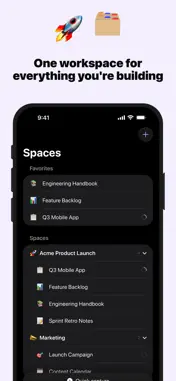
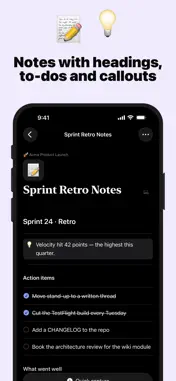
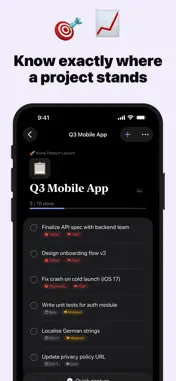
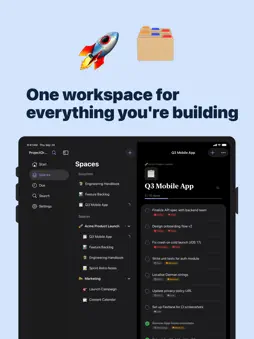
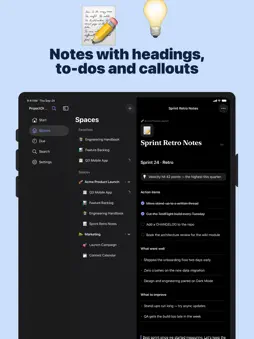
Your whole life, structured — in one calm, private workspace. ProjectOrganizer gives you a flexible, block-based workspace in a fast, native iOS app: Spaces to separate work, life and side projects, pages inside them, and blocks inside those. Notes, projects, tasks, databases and a linked wiki, all in one place. Your workspace, your data — and yours alone. Private by design No account, no login, no sign-up — just open the app and start Everything is stored locally on your device by default Works completely offline — no connection, no problem No analytics, no tracking, no ads, no third-party data collection Optional iCloud sync runs through your own private iCloud — never our servers Structure that grows with you Spaces group work, life and side projects, so nothing bleeds into the wrong context Pages nest as deeply as you need — a wiki is a tree, not a folder Link any page to any other and see the backlinks on both sides Quick Switcher and full-text search find anything in a second A block editor for real notes Headings, to-dos, bullets, numbered lists, quotes, callouts, toggles, code, images and bookmarks Type "/" for the block menu, "[[" to link another page Move, convert and restructure blocks right from the keyboard bar Import and export Markdown — your notes stay portable Export any page as a PDF to hand it to someone Lists that work like databases Add your own properties: text, select, multi-select, number, date, checkbox, URL See the same list as a table, a kanban board, a calendar or a gallery Filter by tag, sort the way you think Projects and tasks Priorities, due dates and reminders A "Due" view that gathers what's on your plate today, across every project Progress at a glance on every project On-device intelligence Turn a goal into a plan, continue writing, or ask a question about the page you're on Powered by Apple's on-device Foundation Models — your text never leaves the iPhone On your Apple Watch Today's tasks at a glance — tap to check them off Capture a task by dictation, due today with one toggle Pinned checklists, like a shopping list, right on your wrist Complications show what's due, even in Always-On Everywhere you work Home Screen and Lock Screen widgets Siri and Shortcuts for capture and navigation Share Extension to send links and text straight into your workspace Spotlight finds your pages from the Home Screen Native on iPhone, iPad and Mac Premium includes Unlimited Spaces (free up to 2) Unlimited pages (free up to 50) Unlimited wikis (free up to 1) Board, table, calendar and gallery views More on-device AI every day (free up to 5 actions per day) iCloud sync across all your devices Every accent color ProjectOrganizer stays out of your way when you just want to write something down, and holds the whole structure when you need it. Subscriptions Auto-renewable Premium plans (1 month, 1 year) A one-time Lifetime unlock is also available Payment is charged to your Apple ID account Subscriptions automatically renew unless cancelled at least 24 hours before the end of the current period Manage or cancel anytime in your Apple account settings Restore Purchases is available in-app Terms of Use (EULA): https://www.apple.com/legal/internet-services/itunes/dev/stdeula/ Privacy Policy: https://darianhanci-legal.web.app/datenschutz
What's New
Version 1.1 2026-09-24
New in 1.1: • Apple Watch: check off today's tasks right from your wrist, capture new ones by dictation and tick off pinned checklists — with complications for ...New in 1.1: • Apple Watch: check off today's tasks right from your wrist, capture new ones by dictation and tick off pinned checklists — with complications for your watch face. • Now available in 15 languages. • Widgets reliably show your tasks again. • Better on iPad: pages in a comfortable reading width. • Small celebrations for milestones, plus “Share the app” in Settings. • Siri and Shortcuts always file tasks in the right inbox. • Lots of small improvements and fixes. Technical Analysis
Package Overview Basic metadata
Bundle ID
com.darianhanci.ProjectOrganizer Current Version 1.1
Minimum iOS 26.5
Package Size App Store Size
Package Metadata 0 / 0 version records
Detailed binary, privacy manifest, framework, and Info.plist results have not been indexed for this package yet. The verified App Store and archive metadata above remains available.
Developer Information
Known Version Records
0 version records with stored package metadata
Stored metadata does not guarantee a package is currently available to download.
| Details | Version / IDs | Version date | Action |
|---|