
Preview


Description
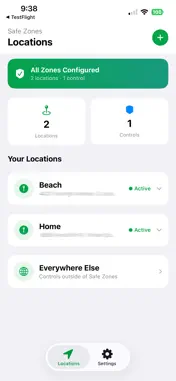
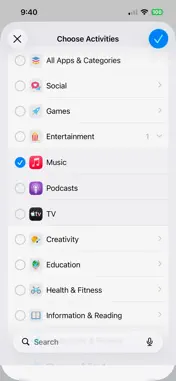
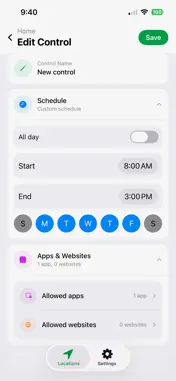
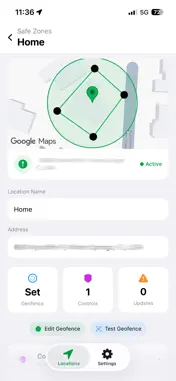
Mobile Safe Zones works with Apple Family Controls as a 'set-it and forget it' system letting parents set location-based controls for their children. 911 and safety alerts always work. Mobile Safe Zones DOES NOT: Track locations Collect data Advertise Basic Setup (screenshots at www.mobilesafezones.com): Setup videos (YouTube @MobileSafeZones): - Parent phone: https://youtu.be/iksbvMH0Zy0 - Child phone: https://youtu.be/a3650Qu1bAM - Second adult: https://youtu.be/yR1R8U7o6G4 - Creating geofences: https://youtu.be/zi3WvblPp08 - App and time controls: https://youtu.be/jrDo0725REU Apple Family Sharing: First, set up Apple Family with parents and minor children's phones (under 18) per Apple's instructions. Mobile Safe Zones (MSZ) set-up: On Parent's Phone: Download the MSZ App from the App Store and choose the free 7-day promotional period or a paid plan, then sign in. You will receive prompts to configure the system: Send notifications-select 'Allow' Review Privacy Policy 'Sign in as Adult' using your Apple sign-in credentials Create and name your MSZ family Select 'Add a child' Enter name-Tap the check mark Set your Security Pin (twice) and save Click 'Add Child' A QR code will appear-Go to your child's phone On Child's Phone: Download MSZ App from App store. Select 'Sign-in as Child' Select 'Allow camera' Scan the QR code shown on Parent's phone. This connects parent and child. You may need to refresh the QR code on the Parent's phone. Tap 'Request Location Permissions' Safe Zones location-Tap 'Allow while using App' Device location-tap 'Open Settings' and chose 'Always' Tap 'Request Family Controls'-select 'Continue' for 'Safe Zones Would Like to Access Screen Time' Select 'Allow with iCloud Sign-in' for Allow Access to Screen Time Enter parent Apple credentials for Parental Approval Required Congratulations!! You are ready to set Geofence locations with unique per-location controls. See the setup videos linked above. Note: To add a second parent/adult, have them download Mobile Safe Zones. On your phone open Family Controls, tap the gear icon on the green bar, tap 'Add Adult', and scan the QR code on the joining adult's phone. Geofences and Controls: Set up to 20 geofence locations from either phone; delete unused locations to free space. Unique per-location app/website controls must be set on the child's phone. The parent's phone can set full-block of all apps and websites; selective allow/block requires the child's phone. See geofences and controls videos above. Voice Calling and Texting: MSZ controls Social Media and other distracting apps/sites by location. Basic phone communications are controlled by Apple (not geofences). Use Apple Communication Limits and Downtime in Apple Family settings to whitelist contacts by time of day (for example parents/key contacts only from 9PM through 3PM the next day). SUBSCRIPTION DETAILS Free Promotional Period: New families receive a 7-day free promotional period with full access. No payment info is required; it is granted automatically by the app, not an Apple intro offer. After 7 days, choose a paid plan or the app signs out. Paid Subscription Plans: - Monthly: $5.99 USD / month - 6 Months: $29.94 USD / 6 months (intro $24.99 first 6 months, new subscribers only) - Yearly: $49.99 USD / year (intro $29.99 first year, new subscribers only) Payment is charged to your Apple ID at purchase. Subscriptions auto-renew unless auto-renew is turned off at least 24 hours before the period ends. Manage or cancel in your Apple ID Account Settings. Privacy Policy: https://mobilesafezones.app/privacy Terms of Use: https://www.apple.com/legal/internet-services/itunes/dev/stdeula/
What's New
Version 1.442.2 2026-10-21
Bug fixes and optimizing location. Technical Analysis
Package Overview Basic metadata
Bundle ID
com.futurehax.safezones Current Version 1.442.2
Minimum iOS 26.0
Package Size App Store Size
Package Metadata 0 / 5 version records
Detailed binary, privacy manifest, framework, and Info.plist results have not been indexed for this package yet. The verified App Store and archive metadata above remains available.
Developer Information
Known Version Records
0 version records with stored package metadata • 5 known version records
Stored metadata does not guarantee a package is currently available to download.
| Details | Version / IDs | Version date | Action |
|---|---|---|---|
| Not archived | App Store ID: 887908956 | Unknown | Request Version |
| Not archived | App Store ID: 886643234 | Unknown | Request Version |
| Not archived | App Store ID: 886117479 | Unknown | Request Version |
| Not archived | App Store ID: 885940170 | Unknown | Request Version |
| Not archived | App Store ID: 866988038 | Unknown | Request Version |