
Preview


Description
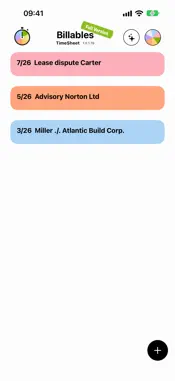
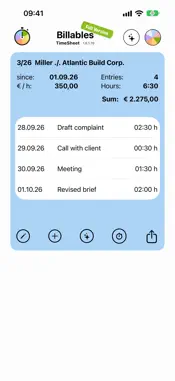
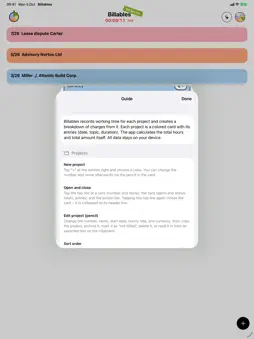
Billables records your working time per matter and turns it into a clean statement for hourly fees. Made for lawyers, tax advisors and anyone who bills by the hour. Billables is fully available in English, German and French – interface, built-in guide, Siri and AI voice input. JUST DICTATE Tap the star and speak, for example "Project 4/26: 2 hours drafting a brief for last Friday". The on-device AI (Apple Intelligence) recognizes matter, date, duration and activity, even several entries in one sentence. Without a date, today is used. You always see a preview first and can correct it. Nothing is saved until you confirm. By voice you can also create new matters, change or delete entries ("change the 3-hour entry to 2.5 hours"), and have a billing statement prepared as an email draft. SIRI AND SHORTCUTS Log time hands-free: Siri reads the entry back before saving. A step-by-step command asks for matter, duration and subject one at a time and works even without Apple Intelligence. Start and stop the stopwatch by voice; Siri tells you the rounded time and logs it after you confirm. All commands are available in the Shortcuts app and can be assigned to the Action button. STOPWATCH Every matter has its own stopwatch button. The running time is shown on the button and in the header. When you stop, a preview opens: check duration, date, a "from–to" subject and billable status, then log it. Choose a time increment of 1, 6 or 15 minutes; started increments are rounded up. The stopwatch keeps running even if you close the app. A separate stopwatch card without a matter lets you assign the time later. BILLING AND EXPORT Hours and amounts are calculated automatically, with hourly rate and currency per matter. Entries can be marked as non-billable. Export the statement as CSV (for Excel) or plain text via the share sheet. Asked by voice, Billables opens an email draft – it is only sent when you tap Send yourself. ORGANIZED – A color-coded card for each matter with totals and entries – Filter by color, archive for closed matters – Statistics card with hours per period – Sort by creation, last change, matter number or name – Backup to a file, e.g. in iCloud Drive PRIVACY All data stays on your device. No account, no server, no ads, no tracking. Speech recognition and AI run on the device. Data only leaves it when you export, save a backup or send an email yourself. START FOR FREE One matter is free, with all features. For unlimited matters, unlock the Full Version with a one-time in-app purchase – no subscription. It applies to all your devices using the same Apple Account and can be restored at any time. REQUIREMENTS – iOS 27 or iPadOS 27 – AI input: a device with Apple Intelligence (iPhone 15 Pro or later, iPad with M1 or later), turned on in Settings > Apple Intelligence & Siri – AI voice input understands the app language (English, German or French). Without Apple Intelligence, manual entry, the stopwatch, step-by-step Siri and export work fully.
What's New
Version 1.0.4 2026-10-18
New in version 1.0.4: – Enter time from–to: start and end as clock times, the duration is calculated and the times are added to the activity – Billables now run...New in version 1.0.4: – Enter time from–to: start and end as clock times, the duration is calculated and the times are added to the activity – Billables now runs on iOS 26 and later Technical Analysis
Package Overview Basic metadata
Bundle ID
de.borgelt.billables Current Version 1.0.4
Minimum iOS 26.0
Package Size App Store Size
Package Metadata 0 / 0 version records
Detailed binary, privacy manifest, framework, and Info.plist results have not been indexed for this package yet. The verified App Store and archive metadata above remains available.
Developer Information
Known Version Records
0 version records with stored package metadata
Stored metadata does not guarantee a package is currently available to download.
| Details | Version / IDs | Version date | Action |
|---|