
Preview





Description
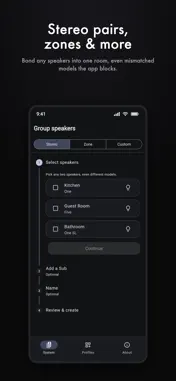
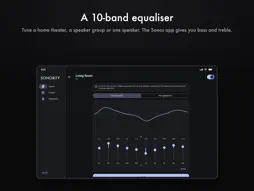
Sonority configures your speakers in ways the standard controller app doesn’t allow, using only the local network connection on your home Wi-Fi. It does no audio processing of its own; all the sound comes from your real speakers. The configurations it creates are standard, supported speaker bondings, just ones the official app chooses not to expose. WHAT YOU CAN DO • Dedicated front speakers on a soundbar: add a discrete left/right pair so your bar becomes the center channel, for a true three-speaker front stage. • Build a complete home theater in one guided flow: fronts, rear surrounds and one or two subs, each optional. • Use a single amplifier to drive both passive front speakers. • Speaker groups the standard app won’t make: full-range zones of 2-16 speakers, stereo pairs (including mismatched models), or a custom per-speaker left/right/both layout, each with an optional sub. • Config profiles: snapshot your whole layout and rebuild it in one tap after moving speakers around. Each profile gets its own icon and colour, reorders with a drag, and opens a per-entity detail view showing exactly what it saved. A profile can also capture and restore per-speaker audio settings (bass, treble, loudness, night sound, speech enhancement, sub and surround levels, lip-sync) and, optionally, volume. • Apply a profile without opening the app: from a home-screen widget (small, medium or large) or a long-press on the app icon. • A 10-band equaliser for a home theater, speaker group or single speaker, something the standard app doesn’t offer at all. Start from a Movie, Music or Vocal preset, then tune the whole configuration at once, or each speaker separately, and move all bands together to set one speaker’s level. An Amp or Port has no tunable channels; the rest of the set is still tuned. • Rename rooms, toggle a speaker’s room-calibration tuning, and identify which physical speaker is which by blinking its status light (or a short chime on phones and tablets), right from a room or a bonded speaker. • Diagnostics: a technical, hide-nothing view of your system when something isn’t working, which you can share with support or email to the developer to get help. • Works on phones, tablets and desktops, with a layout that adapts to the screen: a roomy side navigation and multi-column view on big screens, the familiar single column on phones. Every change is made over your local network and shown to you before it’s applied. Every layout can be undone in the app. Changing a layout or applying an EQ can clear a measured room tuning. PRIVACY No account. No sign-in. No analytics, no tracking, and no data collected. Sonority talks only to the speakers on your own Wi-Fi network. Nothing leaves your home unless you choose to send diagnostics to get help. REQUIREMENTS Compatible speakers on the same Wi-Fi network as your device. A speaker holds one tuning: either one measured in the manufacturer’s own app, or the EQ you set in Sonority. — Sonority is an independent app and is not affiliated with, authorized, maintained, sponsored, or endorsed by Sonos, Inc. “Sonos” is a trademark of Sonos, Inc., used here only to describe compatibility.
What's New
Version 0.9.1 2026-11-02
• The overview now appears in about a second instead of four, and a rescan updates it in place. • Speakers from a second Sonos system on your network (S1 and S2... Technical Analysis
Package Overview Basic metadata
Bundle ID
be.casperverswijvelt.sonority Current Version 0.9.1
Minimum iOS 15.0
Package Size App Store Size
Package Metadata 0 / 0 version records
Detailed binary, privacy manifest, framework, and Info.plist results have not been indexed for this package yet. The verified App Store and archive metadata above remains available.
Price History (USA store)
3 recorded price change points. These are historical observations, not a guarantee of the current price.
| Recorded at | Price | Currency |
|---|---|---|
| 0.99 | USD | |
| 1.49 | USD | |
| 2.99 | USD |
Developer Information
Known Version Records
0 version records with stored package metadata
Stored metadata does not guarantee a package is currently available to download.
| Details | Version / IDs | Version date | Action |
|---|