
Preview


Description
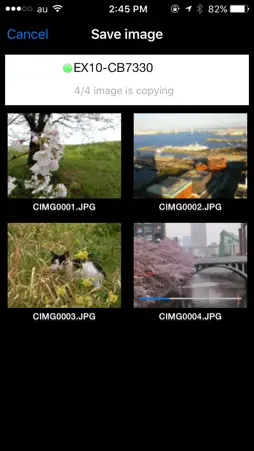
EXILIM Remote is a very useful application that allows you to send images to your iPhone using the Wi-Fi function of your CASIO digital camera or to use your iPhone as a remote control for the camera. Main functions of the application are as follows: Remote Capture Allows you to remotely operate your camera with your iPhone to capture images. Send to Smartphone Allows you to select and send still images or video clips captured with your camera to your iPhone. After sending the images or clips to your smartphone, you can forward them easily to SNS. Launch Scene App Allows you to launch the Scene photo app easily. Compatible digital camera: EX-100F, EX-100, EX-10, EX-ZR850, EX-TR50, EX-TR35, EX-TR15, EX-ZR50 Compatible OS: iOS 5.1-9.3 * Not all functions are available in iOS 5.1. Note: A compatible digital camera is required to run this application. For details on how to operate this application on the EX-TR15, visit the EXILIM Remote website at http://www.exilim.com/app/en/ If you cannot establish a Wi-Fi connection between the camera and phone On your camera, run the wireless LAN function and display the SSID and password. Next, in Settings on your iPhone, tap [Wi-Fi]. Tap [i] on the right of the SSID (model name and number) displayed in CHOOSE A NETWORK…. Tap [Forget This Network] and then tap [Forget] to execute. After deleting, reconfigure the Wi-Fi connection setting and enter a new password.
What's New
Version 3.0.5 2017-09-18
This app has been updated by Apple to display the Apple Watch app icon. iOS11 compatibility Technical Analysis
Package Overview Basic metadata
Bundle ID
jp.co.casio.EXILIM-Remote Current Version 3.0.5
Minimum iOS 8.0
Package Size Latest Recorded Package Size
Package Metadata 1 / 10 version records
Detailed binary, privacy manifest, framework, and Info.plist results have not been indexed for this package yet. The verified App Store and archive metadata above remains available.
Known Version Records
1 version record with stored package metadata • 10 known version records
Stored metadata does not guarantee a package is currently available to download.
| Details | Version / IDs | Version date | Action |
|---|---|---|---|
 1.82 MB | v3.0.5 App Store ID: 841432066Build: 3.0.5 | 2021-04-15 13:36:04 | Get Version |
| Not archived | App Store ID: 823666741 | Unknown | Request Version |
| Not archived | v3.0.5 App Store ID: 823542003Build: 3.0.5 | 2017-09-19 01:55:27 | Request Version |
| Not archived | v3.0.1 App Store ID: 811154785Build: 3.0.1 | 2014-12-09 00:58:21 | Request Version |
| Not archived | v3.0.0 App Store ID: 693172670Build: 3.0.0 | 2014-09-11 02:00:21 | Request Version |
| Not archived | v2.1.1 App Store ID: 590862992Build: 2.1.1 | 2014-05-26 03:02:05 | Request Version |
| Not archived | v2.1.0 App Store ID: 583882651Build: 2.1.0 | 2014-05-19 03:03:41 | Request Version |
| Not archived | v2.0.0 App Store ID: 127212634Build: 2.0.0 | 2013-11-20 00:54:36 | Request Version |
| Not archived | v1.0.1 App Store ID: 15565951Build: 1.0.1 | 2013-06-14 02:42:11 | Request Version |
| Not archived | v1.0.0 App Store ID: 15225296Build: 1.0.0 | 2013-04-29 00:27:04 | Request Version |