
Preview








Description
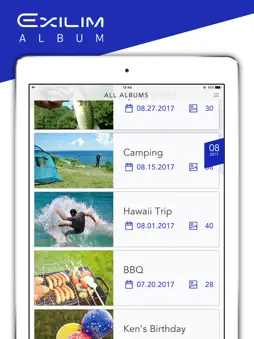
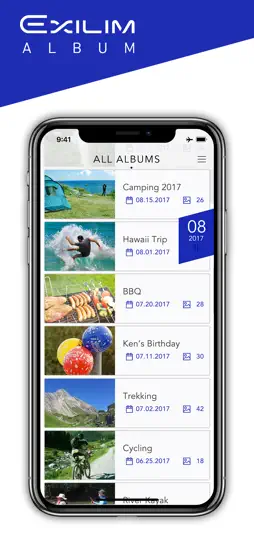
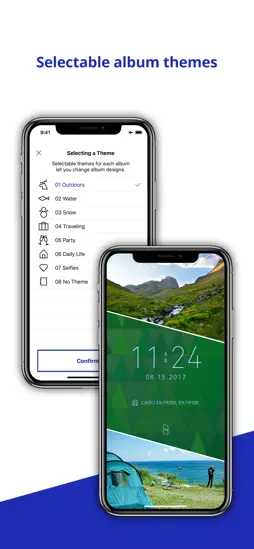
EXILIM ALBUM is an application that automatically picks the best images shot with your CASIO EXILIM digital camera or stored on your iPhone or iPad and turns them into a story, so you can look back on and enjoy your memorable moments. [ Key Features ] ■ Creates albums organized by date from images stored on your iPhone or iPad ■ You can select from among a choice of display formats for auto selected photos and movies when an album is opened. • Still images and video are lined up vertically in chronological order so that you can scroll through and enjoy them at your own rhythm. (Highlight Timeline) • Still images and video are intermixed and connected into one continuous movie. (Highlight Movie) •You can display photos and movies on a map, and view them along with tracks of your movement. ■ Selectable themes for each album let you change album designs. ■You can also manually select images to create a Highlight Timeline or Highlight Movie. ■ Both Highlight Timelines and Highlight Movies can be saved directly as video files or shared. ■ With dome view images and full 360° images captured with the CASIO EXILIM EX-FR200 digital camera, not only can you enlarge a portion of the image and swipe to pan around, you can also extract several areas of a single image and display them all at once on a split screen. (Split-view displays of dome view images and full 360° images) ■ Save and share split-view displays of dome view images and full 360° images. ■ Easily launch directly into the EXILIM Connect image-transferring application [ Recommended for ] ■ CASIO EXILIM Digital Camera users ■ Those who shoot a lot of images ■ Those too busy to organize their images ■ Those who want to create great looking albums ■ Those who like to travel or attend events and shoot a lot of images ■ Those who like to re-live their experiences through their images ■ Those who want an easy way to create a slide show of photos ■ Those who want to use photos to share the travels and other experiences with others [ Compatible OS ] iOS 8.0 – 10.2 【Compatible Devices】 iPhone 5s or later; iPad Air or later [ Additional Notes ] • Saving/sharing of Highlight Timelines, saving/sharing of Highlight Movies, and saving/sharing split-view displays of dome view images and full 360° images are available only on devices running iOS 9.0 or later. These functions are not supported under iOS 10.0. • For details on how to use this application, please refer to the EXILIM ALBUM instruction manual(http://www.exilim.com/manual/). ・ For details on how to use your CASIO camera, please refer to the instruction manual included with the camera. ・EXILIM Connect Ver4.0.1 or higher is required to access EXILIM ALBUM with EXILIM Connect.
What's New
Version 2.0.7 2019-05-07
・Improved stability, minor bug fixes Version 2.0.6 2019-04-25
・Improved stability, minor bug fixes Version 2.0.5 2018-09-10
- Improved stability, minor bug fixes App Store User Reviews
Cfhbcdg 2018-04-02
Ffhhff
Fhjjhk
Technical Analysis
Package Overview Basic metadata
Bundle ID
jp.co.casio.EXILIM-ALBUM Current Version 2.0.7
Minimum iOS 8.0
Package Size App Store Size
Package Metadata 1 / 11 version records
0.0 / 5.0 (0 ratings)
Detailed binary, privacy manifest, framework, and Info.plist results have not been indexed for this package yet. The verified App Store and archive metadata above remains available.
Related Apps


More by CASIO COMPUTER CO., LTD.


Developer Information
Known Version Records
1 version record with stored package metadata • 11 known version records
Stored metadata does not guarantee a package is currently available to download.
| Details | Version / IDs | Version date | Action |
|---|---|---|---|
 103.0 MB | v2.0.7 App Store ID: 831107763Build: 2.0.7 | 2019-04-25 12:14:18 | Get Version |
| Not archived | v2.0.6 App Store ID: 831025355Build: 2.0.6 | 2019-04-25 06:29:40 | Request Version |
| Not archived | v2.0.5 App Store ID: 828500689Build: 2.0.5 | 2018-09-10 02:51:53 | Request Version |
| Not archived | v2.0.4 App Store ID: 828027132Build: 2.0.4 | 2018-07-31 03:32:08 | Request Version |
| Not archived | v2.0.3 App Store ID: 827905071Build: 2.0.3 | 2018-07-23 10:41:54 | Request Version |
| Not archived | v2.0.2 App Store ID: 823537095Build: 2.0.2 | 2017-09-06 02:40:46 | Request Version |
| Not archived | v2.0.1 App Store ID: 823196296Build: 2.0.1 | 2017-08-07 18:18:09 | Request Version |
| Not archived | v2.0.0 App Store ID: 822981347Build: 2.0.0 | 2017-08-04 09:28:26 | Request Version |
| Not archived | App Store ID: 820566934 | Unknown | Request Version |
| Not archived | v1.0.4 App Store ID: 819213336Build: 1.0.4 | 2016-10-24 02:11:56 | Request Version |
| Not archived | App Store ID: 818493592 | Unknown | Request Version |