Preview



Description
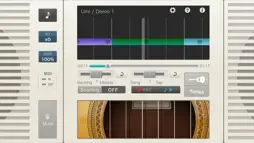
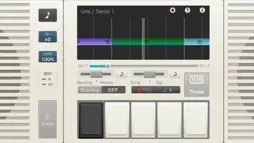
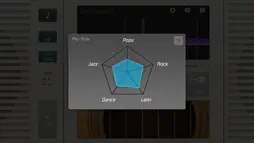
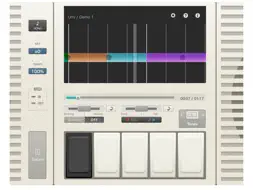
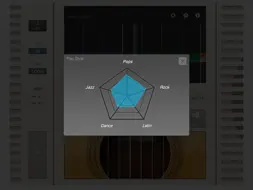
【Operating requirements】 iPhone 4s, iPhone 5, iPhone5s, iPhone5c iPod touch (5th generation) iPad2, iPad (3rd generation), iPad (4thgeneration),iPad mini ※iOS 6.0 or later required. *Important* ・To use iTunes in the Cloud songs (songs purchased or played through the iTunes Match service), first download the songs to a terminal. ・The names of iTunes in the Cloud songs that have not been downloaded to a terminal are shown on the song list, regardless of terminal settings. ・Songs protected by DRM cannot be used even if downloaded. ===Enjoy a virtual session playing your favorite songs=== Casio original technology analyzes the chords in your audio files.By tapping the instrument pad along with a song, you can experience a virtual performance with the analyzed chords. Even people who’ve never played a musical instrument will find it easy to play along and experience for themselves how much fun playing an instrument can be. * The sound produced when the pad is tapped will be a close match to the mood of the song, but may not be the same chord as that used in the original. <Experience a range of different musical instruments virtually[Performance pane]> You can use your favorite instrument pad to experience virtual playing. When you play using the piano pad or guitar pad, the Guide pane is displayed. A performance evaluation function is also included. After you finish playing, the app displays a radar chart showing the musical genre that most closely matches your playing style. You can also use the recording function to record your performances. 『Piano Pad』 Allows you to play the analyzed chords as single tones (black button) or as full chords (white buttons). 『Guitar Pad』 Assigns one of the analyzed chords to the individual strings and lets you play it as a chord or as an arpeggio. 『Rhythm Pad』 Lets you play a range of rhythmic patterns in a combination of drums and bass. <Experience the quality of the sound through changes in color[Guide pane]> This feature uses colors to visually show the differences in the sound in the song, based on the analyzed chords. It can also display the accents in a song or the performance history for the piano pad or guitar pad. <Customize your own tempo, key and vocal balance> By using the app to import an audio file into your iPad or iPhone, you can modify the tempo or key of the song. This allows you to enjoy a song in a very different way from the original, such as by slowing down an up-tempo song, or dropping the key of female vocals so that it sounds more like a man. You can also adjust the balance between the vocals and the accompaniment. By playing just the vocals and playing along yourself on the instrument pad, you can discover what it feels like to accompany your favorite singer. <The Technology Behind Chordana> The Chordana series apps use original Casio technology to analyze audio files. The apps achieve unprecedented success in extracting natural chords from the time changes and the distribution of frequency components included in audio waveforms, while also taking into account the characteristics of the harmonies, melodies and rhythm instruments included in the song.
What's New
Version 1.1.5 2020-06-02
- For iOS 13, fixed a crash when importing from the music(iPod) library. - Compatible with iPhone6(Except for the iPhone SE) and later screen sizes. - Fixed som... Technical Analysis
Package Overview Package analysis available
Bundle ID
jp.co.casio.vnt2.Chordana-Tap Current Version 1.1.5
Minimum iOS 11.0
Package Size App Store Size
Package Metadata 1 / 11 version records
arm64
✗ Swift ✓ Objective C ✓ PIE ✗ Stack Canary ✗ Bitcode
Unknown
AppleMusic
ChordanaTap:// aso675014142://
front-facing-camera arm64
Developer Information
Known Version Records
1 version record with stored package metadata • 11 known version records
Stored metadata does not guarantee a package is currently available to download.
| Details | Version / IDs | Version date | Action |
|---|---|---|---|
 339.49 MB | v1.1.5 App Store ID: 835286013Build: 129 | 2020-05-28 21:00:32 | Get Version |
| Not archived | App Store ID: 820053058 | Unknown | Request Version |
| Not archived | App Store ID: 819938071 | Unknown | Request Version |
| Not archived | App Store ID: 815980207 | Unknown | Request Version |
| Not archived | App Store ID: 815856689 | Unknown | Request Version |
| Not archived | App Store ID: 815823668 | Unknown | Request Version |
| Not archived | App Store ID: 813151125 | Unknown | Request Version |
| Not archived | App Store ID: 614342952 | Unknown | Request Version |
| Not archived | App Store ID: 154972659 | Unknown | Request Version |
| Not archived | App Store ID: 80844329 | Unknown | Request Version |
| Not archived | App Store ID: 15862448 | Unknown | Request Version |