
Preview



Description
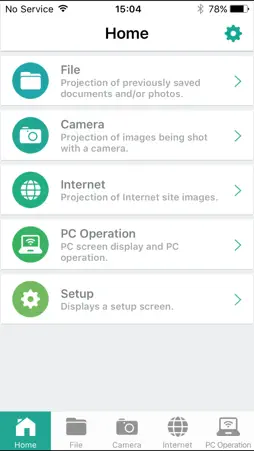
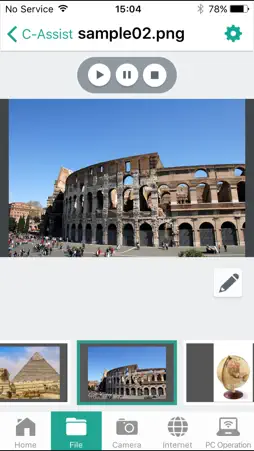
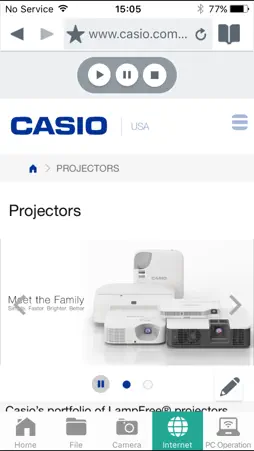
CASIO C-Assist is an iOS app that makes it possible to establish a network connection between an iPad, iPhone, or iPod Touch device and CASIO Projector,*1 and then project documents and images stored in the device's memory, real-time images picked up by the device's built-in camera, and browser screen images. It also enables remote control of a computer connected on the same network for smarter and more efficient presentations. ・File Viewer For projection of documents and images*2 registered with CASIO C-Assist ・Wireless Camera For real-time projection of images picked up by the smart device's camera ・Browser For projection of Web page images using CASIO C-Assist's Web browser ・Remote computer control For remote control of a computer by a smart device over a network connection Supported Operating Systems iOS 6.0 - 11.4 *1 Supported Projectors XJ-A147, XJ-A247, XJ-A257, XJ-A300WN XJ-M146, XJ-M156, XJ-M246, XJ-M256, XJ-M300XN, XJ-M300WN XJ-UT310WN, XJ-UT311WN, XJ-UT351WN, XJ-UT255 XJ-F20XN, XJ-F200WN, XJ-F210WN (Some models covered by this app may not be available in certain geographic areas.) *2 Projectable Document and Image Files Microsoft Word (doc, docx) Microsoft Excel (xls, xlsx) Microsoft PowerPoint (ppt, pptx) PDF JPEG, PNG, BMP Using CASIO C-Assist Follow the steps below to establish a connection between a smart device and projector and use CASIO C-Assist. 1. Configure projector network settings and then select "Network" as the projectors input source. This will cause the standby screen, showing network information, to be projected. 2. On the smart device, select [Settings] and then [Wi-Fi]. Next, select the same network where the projector is selected. 3. Start up CASIO C-Assist 4. After starting up, CASIO C-Assist will find all connectable projectors on the network and displays them on the smart device screen. Select the projector to which you want to connect. 5. On the home screen, select the function you want to use. Support Site https://world.casio.com
What's New
Version 1.4.2 2018-06-26
Minor bug fixes. Technical Analysis
Package Overview Basic metadata
Bundle ID
jp.co.casio.signage.cassist Current Version 1.4.2
Minimum iOS 8.0
Package Size Latest Recorded Package Size
Package Metadata 1 / 4 version records
3.0 / 5.0 (2 ratings)
Detailed binary, privacy manifest, framework, and Info.plist results have not been indexed for this package yet. The verified App Store and archive metadata above remains available.
Known Version Records
1 version record with stored package metadata • 4 known version records
Stored metadata does not guarantee a package is currently available to download.
| Details | Version / IDs | Version date | Action |
|---|---|---|---|
 21.03 MB | v1.4.2 App Store ID: 841471982Build: 1.4.2 | 2021-04-16 04:47:54 | Get Version |
| Not archived | App Store ID: 827242856 | Unknown | Request Version |
| Not archived | App Store ID: 823736108 | Unknown | Request Version |
| Not archived | App Store ID: 660822716 | Unknown | Request Version |