
Preview




Description
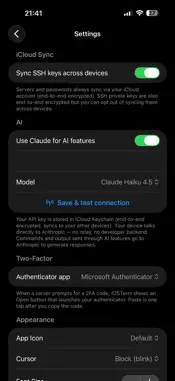
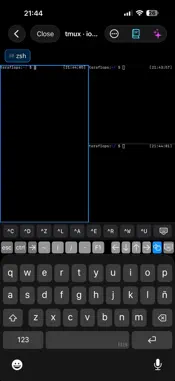
IOSTerm is a native SSH, SFTP, and terminal client for developers and system administrators who want a fast, clean tool that feels like it belongs on their iPhone and iPad. TERMINAL A full-featured SSH terminal with proper ANSI colors, mouse support, and UTF-8. Optional tmux integration lets your sessions survive wifi drops and backgrounding: reconnect and pick up exactly where you left off. FILES Every server you add appears as a location in the Files app. Browse, open, edit, and save remote files with any app that supports document providers, just like iCloud Drive or Dropbox. RUN One-shot commands without opening a full shell. Drop into the Run sheet, type the command, see the output. Your command history syncs through your private iCloud account across your devices. AI ASSISTANT BRING YOUR OWN KEY (OPTIONAL) An in-terminal AI drawer with context-aware help. Ask about output you don't understand, or describe what you want in natural language and get a command you can review before running. The feature is opt-in and bring-your-own-key: you add your own API key in Settings, stored in the Keychain on your device, and your device talks directly to Anthropic. The developer operates no backend, sees no prompts, and has no visibility into this traffic. Use of Anthropic's API is billed by Anthropic. You can skip this feature entirely; it is off by default. SECURE BY DEFAULT Modern ciphers and key-exchange algorithms out of the box Optional legacy mode for older servers (OpenSSH 6.7, RHEL 5/6) Passwords and SSH keys stored in the Keychain iCloud Keychain sync across your Apple devices, end-to-end encrypted by Apple No analytics, no advertising SDKs, no third-party trackers
What's New
Version 9.5 2026-11-12
Tunnels: reach web panels and services that are not exposed to the network. Save port forwards per server, switch them on, and open them in the built-in browser...Tunnels: reach web panels and services that are not exposed to the network. Save port forwards per server, switch them on, and open them in the built-in browser. Jump hosts: connect to a server through another saved server. Set "Connect via" in the server's settings. Tap a server to connect. Its settings are behind the info button on the row. Sessions come back: when iOS drops the connection in the background, the terminal reconnects on return, and tmux sessions reappear as you left them. Also in this release: • Import ECDSA keys (P-256, P-384, P-521). • Passphrase-protected keys created with recent OpenSSH versions now import correctly. • Search your server list. • Screen draws faster. • Wake on LAN can read the server's MAC address for you. • AI features use the latest Claude models. • The first connection with a YubiKey asks about the server's identity before the NFC prompt. Technical Analysis
Package Overview Basic metadata
Bundle ID
com.iosterm.app Current Version 9.5
Minimum iOS 17.0
Package Size App Store Size
Package Metadata 0 / 7 version records
Detailed binary, privacy manifest, framework, and Info.plist results have not been indexed for this package yet. The verified App Store and archive metadata above remains available.
Developer Information
Known Version Records
0 version records with stored package metadata • 7 known version records
Stored metadata does not guarantee a package is currently available to download.
| Details | Version / IDs | Version date | Action |
|---|---|---|---|
| Not archived | App Store ID: 885194446 | Unknown | Paid / Arcade |
| Not archived | App Store ID: 885131308 | Unknown | Paid / Arcade |
| Not archived | App Store ID: 885062971 | Unknown | Paid / Arcade |
| Not archived | App Store ID: 884933493 | Unknown | Paid / Arcade |
| Not archived | App Store ID: 884913571 | Unknown | Paid / Arcade |
| Not archived | App Store ID: 884893178 | Unknown | Paid / Arcade |
| Not archived | App Store ID: 884711056 | Unknown | Paid / Arcade |