
Preview








Description
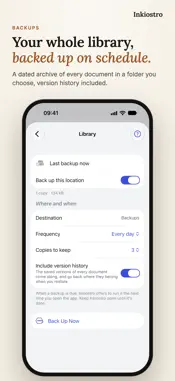
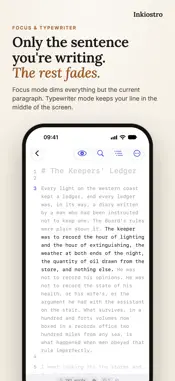
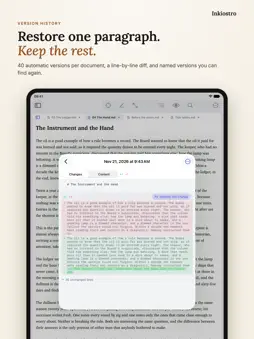
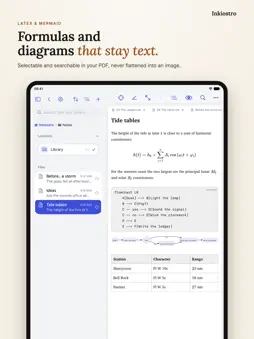
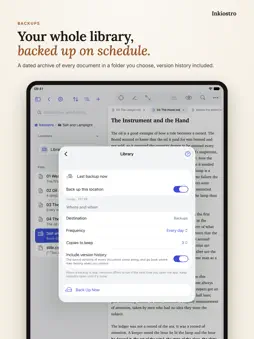
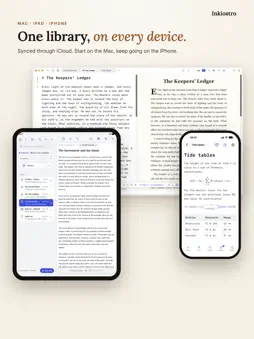
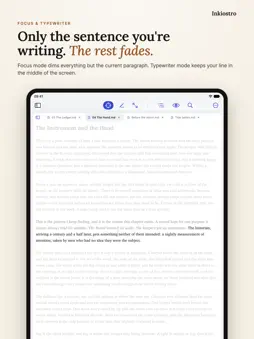
Inkiostro is a Markdown editor for people who write — notes, documentation, theses, novels. Plain text files that stay yours, a preview that looks like a finished page, and exports ready to hand over. Write in Markdown, or in the visual editor and never see a symbol. Buy once, no subscription. No account, no tracking. WRITE, SEE, FINISH • Two ways to write: the Markdown editor shows the symbols, the visual editor formats as you type, like a word processor. Either way the file stays plain Markdown. (Visual editor: Pro, free for 7 days) • A complete Markdown toolbar: headings, lists, tables and code blocks, one tap away. • A side-by-side preview that comes back exactly where you left it. • LaTeX formulas typeset by KaTeX, and Mermaid diagrams drawn as you type. • 27 preview styles, 11 of them free: GitHub, Sepia, Nord, Solarized and more. With Pro, Manuscript, Book, Report, Academic and others set the page like print. • Focus and Typewriter modes, a live word count and a daily writing goal. FROM DRAFT TO BOOK • PDF with selectable text, formulas and diagrams included. Free, with a small credit line in the footer. • A professional ePub: real chapters, a cover, ISBN, series, footnotes that open over the page, and the accessibility declaration Europe requires. The export sheet tells you what a store would reject — before you send it. (Pro) • A book made of many files: one chapter per file, in a folder, in the order you choose. Arranging it is free; exporting it as a single ePub or a single PDF is Pro. • Self-contained HTML, and page setup for PDF: paper, margins, headers and page numbers. (Pro) NEVER LOSE A WORD • Version history: Inkiostro saves versions as you write. Search them, compare them line by line, and bring back a single word or a whole draft. (Pro) • Backups of your whole library: a dated zip archive with your version history inside, offered when one is due, while the app is open, in a folder you pick. Open it in the Files app and your Markdown files are right there. (Pro) YOUR FILES, YOUR RULES • Unlimited documents, as plain .md files you can open anywhere. • Folders, color labels and tags, with search that filters by tag. • iCloud Drive sync between iPhone, iPad and Mac, with no setup. • External folders: work directly inside any folder on your device or in iCloud Drive. (Pro) INKIOSTRO PRO — ONE PURCHASE, EVERY DEVICE One purchase unlocks Pro on iPhone, iPad and Mac, forever. Try it free for 7 days. • The visual editor • Version history with search, comparison and a year of versions • Backups of your library • Professional ePub, HTML, and books made of many files • PDF page setup • Focus and Typewriter modes • External folders • 24 app themes, the Pro preview styles and any font installed on your device MADE FOR • Writers: novels and essays in plain text, out as a real ebook • Students and researchers: notes and theses with proper formulas • Developers: READMEs, documentation and technical notes with diagrams • Anyone tired of paying every month for a text editor • Anyone new to Markdown: the visual editor works like a word processor PRIVACY Your documents stay in your iCloud Drive or on your device. No servers of ours, ever. Inkiostro collects only anonymous, aggregated usage statistics — never personal data, never the content of your documents — and you can turn them off in Settings.
What's New
Version 1.16.1 2026-11-23
Fixes in 1.16.1 • No more backup alerts for a folder you had removed from your locations. • The last words typed in the visual editor are saved even if you clos...Fixes in 1.16.1 • No more backup alerts for a folder you had removed from your locations. • The last words typed in the visual editor are saved even if you close the document or quit right away. • Renaming or moving a folder keeps the labels and colors of the documents inside. • A backup that can't be opened again is reported as failed, and the previous ones are kept. • Sharing to Inkiostro works with any title, even one with a date like 11/22/2026. New in 1.16 — A new look, calmer and lighter. • Lists in clean white groups on iPhone, the page set on the desk on iPad, one ink-blue accent everywhere. • Three ways to see your files: List, Preview and Details, from the switch at the bottom of the column. Recent, Folders and Files fold away. • The Visual / Markdown switch is in the bar under the page. • Typing no longer pauses while a document in iCloud Drive is being saved. Technical Analysis
Package Overview Basic metadata
Bundle ID
it.cdigiuseppe.Lettera Current Version 1.16.1
Minimum iOS 18.0
Package Size App Store Size
Package Metadata 1 / 9 version records
Detailed binary, privacy manifest, framework, and Info.plist results have not been indexed for this package yet. The verified App Store and archive metadata above remains available.
Developer Information
Known Version Records
1 version record with stored package metadata • 9 known version records
Stored metadata does not guarantee a package is currently available to download.
| Details | Version / IDs | Version date | Action |
|---|---|---|---|
| 19.44 MB | v1.11.1 App Store ID: 887547720Build: 1.11.1 | 2026-09-26 07:54:17 | Get Version |
| Not archived | App Store ID: 887325312 | Unknown | Request Version |
| Not archived | App Store ID: 887133534 | Unknown | Request Version |
| Not archived | App Store ID: 886226701 | Unknown | Request Version |
| Not archived | App Store ID: 885544124 | Unknown | Request Version |
| Not archived | App Store ID: 882785042 | Unknown | Request Version |
| Not archived | App Store ID: 878730833 | Unknown | Request Version |
| Not archived | App Store ID: 878457482 | Unknown | Request Version |
| Not archived | App Store ID: 878235915 | Unknown | Request Version |