
Preview





Description
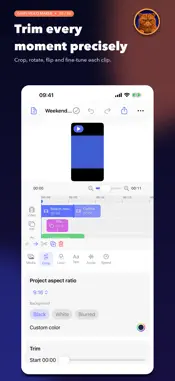
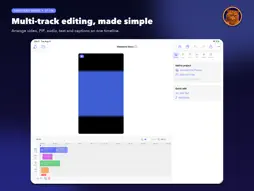
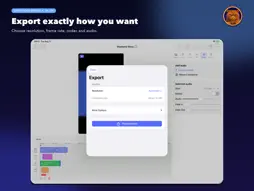
Garfi is a focused, native video editor. Import videos and photos, trim and split clips, add one picture-in-picture layer, text, editable automatic captions, music and voice-over, then export in MOV or MP4 up to 4K when supported. Keep your work under your control. Garfi projects are portable .gvideo packages you can save, reopen, and move with the system file browser or a compatible cloud drive. There is no account, subscription, advertising, watermark, developer cloud backend, or generative AI. Features: • Precise trim, split, reorder, duplicate, undo and redo • Picture in Picture, crop, fit/fill, rotation and flip • Canvas formats for landscape, portrait, square and 4:5 • Filters, exposure, contrast, saturation and warmth • Text, editable automatic captions and transitions • Clip audio, music, waveform, detach audio, voice-over and fades • 0.25×–4× speed • MOV/MP4 export in H.264 or HEVC, up to 4K when supported • Portable .gvideo project files TRY FIRST. UNLOCK ONCE. Download Garfi free and explicitly start a free 14-day trial of watermark-free video export. After the trial, a one-time in-app purchase unlocks export permanently. No subscription or automatic charge. Editing, saving and reopening projects, and moving .gvideo files remain available even if you do not purchase. Previously exported videos are unaffected. If you have already bought Full Unlock, use Restore Purchases to bring it back on any device signed in to the same Apple Account. This purchase covers Garfi on iPhone and iPad. The Mac version is sold separately.
What's New
Version 1.3 2026-09-28
A big editing update. • Pick picture-in-picture and music sources straight from Photos • Timeline: clips snap to the playhead and each other, pinch to zoom, la...A big editing update. • Pick picture-in-picture and music sources straight from Photos • Timeline: clips snap to the playhead and each other, pinch to zoom, larger touch targets and frame thumbnails; overlapping items stack instead of hiding each other • Choose the caption language; long videos are captioned in full and on the device when possible • Music is trimmed to the end of the video with a fade-out • Speed changes keep the original pitch • More accurate colors in preview and export • Text backgrounds fit the text; sliders show their value and have a reset button • Portrait sources now preview in their real shape • iPhone landscape layout and a new playback bar • Fixed: exporting a project with no audio, fades after a split, and many smaller issues Technical Analysis
Package Overview Basic metadata
Bundle ID
com.garfi.videoeditor Current Version 1.3
Minimum iOS 18.0
Package Size App Store Size
Package Metadata 0 / 0 version records
Detailed binary, privacy manifest, framework, and Info.plist results have not been indexed for this package yet. The verified App Store and archive metadata above remains available.
Known Version Records
0 version records with stored package metadata
Stored metadata does not guarantee a package is currently available to download.
| Details | Version / IDs | Version date | Action |
|---|