
Preview



Description
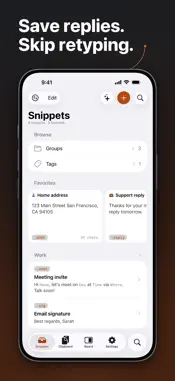
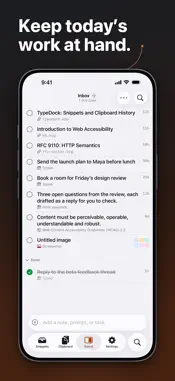
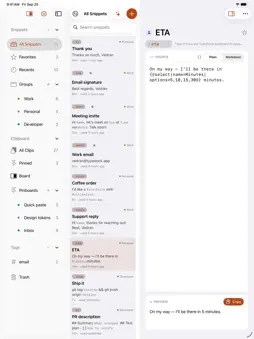
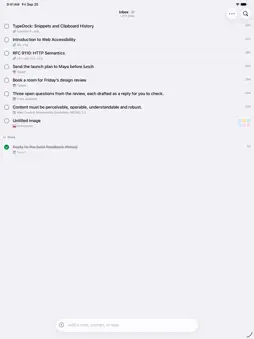
TypeDock is your snippet library and clipboard history in one — on Mac, iPhone, and iPad. SNIPPETS THAT TYPE FOR YOU Save the things you type all the time — emails, addresses, replies, code. Give each one a short ;keyword and TypeDock expands it as you type. Fill-in placeholders, dates, and profile fields make every expansion fit the moment. A CLIPBOARD THAT REMEMBERS Everything you copy is saved and searchable — text, links, code, colors, rich text, images, and files, organized by the app it came from. Pin what matters, find anything in seconds, and paste it again anywhere. MADE FOR ALL YOUR DEVICES • iCloud sync keeps snippets and clips together on Mac, iPhone, and iPad • Mac: Quick-Paste dock, snippet palette, and system-wide ;keyword expansion • iPhone and iPad: a custom keyboard that expands keywords inline as you type • Terminal fans: the typedock CLI puts your whole library one command away ON-DEVICE AI, ACTUALLY PRIVATE Ask questions about your clipboard, describe clips, or draft new snippets — powered entirely by on-device intelligence. Nothing leaves your device. ORGANIZE YOUR WAY Groups, tags, pinboards, favorites, and flexible sorting — including your own manual order. A BOARD FOR THE WORK IN FRONT OF YOU Collect the notes, links, and screenshots you are working from, tick them off, give them due dates, and hand them to your AI chat as one list. Its own tab on iPhone, its own window on iPad, a sidebar on the Mac — plus a Home Screen widget and a Control Center control. Board is part of TypeDock Pro. TYPEDOCK PRO The free tier gives you a real taste: up to 10 snippets, 25 clips, and 3 groups, all local. TypeDock Pro unlocks Board, unlimited snippets and clipboard history, iCloud sync, all on-device AI, the typedock CLI, and unlimited groups, tags, and pinboards — $2.99/month or $24.99/year, with a 7-day free trial. PRIVATE BY DESIGN No account required. Your snippets and clips live on your devices and in your personal iCloud — not on our servers. Clipboard data is encrypted at rest. Terms of Use: https://typedock.app/terms Privacy Policy: https://typedock.app/privacy
What's New
Version 1.15.0 2026-09-27
Bring your snippets with you • Import from TextExpander, Raycast and Alfred in Settings › Import. Fill-ins, dates and clipboard placeholders come across, and an... Technical Analysis
Package Overview Basic metadata
Bundle ID
com.caffeinatedcode.TypeDock Current Version 1.15.0
Minimum iOS 26.0
Package Size App Store Size
Package Metadata 0 / 0 version records
Detailed binary, privacy manifest, framework, and Info.plist results have not been indexed for this package yet. The verified App Store and archive metadata above remains available.
Developer Information
Known Version Records
0 version records with stored package metadata
Stored metadata does not guarantee a package is currently available to download.
| Details | Version / IDs | Version date | Action |
|---|