
Preview


Description
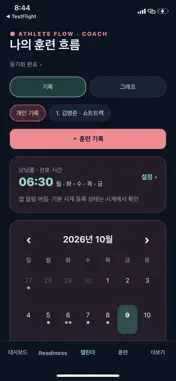
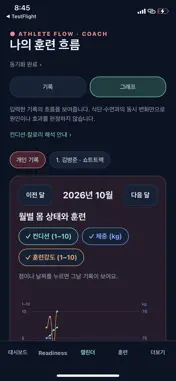
Build a clearer picture of your training. Log each session, track how you feel, and share the records you choose with your coach. Athlete Flow connects your daily training journal with athlete and team management. Use it for your own training or to stay connected with a coach. YOUR DAILY TRAINING JOURNAL Record training time, session notes and perceived effort (RPE). Keep track of sleep, naps, body weight and daily condition. Review your history in a calendar and basic charts. Basic records are stored on your device. UNDERSTAND YOUR TRAINING Review training load based on session duration and RPE. Follow changes in training, sleep and daily condition over time. Organize goals, routines and season plans. Some detailed analysis, comparisons and export features require Pro. CONNECT WITH YOUR COACH Use your AF sign-in email to request a connection. Invitations and approvals happen inside the app. Sharing starts after the required consent and coach approval. Free athletes can connect with one primary coach and share permitted records without Athlete Pro. The coach needs Coach Pro or Coach Team Pro. Sharing with a coach is separate from full personal cloud backup. Permissions do not automatically extend to other coaches or staff. TOOLS FOR COACHES AND TEAMS Review approved athlete records, training and condition. Manage team training plans, assignments, attendance and completion. Share weekly and daily plans in the team calendar. Planned sessions are kept separate from completed training records. Coach Team Pro supports up to five coaching staff members, including the team owner, with role-based access and no athlete count limit. The team owner subscribes; approved staff use their assigned team features without a separate Coach Pro purchase for that team. CHOOSE YOUR PLAN FREE: Basic training and daily records, calendar, basic charts, on-device storage and permitted sharing with one primary coach. ATHLETE PRO: Detailed analysis, nutrition and calorie management, PDF and database export, automatic personal record and attachment sync, and 5GB of cloud storage per account. COACH PRO: Athlete Pro features plus athlete and team management for one coach. COACH TEAM PRO: Coaching features with collaboration for up to five staff, including the owner. Optional 25GB and 100GB cloud storage subscriptions are separate from Pro. These totals include the base 5GB and do not reset monthly. A storage subscription alone does not unlock Pro features. Monthly and annual subscriptions are available. Annual plans are billed for the full year. Check the purchase screen and App Store confirmation for current prices and renewal terms. Subscriptions renew automatically and can be managed or canceled in your Apple account settings. Pro and storage subscriptions are managed separately. Deleting the app does not cancel a subscription; restoring purchases does not restore training records. SHARE ON YOUR TERMS Access depends on account permissions and the required athlete or guardian consent. Personal injury and rehabilitation notes are not automatically shared with the whole team. Training and recovery indicators are references based on recorded data, not medical diagnoses or treatment. Privacy Policy https://athlete-flow-legal.netlify.app/privacy/ Terms of Use https://www.apple.com/legal/internet-services/itunes/dev/stdeula/
What's New
Version 0.8.27 2026-10-30
• Start the watch connection from Training, Calendar, or More. • View manually entered records together with watch workouts and distinguish them using filters. ... Technical Analysis
Package Overview Basic metadata
Bundle ID
com.athleteflow.training Current Version 0.8.27
Minimum iOS 16.4
Package Size App Store Size
Package Metadata 0 / 0 version records
Detailed binary, privacy manifest, framework, and Info.plist results have not been indexed for this package yet. The verified App Store and archive metadata above remains available.
Known Version Records
0 version records with stored package metadata
Stored metadata does not guarantee a package is currently available to download.
| Details | Version / IDs | Version date | Action |
|---|