
Preview


Description
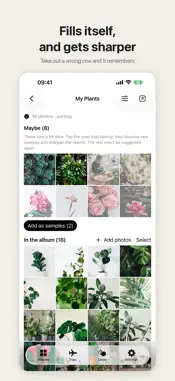
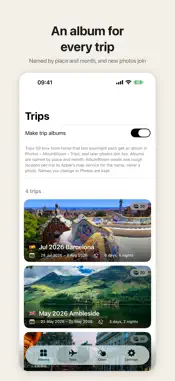
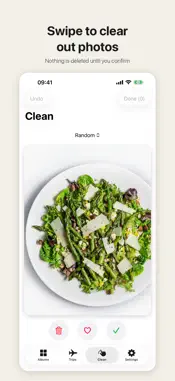
AlbumBloom sorts the photos on your iPhone into albums in the Photos app, and keeps them up to date every day. No dragging photos one by one, no guessing keywords. Teach it with a few photos Pick three or more examples, like your children's drawings, your house plants or your crafts, and AlbumBloom finds the photos that look alike and puts them in the album. Got one wrong? Take it out. "Doesn't belong" teaches it to avoid photos like that; "Belongs, but not wanted here", say for a downloaded picture, just takes it out without learning the wrong thing. You can put removed photos back any time. An album for every trip Overnight trips away from home are found for you, each with its own album named by place and month, like "Aug 2026 Benidorm". New photos taken on the trip join too. Real albums, right in Photos Every album lives in an "AlbumBloom" folder in the Photos app, so you see them on your iPhone, iPad and Mac, and can rename or share them. Stop using AlbumBloom and the albums stay. Ready-made categories Food, Sunsets & Rainbows, Beach & Sea, Nature, Flowers, Plants, Snow, Birthdays & Parties, Christmas, Night Lights, Sweets & Coffee, Theme Parks, and Zoos & Aquariums. Only what Photos doesn't already sort, so nothing is repeated. Updates itself every day Set up a nightly run in Shortcuts and new photos land in the right albums on their own. Clean Go through photos at random, the most recent ones or by topic: swipe left to delete, right to keep, up to favourite. Nothing is deleted until you confirm, and deleted photos stay in Recently Deleted for 30 days. Private by design Photos are analysed only on your iPhone and never uploaded. No account, no ads, no tracking. AlbumBloom never edits or moves your photos and never reads your Hidden album. Your topic settings back up to your own iCloud, so a new iPhone needs no setting up again. Free and AlbumBloom Plus Free: every ready-made category, trip albums, Clean and one custom topic. AlbumBloom Plus: a one-time purchase, no subscription. Unlimited custom topics, plus sorting by text in photos (keywords), like words on packaging, signs or cards.
What's New
Version 1.4 2026-11-13
Any album can now be shown in other apps. Turn on Show in other apps and the album moves to the top level of Photos, with a flower mark in front of its name, so...Any album can now be shown in other apps. Turn on Show in other apps and the album moves to the top level of Photos, with a flower mark in front of its name, so you can find it when picking photos in apps like Facebook. The switch is in each topic’s settings and on each trip’s page. Technical Analysis
Package Overview Basic metadata
Bundle ID
com.milly.AlbumBloom Current Version 1.4
Minimum iOS 17.0
Package Size App Store Size
Package Metadata 0 / 0 version records
Detailed binary, privacy manifest, framework, and Info.plist results have not been indexed for this package yet. The verified App Store and archive metadata above remains available.
Developer Information
Known Version Records
0 version records with stored package metadata
Stored metadata does not guarantee a package is currently available to download.
| Details | Version / IDs | Version date | Action |
|---|