
Preview



Description
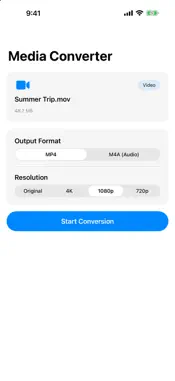
Convert video, audio, and image files directly on your iPhone or iPad. MediaConvert handles common tasks such as converting MOV to MP4, extracting M4A audio from videos, and converting HEIC images to JPEG. File conversion is processed directly on your device, so there is no need to upload your media to an external server. 【VIDEO CONVERSION】 • MP4 → MOV • MOV → MP4 • M4V → MP4 / MOV • Select the output resolution • Original / 4K / 1080p / 720p / 480p / 240p Available resolutions depend on the resolution of the original video. 【EXTRACT AUDIO FROM VIDEO】 • MP4 / MOV / M4V → M4A • Save audio from recordings, lectures, interviews, and other videos • Conversion is completed directly on your device 【AUDIO CONVERSION】 • MP3 → M4A • WAV → M4A • AAC → M4A 【IMAGE CONVERSION】 Supported input formats: JPEG, PNG, HEIC, WebP, TIFF, GIF, BMP Supported output formats: JPEG, PNG, TIFF, BMP Available output formats depend on the selected input format. Image quality can be adjusted when exporting as JPEG. 【HOW TO USE】 1. Select a file from your Photo Library or the Files app 2. Choose an output format 3. Adjust the resolution or image quality if needed 4. Convert, save, or share the new file 【WHY MEDIACONVERT】 • Convert videos, audio files, and images in one app • Media processing takes place directly on your device • Real-time conversion progress • Works with the Files app • Share converted files immediately • Simple and intuitive interface MediaConvert is free to use with advertising.
What's New
Version 1.2.4 2026-11-01
We've improved performance and usability for a smoother experience. Technical Analysis
Package Overview Basic metadata
Bundle ID
com.butterfalcon.mediaconvert Current Version 1.2.4
Minimum iOS 17.0
Package Size App Store Size
Package Metadata 2 / 6 version records
Detailed binary, privacy manifest, framework, and Info.plist results have not been indexed for this package yet. The verified App Store and archive metadata above remains available.
Developer Information
Known Version Records
2 version records with stored package metadata • 6 known version records
Stored metadata does not guarantee a package is currently available to download.
| Details | Version / IDs | Version date | Action |
|---|---|---|---|
| 4.18 MB | v1.2.3 App Store ID: 890899355Build: 1.2.3 | 2026-09-07 01:24:55 | Get Version |
| 4.2 MB | v1.2.2 App Store ID: 889157311Build: 1.2.2 | 2026-08-01 18:59:05 | Get Version |
| Not archived | App Store ID: 888048734 | Unknown | Request Version |
| Not archived | App Store ID: 881153518 | Unknown | Request Version |
| Not archived | App Store ID: 880307917 | Unknown | Request Version |
| Not archived | App Store ID: 878959868 | Unknown | Request Version |