
Preview



Description
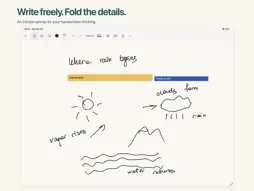
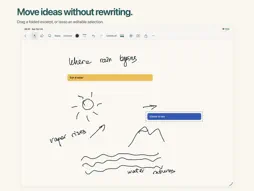
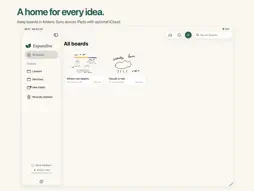
Write your notes. Fold the details. Replay your thinking. Expandive is an infinite whiteboard for handwritten notes and visual explanations on iPad. Write with Apple Pencil, erase with a finger, and keep every detail in foldable excerpts. FOLD THE DETAILS Turn a section of handwriting into a compact, named strip. Draw a line beside it, hold the Pencil tip briefly, then adjust the area and choose Fold. Horizontal, vertical, and angled lines work. Give each excerpt its own banner color, drag it while folded or open, and double-tap to fold or unfold. Long-press to rename with the keyboard or Pencil. RECORD YOUR THINKING Record writing on its own or together with your voice. Add a voice note to a board or excerpt, or narrate recorded writing later. Replay clips inside your board. Trim and arrange them into a movie of up to one hour, then export an MP4 video or an M4A audio file, created on your iPad. Handwriting must be recorded for timed replay; existing ink does not become a recording automatically. MAKE SPACE FOR IDEAS Move and copy editable handwriting, images, and folded excerpts with the lasso. Add pictures, choose from a broad pen palette or a custom color, and adjust stroke width. Undo or redo the last ten edits. Name boards with the keyboard or Pencil. FIND YOUR WAY Move smoothly with two fingers and glide across the canvas with a quick swipe. Tap the zoom percentage to return to 100% without losing your place. Edge arrows point to off-screen content: preview a screenful, browse nearby areas, and jump there at 100%. Use Back to restore your previous view, or Fit board to see the bigger picture. KEEP YOUR NOTES TOGETHER Organize boards in folders inside Expandive. Work offline, and optionally sync across your iPads with iCloud using the same Apple Account and your own iCloud storage. You can switch sync off in Settings. START SIMPLY A short first-launch tour introduces the essentials. Open the full guide whenever you need it, and send questions, issues, or ideas directly from the app. Local recovery helps protect unfinished recordings if the app closes unexpectedly. No ads, subscription, or Expandive account. Requires iPadOS 18 or later. Apple Pencil is recommended; optional finger writing is available.
What's New
Version 1.0.2 2026-10-26
Find your way around your infinite canvas. • Move smoothly with two fingers, pinch to zoom, and glide farther with a quick swipe. • Return to 100% zoom with on...Find your way around your infinite canvas. • Move smoothly with two fingers, pinch to zoom, and glide farther with a quick swipe. • Return to 100% zoom with one tap, without losing your place. • Follow the edge arrows to preview off-screen handwriting, pictures, and excerpts. Browse the previews, then jump to an area at 100%. • Tap Back after a preview jump to restore your previous position and zoom. • Find Fit board and Return to start in the zoom menu. Technical Analysis
Package Overview Basic metadata
Bundle ID
studio.unfurl.app Current Version 1.0.2
Minimum iOS 18.0
Package Size App Store Size
Package Metadata 0 / 0 version records
Detailed binary, privacy manifest, framework, and Info.plist results have not been indexed for this package yet. The verified App Store and archive metadata above remains available.
Developer Information
Known Version Records
0 version records with stored package metadata
Stored metadata does not guarantee a package is currently available to download.
| Details | Version / IDs | Version date | Action |
|---|