
Not @ Homes App Icon

Not @ Homes

Utilities • Build Passed, LLC
4+ v1.1 Recorded price: Free App Store →
★★★★★
★★★★★
(17 App Store ratings)
IPA Analysis
Technical Specs
Bundle ID ktree.nothome
Version 1.1
Latest Recorded Package Size 40.16 MB
Minimum iOS 10.0
Devices iPhone, iPad, iPod touch
Catalog release date 2017-04-09
Latest recorded version date 2024-10-28
Features & Support
Apple Watch
Advisory 4+
Languages (1)
EN
Top In App Purchases
No In App Purchases Listed

Preview

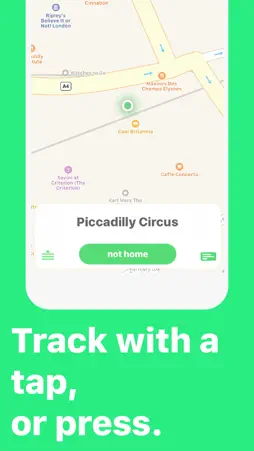
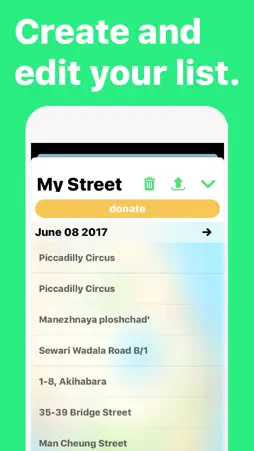
Not @ Homes screenshot 1 Not @ Homes screenshot 2 Not @ Homes screenshot 3 Not @ Homes screenshot 4

Description

Save the organization money by keeping track of Not at Homes digitally. • Tap to track an address • Create, edit and rename your list • Instantly share to your group with iMessage, Email, etc. • Find any not @ home with Maps and Street View • Avoid "do not calls" by taking a picture of your territory card • Track not @ homes on your Apple Watch Street View provided by Google. Geocoding provided by Apple. What Pioneers are Saying: "I can discreetly mark the accurate house number from my mobile device, even when I can't locate the number on the house!" "Easy, convenient & discreet! Great pioneer partner!"

What's New

Version 1.1 2017-06-12
This app has been updated by Apple to display the Apple Watch app icon. not @ homes 1.1 is here! Check out what's new: Apple Watch! ------------- Track addres...This app has been updated by Apple to display the Apple Watch app icon. not @ homes 1.1 is here! Check out what's new: Apple Watch! ------------- Track address straight from your watch. Open the not @ homes app on your Apple Watch (ooh.. looks fancy!) Tap "not home" to write down the address. It will write it down in your list (wait for the happy little popup). View the added addresses in the app when you finish the street. Territory Card -------------- Take a picture of your territory card so you can see if the house you're at is a "do not call". Just open the page, tap the Street View ----------- It was a yellow house. Yep, that one. Wait no.. I don't think they had those bushes. Try the next one... See the address in Street View to help find it. This paired with the map directions, and you'll never forget what the house looked like! Go to your list and swipe left on any address. Tap the house for street view and the map for directions. If it can't find the correct street, add the city and state or province by tapping the address and typing it in. [powered by Google] Importing --------- Not so scary anymore. You have 2 options, replace or append. Replace - clears the old list and "replaces" it with the new one you're importing. Append - adds the new list to the old one, so you don't lose your other addresses. Other Stuff ----------- Moved around some buttons to make them easier to reach. Changed some icons to clear up confusion. Added a confirm on the delete button. The list name is much bigger now. Added onboarding (find out what the app can do). If you drag down the list, it will close. Bug Fixes --------- Keep scrolling if you really care: Export shouldn't look like a bunch of jumbled text anymore. (sorry about that!) Import doesn't crash the app anymore. Saving a long list won't crash anymore. Deleting items from your list won't crash anymore.

Technical Analysis

Package Overview Basic metadata
Bundle ID ktree.nothome
Current Version 1.1
Minimum iOS 10.0
Package Size Latest Recorded Package Size
Package Metadata 1 / 1 version records
3.9 / 5.0 (17 ratings)
Detailed binary, privacy manifest, framework, and Info.plist results have not been indexed for this package yet. The verified App Store and archive metadata above remains available.

Developer Information

Known Version Records

1 version record with stored package metadata

Stored metadata does not guarantee a package is currently available to download.

Details Version / IDs Version date Action
Not @ Homes icon
40.16 MB
v1.1
App Store ID: 841712751Build: 6
2024-10-28 01:41:05 Get Version