Preview


Description
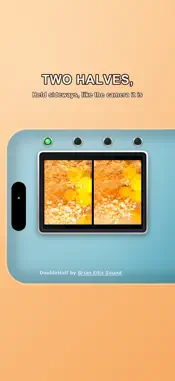
DoubleHalf is a double-exposure half-frame film camera emulator for iPhone. Half-frame cameras split one frame of 35 mm film into two tall pictures side by side. Double exposure takes the same roll of film and runs it through the camera twice. DoubleHalf does both of these: four captures composited into a single frame. FIXED EVERYTHING There is no autofocus, no HDR, and no computational processing. White balance is pinned. You point it and you press it, and you find out later what you got. With the flash on, exposure is pinned dark and the lamp carries the picture, so a subject falls off hard into black. Turn the flash off and the camera meters the room instead. FOCUS There is no autofocus, so you choose a distance and commit to it. Press the focus button to cycle between near, medium and far. Near pulls in close, medium sits around arm's length, and far finds infinity — the lens is set there once, when you choose it, and then stays put. FILM EMULATOR SETTINGS Ember 64 - dense reds, deep blacks Prism Three - separated primaries, hard colour Night Bloom - cold light, red halation glow Violet Field - greens shift to magenta Scorch 200 - harsh, blown-out halation False Summer - false-colour infrared None - just an out of focus iPhone camera! A CAMERA, NOT AN APP Hold it sideways like a compact or upright like a phone. The back is a camera: a screen, four exposure lights that count your shots, three buttons for focus, film and flash, and a shutter. Turn it and the buttons stay exactly where they are — only the lettering turns to face you. Nothing to swipe, nothing to pinch. ALSO The volume buttons work as a shutter release. Shot upright, a frame is two tall pictures side by side; shot sideways, two wide ones stacked. Finished frames save straight to your photo library. Every saved photo carries its settings in EXIF: film, flash, focus, exposure, zoom. No accounts, no ads, no analytics, and no network access at all.
What's New
Version 1.2.0 2026-09-29
Hold it either way. Turn the phone upright and the engravings and the screen's lettering turn to face you; the buttons stay exactly where they are, as they woul... Technical Analysis
Package Overview Basic metadata
Bundle ID
com.brianellissound.doublehalf Current Version 1.2.0
Minimum iOS 18.0
Package Size App Store Size
Package Metadata 0 / 0 version records
Detailed binary, privacy manifest, framework, and Info.plist results have not been indexed for this package yet. The verified App Store and archive metadata above remains available.
Developer Information
Known Version Records
0 version records with stored package metadata
Stored metadata does not guarantee a package is currently available to download.
| Details | Version / IDs | Version date | Action |
|---|