
Preview



Description
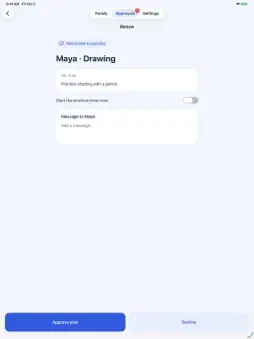
Help your family make room for practice and play. Progress Pass connects real-world effort with screen time. Children plan what they want to practice, parents approve the plan, and a timer helps keep track. Afterward, children share what they accomplished and parents decide how much screen time they earned. PRACTICE WITH PURPOSE Choose an activity and set a goal: a piano passage, drawing exercise, reading session, or another skill that takes practice. Parents can also start practice from their child’s profile and choose the device the child will use to finish it. KEEP PARENTS INVOLVED Approve or decline practice requests with a message. Review the finished session and optional photos or videos before awarding time. The suggested award matches practice time, and parents can adjust it. USE TIME WHEN IT WORKS FOR YOU Children choose how much of their balance to use. Screen time counts down continuously until paused or finished, including while the device is idle. Pausing restores restrictions on that device; unused time returns to the balance when the pause syncs. Practice details and media are kept for up to 90 days; earned minutes remain available. SET FAMILY BOUNDARIES On an authorized child's device, Progress Pass restricts supported apps by default, with parent-selected exceptions. Redeeming time temporarily allows access. Each child can use a redemption on one device at a time. STAY CONNECTED Notifications bring practice requests and decisions to parents and children. A five-minute reminder helps children prepare to finish longer redemptions. Notifications must be enabled to receive reminders. REQUIREMENTS Install Progress Pass on the parent's and child's supported iPhone or iPad. Before connecting a child, the purchasing parent reads the privacy notice and explicitly confirms permission in the app, linked to their verified Apple subscription transaction. Photos and videos require separate optional permission. Child Screen Time setup requires an eligible Apple child account in Family Sharing and approval from a parent or guardian. Internet access is needed for setup, approvals, and starting or resuming screen time. Available restrictions depend on Apple's Screen Time controls; Progress Pass does not lock every system function. FAMILY SUBSCRIPTION Progress Pass Family includes practice requests, parent approvals, progress sharing and earned-time coordination for your family at US $2.99/month or $24.99/year. A subscription is required to add children and start new practice. Eligible new subscribers get a two-week free trial, followed by the selected plan’s regular price. Local prices are shown before purchase. Payment is charged to your Apple Account. Subscriptions renew automatically unless canceled at least 24 hours before the current period ends. Manage or cancel in Apple subscription settings. Deleting a Progress Pass account does not cancel an Apple subscription. Privacy policy: https://progresspass.app/privacy Terms of use: https://www.apple.com/legal/internet-services/itunes/dev/stdeula/ Support: [email protected]
What's New
Version 1.0.1 2026-10-07
Parents can now start a practice session from their child’s profile and choose the device the child will use to finish and share it. Technical Analysis
Package Overview Basic metadata
Bundle ID
co.worthysoftware.progresspass Current Version 1.0.1
Minimum iOS 26.5
Package Size App Store Size
Package Metadata 0 / 0 version records
Detailed binary, privacy manifest, framework, and Info.plist results have not been indexed for this package yet. The verified App Store and archive metadata above remains available.
Developer Information
Known Version Records
0 version records with stored package metadata
Stored metadata does not guarantee a package is currently available to download.
| Details | Version / IDs | Version date | Action |
|---|