
Preview





Description
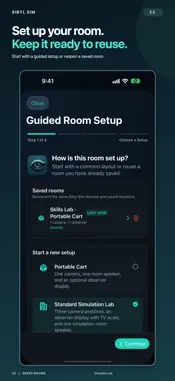
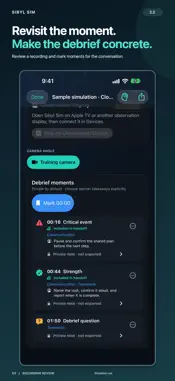
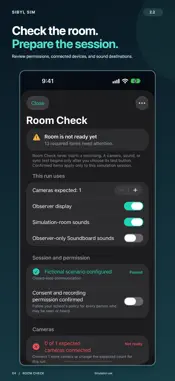
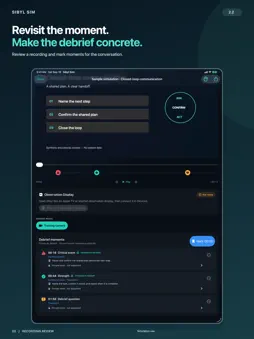
Sibyl Sim helps healthcare simulation faculty set up, run, observe, record, and review learning scenarios on iPhone and iPad. SET UP ONLY WHAT YOU NEED Choose Cameras, Soundboard, Simulation Calls, or a combination. Guided setup asks about the tools you selected. Run a calls-only or sound-only scenario without a camera. Save named scenarios for reuse; Sibyl Sim checks the current devices each time. Saved setups never start recording, send sound, or open a microphone automatically. ONE SESSION WORKSPACE Use the Control Hub to view up to three approved cameras, choose the Main Camera for audio and recording, send sounds, and mark moments for debriefing. On larger screens, keep live video beside sound controls and patient-response entry. Flexible layouts adapt to iPhone, iPad, and the expanded iPhone Duo display while preserving your work. An iPhone or iPad can also serve as a Camera or Viewing Display. Expand an available shared camera full screen and rotate its live picture locally. The separate Apple TV companion brings the faculty-selected program to a viewing room. INVITE LEARNERS AND PRACTICE TEAM CALLS Show a temporary session QR code. Participants join from Sibyl Sim or ChartSlate, review the session, and call the simulation operator. Joining alone does not turn on a microphone or grant faculty controls. Choose Answer as… before answering. Hear the participant's natural voice while they hear your speech through a Lower, Higher, Warm, Bright, or Telephone effect. Switch roles during the call, mute your microphone, or hang up. These on-device effects change pitch and tone; they do not impersonate a specific person or promise an age or gender. Invite an approved co-operator to handle calls on another Sibyl Sim device without granting room controls. Calls require compatible updated apps, kept open on the same approved local network using Automatic LAN. These are simulated in-app calls, not calls to real telephone numbers. The call feature does not record calls; room microphones may still capture sound played aloud. SOUNDS AND PATIENT RESPONSES Play built-in cues, import reviewed audio, or record a response. Prepare fictional-patient phrases with an available English system voice, preview them, and save before sending. Choose the approved device by name, adjust the sound level, retry a failed send, or stop playback. Preview Here remains local to the Hub. Built-in-speaker cues during camera capture require supported echo protection. REVIEW BESIDE THE VIDEO Review Main Camera recordings with debrief moments and private notes. On a fitting screen, edit a moment beside the saved video; compact layouts use the same draft in an editor. Keep facilitator notes private and choose learner takeaways to share. Optional captions and transcripts depend on the device, language, and installed speech assets. FACULTY-CONTROLLED PRIVACY Privacy Stop ends calls and stops room media and remote sounds. Turning it off does not restart them. Calls also stop on disconnection, backgrounding, interruption, or a changed audio route; reconnecting never reopens a microphone automatically. After installation and provisioning, sessions are designed to operate over an approved local network without Internet access. Recordings remain in protected local storage on the Control Hub. Faculty decide what to share. Sibyl Sim is solely for education and simulation. It is not a clinical monitor or medical device and must not be used for patient care. Institutions are responsible for consent, privacy, retention, security review, and appropriate device management.
What's New
Version 2.3 2026-10-29
Sibyl Sim 2.3 brings simpler setup and live team-call practice to your simulation. - Choose just the tools you need: Cameras, Soundboard, Simulation Calls, or ...Sibyl Sim 2.3 brings simpler setup and live team-call practice to your simulation. - Choose just the tools you need: Cameras, Soundboard, Simulation Calls, or a combination. Save named scenarios and reuse them with fresh device checks. - Find your work through Session, Scenarios, and Recordings, with the existing simulation controls kept together. - Invite participants with a temporary QR code. Learners can join from Sibyl Sim or ChartSlate without gaining room controls or opening a microphone. - Answer live two-way simulation calls with Answer as… and on-device Lower, Higher, Warm, Bright, or Telephone voice effects. Switch roles, mute, and hang up from the call workspace. - Invite a co-operator to answer calls on a separate Sibyl Sim device. - Keep live video beside sound controls and patient-response entry when space permits. Edit debrief moments beside saved video on larger layouts, including the expanded iPhone Duo display. - Improved recording continuity during layout changes, draft preservation, call startup, and mute/role-switch handling. Update the operator and participant apps to compatible versions. Calls use an approved local network in Automatic LAN mode with both apps open. The call feature does not record calls. Voice effects change pitch and tone, without promising a specific person's voice. Technical Analysis
Package Overview Basic metadata
Bundle ID
com.domingueznursing.sibyl Current Version 2.3
Minimum iOS 27.0
Package Size App Store Size
Package Metadata 0 / 0 version records
Detailed binary, privacy manifest, framework, and Info.plist results have not been indexed for this package yet. The verified App Store and archive metadata above remains available.
Developer Information
Known Version Records
0 version records with stored package metadata
Stored metadata does not guarantee a package is currently available to download.
| Details | Version / IDs | Version date | Action |
|---|