
Preview




Description
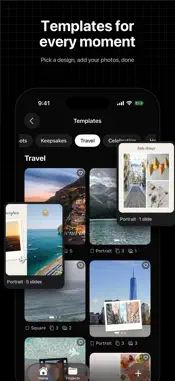
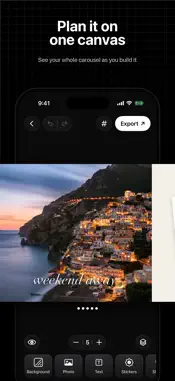
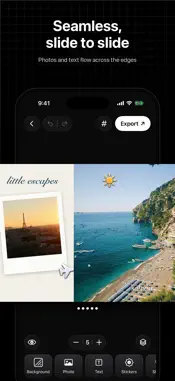
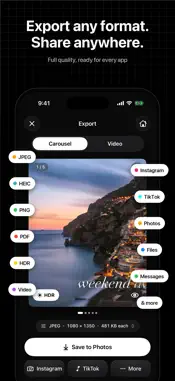
Turn a handful of photos into a carousel people can't stop swiping. Framefold lays out your whole post on one long, seamless canvas. Photos, text and stickers can stretch across the edges between slides, so every swipe flows into the next. When you're done, Framefold cuts it into perfectly sized slides and saves them in order, ready to post. START IN SECONDS • 70 ready-made templates for travel, food, everyday moments, celebrations, holidays and more • Carousel: up to 20 slides on one seamless canvas • Story: a full-screen 9:16 page • Collage: 28 grid layouts that fit any set of photos • Portrait, square, story and landscape sizes MAKE IT YOURS • Filters and adjustments: brightness, contrast, saturation, warmth and fade • Text with beautiful fonts, styles, outlines, shadows and spacing • Stickers, emoji, photo frames, shapes and freehand drawing • Remove the background from a photo in one tap • Flip, rotate, align and layer anything, with smart snapping • Undo and redo every step ORGANIZE YOUR SLIDES • See every slide at a glance in Slides mode • Add, duplicate, reorder or delete slides with a tap • Preview the finished post full screen before you share EXPORT ANY FORMAT. SHARE ANYWHERE. • Save every slide to Photos as JPEG or HEIC • Brighter, more vivid HDR photos on iPhones that support it • Lossless PNG, or a multi-page PDF to Files • A smooth 60 fps video that glides across your slides • Share straight to your favorite apps, or anywhere with the share sheet PRIVATE BY DESIGN No account, no sign-in, no ads and no tracking. Framefold only sees the photos you choose, everything runs on your iPhone, and your projects never leave your device. Questions or ideas? Tap Settings → Contact Support. We read every message. Terms of Use: https://brainsphere.org/framefold/terms Privacy Policy: https://brainsphere.org/framefold/privacy
Technical Analysis
Package Overview Basic metadata
Bundle ID
com.brainsphereframefold.app Current Version 1.0.1
Minimum iOS 17.0
Package Size App Store Size
Package Metadata 0 / 0 version records
Detailed binary, privacy manifest, framework, and Info.plist results have not been indexed for this package yet. The verified App Store and archive metadata above remains available.
Developer Information
Known Version Records
0 version records with stored package metadata
Stored metadata does not guarantee a package is currently available to download.
| Details | Version / IDs | Version date | Action |
|---|